Mateo Luis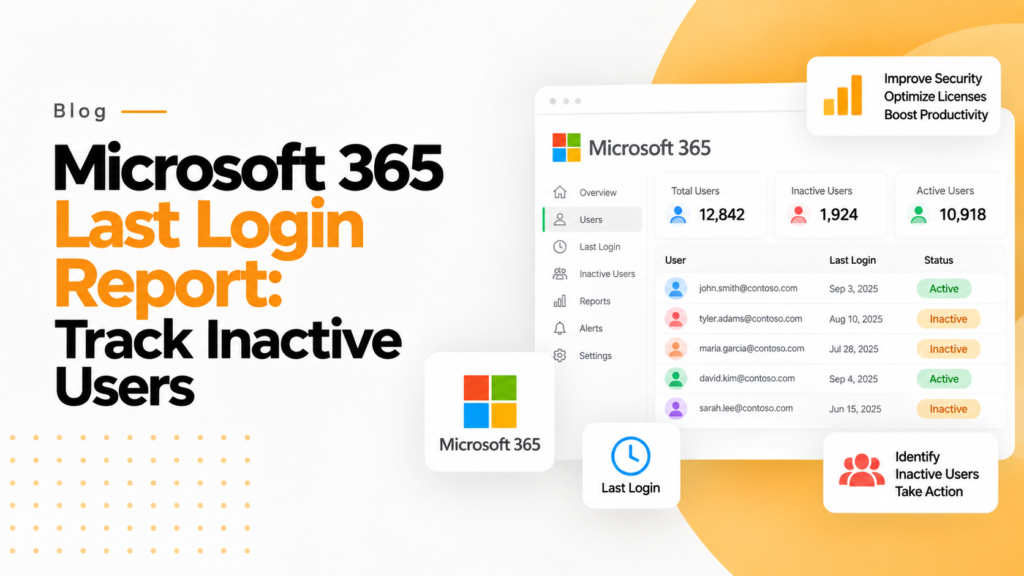
Key takeaways
- A Microsoft 365 account with an assigned license and no sign-in for a long period is both wasted spend and an easy target for attackers.
- Exporting several raw Microsoft 365 activity reports into spreadsheets to find inactive users is slow and prone to human error.
- If 150 users have not signed in for 30 days, 365TUNE puts a cost on those accounts and recommends how to optimize them.
A Microsoft 365 last login report shows when each user last signed in, using the lastSignInDateTime value in Microsoft Entra ID. Accounts with no recent sign-in often still hold paid licenses.
In today’s SaaS-driven business environment, organizations generate vast amounts of usage data but often struggle to turn it into meaningful insights. One of the most overlooked yet powerful data points lies within Microsoft 365 user activity. Understanding how each employee interacts with these types of tools is no longer optional.
Importantly, companies are now battling an increasing lack of visibility and control over their company’s applications due to growing adoption of SaaS-based models, specifically by using a staffing or support company to manage access to these applications. Microsoft 365 applications help improve collaboration by providing employees with ways to collaborate and communicate effectively with teams while having tangible work results.
However, Microsoft 365 Last Login Reports will help to ensure that you have a way of measuring whether your employees are actually using the tools you are paying for. Therefore, your organization must use the features of Microsoft 365 Last Login Reports to maximize effectiveness. As a result of using this report, you will successfully create more BI, giving your organization better insight into how employees utilize the applications.
What’s the Significance of Last Login for your Company?
Last login can be misleading at first glance; it can appear to be just a report used for administrative purposes. However, the last login can be used to quantify your employee’s engagement and usage of the license, and can indicate possible areas of security risk. Many businesses waste part of their software as a service (SaaS) spend on accounts that are dormant or underutilized, meaning they have assigned MS 365 licenses but have not logged in for a significant period.
Unused or underutilised SaaS licenses are one of the most common types of hidden IT costs. The last login report helps to illuminate the hidden cost of missed opportunity.
Insights about the Microsoft 365 Last Login Report
With this report, you will glean insight into when users last accessed Microsoft Office products like Outlook or Microsoft Teams.
In addition to viewing the last time a user logged into a particular program, you may start to see patterns emerging, such as the frequency with which users are accessing Microsoft 365 applications and collaborating with fellow users. In a large organization, there can be vast gaps in user activity and the above data over time.
Another important reason to be mindful of who has not been active in your organization is due to the risk associated with idle accounts, representing a potential cybersecurity breach. These accounts typically do not receive regular review and monitoring and thus are considered an easy target by cybercriminals.
The problem: data without actionable intelligence
Most IT departments can access login and activity data through Microsoft 365 usage reports and the Microsoft 365 admin center; however, these reports can still be difficult to translate into actionable business decisions.
Many times there is more than one raw report. The IT department exports multiple spreadsheets from those raw reports and manually analyses each sheet to determine which users have not been active for a reasonable period of time. This is a very time-consuming process and subject to human error.
Many IT teams still track SaaS usage manually, creating inefficiencies in their operations and missing out on opportunities for optimization.
How do you take your accumulated data and use it to make a business decision?
A Better Way to Make Decisions Using 365TUNE
Before using 365TUNE, companies often used spreadsheets to report on user activity. With the introduction of 365TUNE, rather than just measuring user activity, you can now start to truly measure the impact of user activity. 365TUNE turns login data into actionable insights. For example, if you had 150 users who have not signed into your organization for 30 days, 365TUNE would quantify the financial consequences of these inactive accounts and provide recommendations on how to optimize those accounts to make sure they are used optimally.
Its Microsoft 365 user activity report shows each person’s last activity in every workload, next to the licenses they hold and what each costs.
As a well-known management saying goes, “What gets measured gets managed.” 365TUNE takes it one step further. “What gets measured gets optimized.”
From Awareness to Action
The last login report only has value when you take action based on information available to you.
Companies that actively track user login activity are able to lower the cost of unqualified licenses and improve their organization’s frequency of using services provided by SaaS.
Companies that begin implementing the use of SaaS optimization tools can make meaningful cost savings within their first year. This is not just an operational efficiency; companies are measuring a return on the investment.
With the help of 365TUNE, you will have the ability to review license usage on every scan, as opposed to just acting on reports run every three months. You will have access to regularly refreshed data regarding user activity and the actual usage of licenses.
To put the result in front of finance every month, scheduled Microsoft 365 reports in 365TUNE can email the cost of inactive users as PDF and CSV.
The Bottom Line
The last login report within Microsoft 365 is much more than just an administrative function; it is a window into how your organization functions in a digital environment.
Data is not enough; to realize the full potential, you need interpretive, responsive, sustained optimization capabilities as part of your 365TUNE tool, allowing you to bridge the gap from visibility to value.
In a time of increased SaaS spending, true competitive advantage requires you to have access to the appropriate software, as well as to constantly be working to optimize and improve your usage of that software.
Frequently asked questions
How do I get the last login date for Microsoft 365 users?
Microsoft Graph returns a signInActivity property with lastSignInDateTime for each user, which needs Microsoft Entra ID P1 or P2. Without P1, the Active users report in the admin center shows each user's last activity date per service instead.
How do I find inactive Microsoft 365 users with PowerShell?
With the Microsoft Graph PowerShell SDK, run Get-MgUser -All -Property DisplayName,SignInActivity and filter on SignInActivity.LastSignInDateTime older than your cutoff, such as 90 days. Reading sign-in activity needs the AuditLog.Read.All permission.
Is last sign-in the same as last activity in Microsoft 365?
No. Last sign-in records when the user authenticated to Microsoft Entra ID, while last activity in usage reports records actions in a service, such as sending mail or editing a file. A user can sign in regularly yet show little activity in some services.
How long should a user be inactive before removing their license?
Many organizations review licenses after 30, 60 or 90 days without a sign-in. Check with the manager before removing anything, since the user may be on leave or rely on a service that rarely records an interactive sign-in.