
Microsoft 365 license optimization recommendations
See which licenses to remove, downgrade, reassign or reduce at renewal. Each recommendation shows its estimated monthly and annual saving, the users affected and the next step.
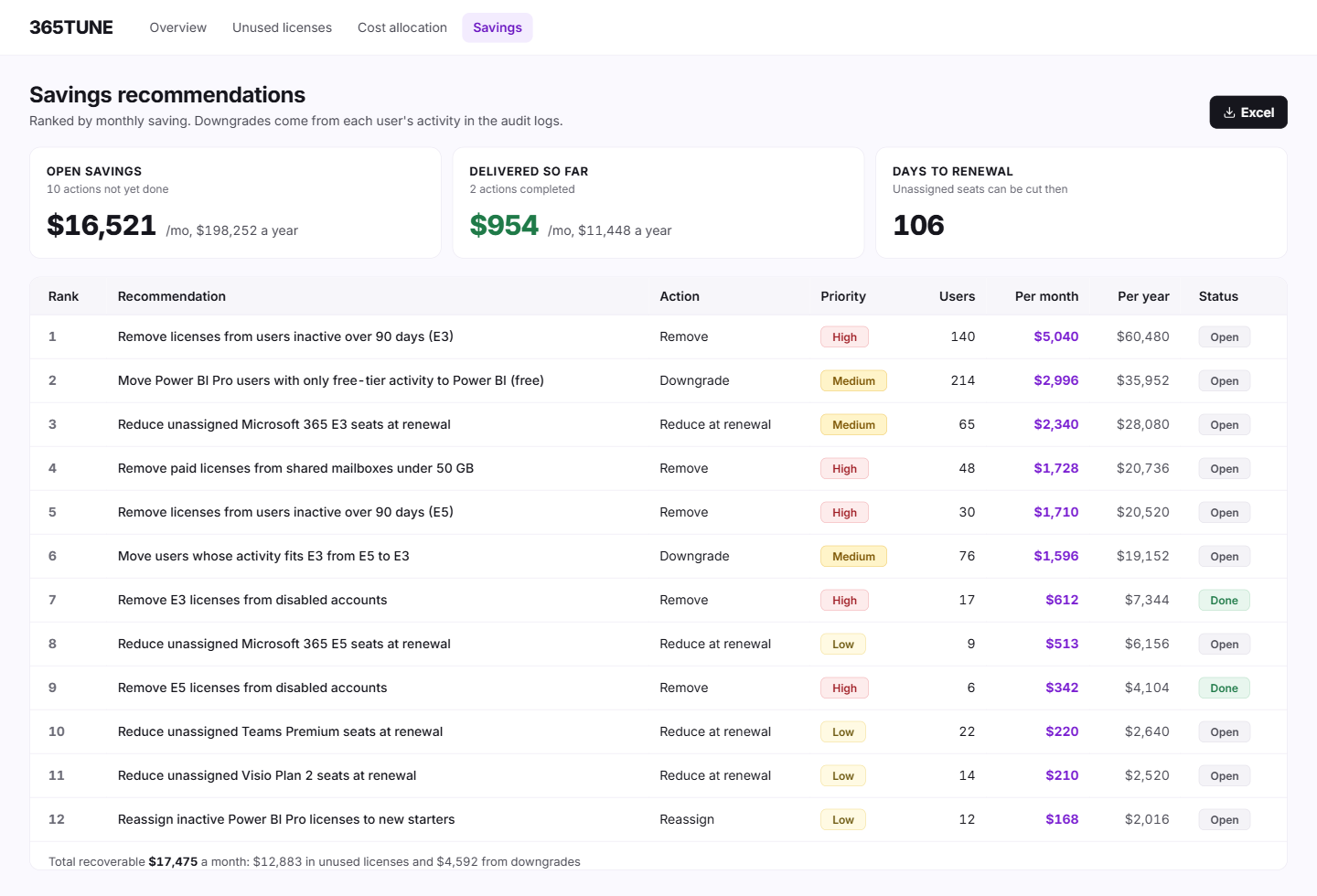
What is a Microsoft 365 license optimization tool?
A Microsoft 365 license optimization tool matches each license to what the person uses, finds what nobody uses and shows what to buy at renewal. It turns thousands of users into a short list of decisions.
365TUNE makes that list for you. It turns its findings on unused, unassigned and oversized licenses into actions (remove, downgrade, reassign or reduce at renewal) and ranks them by the estimated saving of each one. Each action lists the users it affects, so the owner can confirm it before anything changes.
Why a list of findings isn't enough
Finding 400 inactive users is the easy part. The question in the renewal meeting is which changes to make, in what order, and who signs off. A count of unused licenses leaves that to someone with a spreadsheet and a free afternoon.
365TUNE puts the biggest estimated saving first. Removing 40 unused E5 licenses outranks downgrading three Visio plans, and the list shows each estimate per month and per year.
Then it acts on them. For each change, 365TUNE sends an approval request to the user's manager, HR or both. Once approved, it deprovisions the account, reclaims the license and logs every step. Acting needs its own write consent, granted separately from the read-only scan.
How it works
- Connect read-only. 365TUNE scans license assignments and activity.
- Find. It identifies inactive, unassigned and oversized licenses.
- Recommend. Each finding becomes an action with its estimated saving per month and per year.
- Rank. Actions are sorted by estimated saving, and each shows the users affected and the license involved.
- Approve and reclaim. 365TUNE sends each change to the user's manager or HR for approval, then deprovisions the account and reclaims the license.
- Track. Completed actions are marked off, and the savings they deliver add up to a monthly savings report you can share with finance.
What you get
| Action | When it applies | Estimated saving |
|---|---|---|
| Remove | License assigned to an inactive or departed user | Full cost of the license |
| Downgrade | User on a higher tier than their activity in the audit logs calls for | Difference between the two tiers |
| Reassign | Inactive license that a new starter could use | A purchase avoided, not a cut to the current bill |
| Reduce at renewal | Unassigned licenses in the pool | Cost of the licenses not renewed |
For IT teams and MSPs
For IT teams
Walk into the renewal meeting with the changes already in order and the saving next to each one.
For MSPs
Rank savings across every customer tenant and start with the customers where you'll save the most.
Before you downgrade
A downgrade saves money only if nothing the user needs goes with it. Check the features the higher tier adds, such as phone system, advanced security or Power BI Pro in E5, before moving a user to E3. 365TUNE bases each downgrade on the user's activity in the audit logs. Activity shows what someone has used, not everything they need, so confirm with the user or their manager before you move them.
Security of the connection
Reporting needs read-only access to your tenant. Anything that writes asks for its own consent, and only for the permissions that task needs. 365TUNE is ISO 27001 certified, has a SOC 2 Type II report and doesn't use your data for training.
Know which change to make first
Connect read-only and get your savings ranked before renewal.
Questions about Microsoft 365 license optimization
How is this different from unused license detection?
Unused license detection finds and prices the waste. Savings recommendations turn it into actions and put them in order. Most teams use both: one to see the total, the other to work through it.
What does a Microsoft 365 license optimization tool do?
It reads your license assignments and usage, finds licenses you're paying for and not using, and tells you what to change. 365TUNE adds a saving to each change and ranks them, so you know where to start.
Where can I see license costs?
Microsoft's list prices are on its Microsoft 365 Enterprise plans and pricing page. You can also use the prices on your actual invoices: update them in 365TUNE and its figures use your prices.
Should we wait for renewal to make changes?
Not for licenses assigned to inactive users. Removing them frees licenses to reassign now, so you buy fewer new ones. Whether you can cut unassigned licenses before renewal depends on your agreement, so most teams reduce those at renewal.