
Microsoft 365 cost optimization
Find the Microsoft 365 spend you're wasting, before renewal. 365TUNE prices every unused license, splits the bill by department and ranks the fixes by what they save.
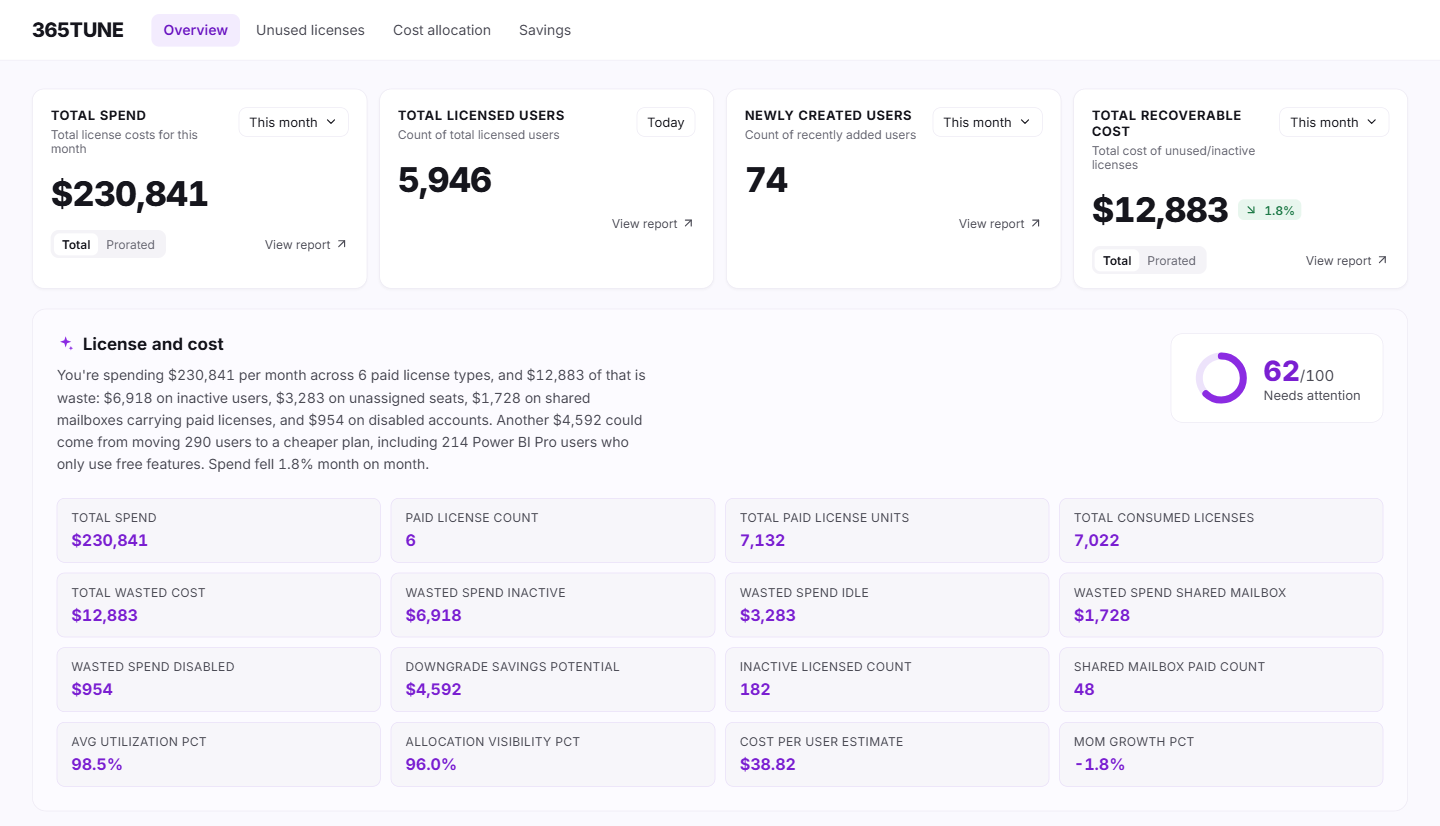
What is Microsoft 365 cost optimization?
Microsoft 365 cost optimization means paying only for the licenses people use, at the tier they need, and knowing which team each dollar belongs to. In practice it comes down to three jobs: find the licenses nobody uses, put a cost against each team, and decide which changes to make first.
365TUNE does all three from one read-only connection to your tenant. It reads license assignments and sign-in activity, prices each license at Microsoft list price, or at your own price once you enter it, and shows the result in dollars per month.
For organizations that act on the findings, the spend reclaimed is typically 20–30% of license spend.
What Microsoft 365 cost optimization covers
Unused license detection
Leavers keep their licenses, new starters get an E5 because the last person in the role had one, and licenses bought for a project that never started sit in the pool. 365TUNE lists every inactive, unassigned and oversized license with its monthly cost.
Find unused licensesCost allocation & recharging
Microsoft sends one invoice, and finance wants to recharge it to each department. 365TUNE splits license spend by department, cost center, project or location, with the users behind each figure.
See cost allocationSavings recommendations
A list of 400 inactive users doesn't say where to start. 365TUNE turns each finding into an action (remove, downgrade or reassign) and ranks them by monthly saving, with the users each one affects.
See savings recommendationsHow the three work together
- Find. Unused license detection prices what's wasted.
- Assign. Cost allocation shows which team's budget carries it.
- Act. Savings recommendations put the changes in order, so the biggest savings land before your renewal date.
Budget holders get a figure for their own team. That figure is what turns a list of findings into decisions people sign off.
All three read the same read-only scan, so the totals agree. The unused spend on the first card is the same money the allocation view splits by team and the savings list puts in order, which means finance, IT and budget holders argue about decisions instead of numbers.
For IT teams and MSPs
For IT teams
One figure for wasted spend that finance can check, with the users and licenses behind it. Bring it to the renewal meeting instead of an estimate.
For MSPs
The same view for every customer tenant from one dashboard. In our sample data that's 104 tenants and 49,839 seats. Show each customer what you saved them.
See what your tenant is wasting
Connect read-only and get your first cost findings during the 14-day trial.
Questions about Microsoft 365 cost optimization
How much can we save on Microsoft 365 licenses?
It depends on how many licenses are unused, unassigned or above what people need. Across organizations that act on 365TUNE's findings, the spend reclaimed is typically 20–30% of license spend. Your own figure is on the dashboard after the first scan.
Where can I see license costs?
Microsoft's list prices are on its Microsoft 365 Enterprise plans and pricing page. You can also use the prices on your actual invoices: update them in 365TUNE and its figures use your prices.
Does 365TUNE change anything in our tenant?
Reporting needs read-only access, so the scan changes nothing. Features that make changes, such as lifecycle automation, ask for their own consent, and only for the permissions they need. Until you grant it, changes stay with your admins in Microsoft 365.
How long until we see results?
Minutes. The first findings appear once the initial scan of your tenant finishes, and the 14-day trial gives you time to check them against your own records.
Is it safe to connect?
365TUNE connects with read-only access, is ISO 27001 certified, has a SOC 2 Type II report and doesn't use your data for training.