
Microsoft 365 usage and adoption analytics
See which teams use the Microsoft 365 apps you pay for, who has stopped, and what the idle licenses cost. One read-only connection, every service, every team.
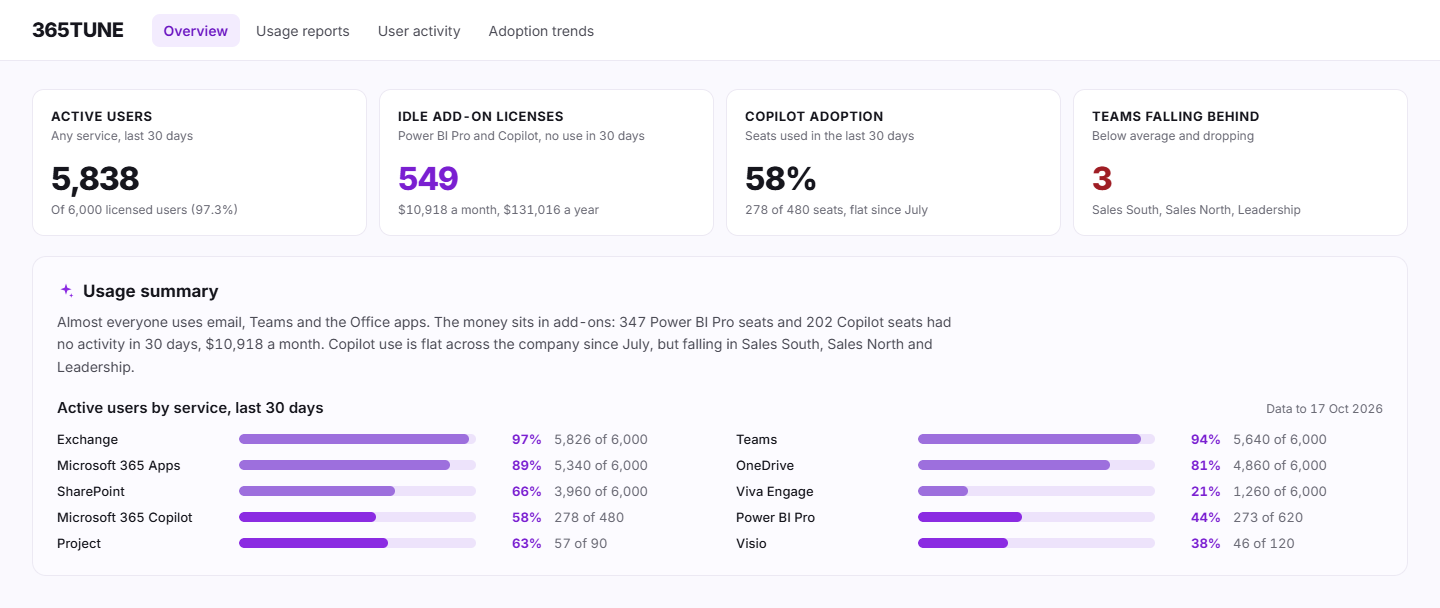
What is Microsoft 365 usage analytics?
Microsoft 365 usage analytics shows how people use each service: who sends email, who joins Teams meetings, who stores files in OneDrive and SharePoint, who opens Power BI. Microsoft offers three versions: the usage reports in the admin center, a Power BI app and Adoption Score. Each answers part of the question.
365TUNE reads the same Microsoft Graph data from one read-only connection. It groups usage by department, location, manager, license type or a custom attribute such as cost center, and puts a monthly cost on every license that sits unused.
What Microsoft's reports show, and what they leave out
| Admin center usage reports | Usage analytics (Power BI app) | Adoption Score | 365TUNE | |
|---|---|---|---|---|
| History | 7, 30, 90 or 180 days | 12 months | 28 and 180 days | Up to 24 months, starting with Microsoft's last 180 days on day one |
| Per person | Yes, names hidden by default | Yes, for the previous full month | No, organization level | Yes, with names |
| By department | No, export and join it yourself | Yes, from directory attributes | Group filters from Entra ID | Yes, plus location, manager, license type and custom attributes such as cost center |
| License cost | No | No | No | Monthly cost of each idle license |
| What you need | An admin role | Power BI Pro for each viewer | An admin or reader role | Read-only consent |
Microsoft documents its options in Microsoft 365 reports in the admin center.
Usage and adoption features
Usage reports
Active users for Exchange, Teams, SharePoint, OneDrive and Power BI, by department and license type. Each service shows who holds a license and hasn't used it, with the monthly cost.
See usage reportsUser activity
Look up one person and see their last activity in Copilot, Exchange, SharePoint, Teams and Power BI on one screen, next to the licenses they hold.
See user activityAdoption tracking
Month-by-month adoption for each team. See which teams fall behind after a rollout and which licenses they leave idle, so training goes where it pays off.
See adoption trackingHow usage connects to cost
Usage is half of a license decision. The other half is what the license costs. 365TUNE reads both from the same scan, so a team that stopped using Power BI shows up twice: in the adoption trend, and in unused license detection with the monthly saving from removing those seats. Savings recommendations then ranks that change against every other one in the tenant.
For IT teams and MSPs
For IT teams
Show leadership which services each department uses before renewal, with the cost of the seats nobody uses. Plan training for the teams that need it.
For MSPs
See usage across every customer tenant in one dashboard. In our sample data that's 104 tenants and 49,839 seats. Show each customer which services their people use and which licenses they could drop.
See who uses what you pay for
Connect read-only and see usage by team during the 14-day trial.
Questions about Microsoft 365 usage analytics
Is the Microsoft 365 usage analytics app free?
The Power BI template app is included with Microsoft 365, but installing and viewing it needs a Power BI Pro license for everyone who opens it, or a Premium workspace. It shows the last 12 months.
Why do usage reports show random strings instead of names?
Since September 2021 Microsoft hides user, group and site names in usage reports by default. A Global Administrator can show them under Settings › Org settings › Services › Reports by clearing "Conceal user, group, and site names in all reports". Check your privacy policy and works council rules before you do. 365TUNE shows names in its own reports either way, so you can leave the setting as it is.
Does 365TUNE read emails or files?
No. It reads usage counts and activity dates from Microsoft Graph, the same data the admin center reports use. It asks only for the permissions each feature needs, and you choose the level of access you grant.
Is it safe to connect?
365TUNE connects with read-only access, is ISO 27001 certified, has a SOC 2 Type II report and doesn't use your data for training.