
Microsoft 365 user activity reports
One person's activity in every Microsoft 365 workload on one screen, with the last active date for each and the licenses they hold.
What is a Microsoft 365 user activity report?
A Microsoft 365 user activity report shows when a person last used each service: the last email in Exchange, the last chat or meeting in Teams, the last file in OneDrive or SharePoint, the last Copilot prompt. Admins use it to answer two questions: is this account still in use, and does this person use what their license pays for?
365TUNE shows that activity for one user on one screen, next to the licenses they hold and what each costs.
Why the admin center makes this slow
In the admin center, one user's activity is spread across separate reports: Active users, Email activity, Teams user activity, OneDrive activity, SharePoint activity, Microsoft 365 Apps usage and the Copilot usage report. Each has its own page and export, and names are hidden by default. Checking one leaver or one disputed license means opening five or six reports and matching rows by hand.
One user, the way you'll see it
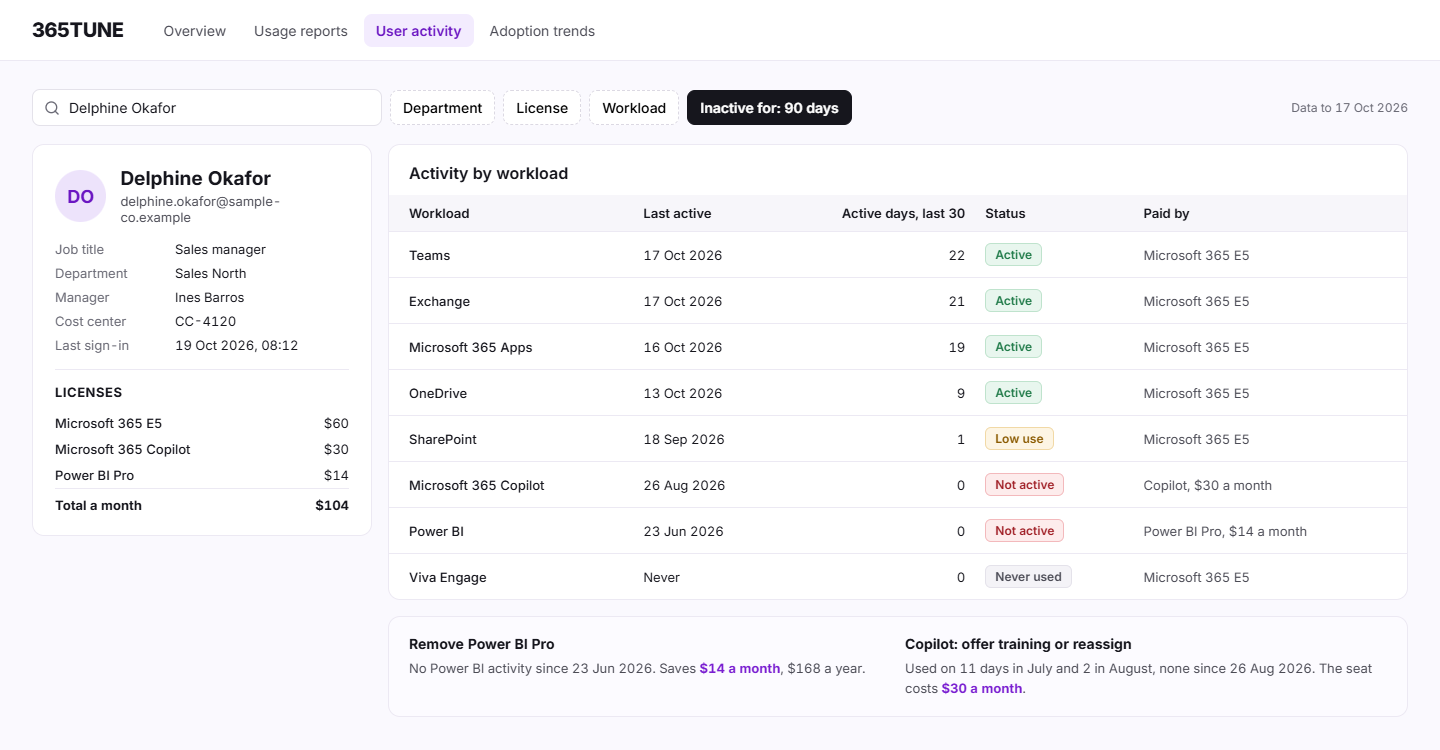
Sample data for a sales manager with Microsoft 365 E5 ($60), Microsoft 365 Copilot ($30) and Power BI Pro ($14):
| Workload | Last active | Active days, last 30 | Status |
|---|---|---|---|
| Teams | 17 Oct 2026 | 22 | Active |
| Exchange | 17 Oct 2026 | 21 | Active |
| Microsoft 365 Apps | 16 Oct 2026 | 19 | Active |
| OneDrive | 13 Oct 2026 | 9 | Active |
| SharePoint | 18 Sep 2026 | 1 | Low use |
| Microsoft 365 Copilot | 26 Aug 2026 | 0 | Not active |
| Power BI | 23 Jun 2026 | 0 | Not active: Power BI Pro idle |
| Viva Engage | Never | 0 | Never used |
The Power BI Pro seat can go: $14 a month. Copilot was used in July and August and then stopped, so training comes before reassigning that $30 seat.
How it works
- Connect read-only. Consent to 365TUNE's read-only app.
- Scan. It reads sign-in activity, Microsoft Graph usage reports and the audit logs, daily or on a schedule you set.
- Look up. Search for a person, or filter by department, license, workload or inactivity.
- Act. Reassign the license, remove it, or plan training.
What you get
| View | What it shows | Use it to |
|---|---|---|
| User lookup | Last active date per workload, with the user's licenses and their cost | Settle "does this person need E5?" |
| Inactive users | Licensed users with no activity in 90 days, adjustable | Clean up before renewal |
| Leavers | Blocked or deleted accounts that still hold a license | Reclaim the license today |
| Workload filter | Everyone inactive in one service, such as Power BI | Find add-ons nobody opens |
For IT teams and MSPs
For IT teams
Answer a manager's "does she still need that license?" in one lookup instead of six exports.
For MSPs
Check a customer's leavers and idle add-ons before each monthly bill.
Security of the connection
The activity view needs read-only access to your tenant. 365TUNE reads activity dates and counts from Microsoft Graph and the audit logs, never the content of emails, chats or files. It asks only for the permissions each feature needs, and you choose the level of access you grant. 365TUNE is ISO 27001 certified, has a SOC 2 Type II report and doesn't use your data for training.
Look up anyone's activity in one place
Connect read-only and see every user's last activity during the 14-day trial.
Questions about Microsoft 365 user activity
How do I see a user's last activity in Microsoft 365?
In the admin center, open Reports › Usage › Active users and export the details: there's a last activity date column for each service. Names are hidden by default. 365TUNE shows the same dates for one user on one screen.
Is this employee monitoring?
No. It shows dates and counts, such as the last day someone used Teams, to decide whether a license is needed. It doesn't show what anyone wrote, said or opened. Check your works council and privacy rules before you show names.
Can I find users who haven't signed in for 90 days?
Yes. The inactive users view lists licensed users with no sign-in or app activity in 90 days, and you can change the period. Each row shows what their licenses cost.
Does it include Copilot activity?
Yes. It shows the last date each licensed user used Microsoft 365 Copilot, so you can see who stopped after rollout.