
Microsoft 365 Copilot readiness assessment
Copilot can find any file a user can open. 365TUNE finds the ones they shouldn't be able to, before you roll it out.
What is a Copilot readiness assessment?
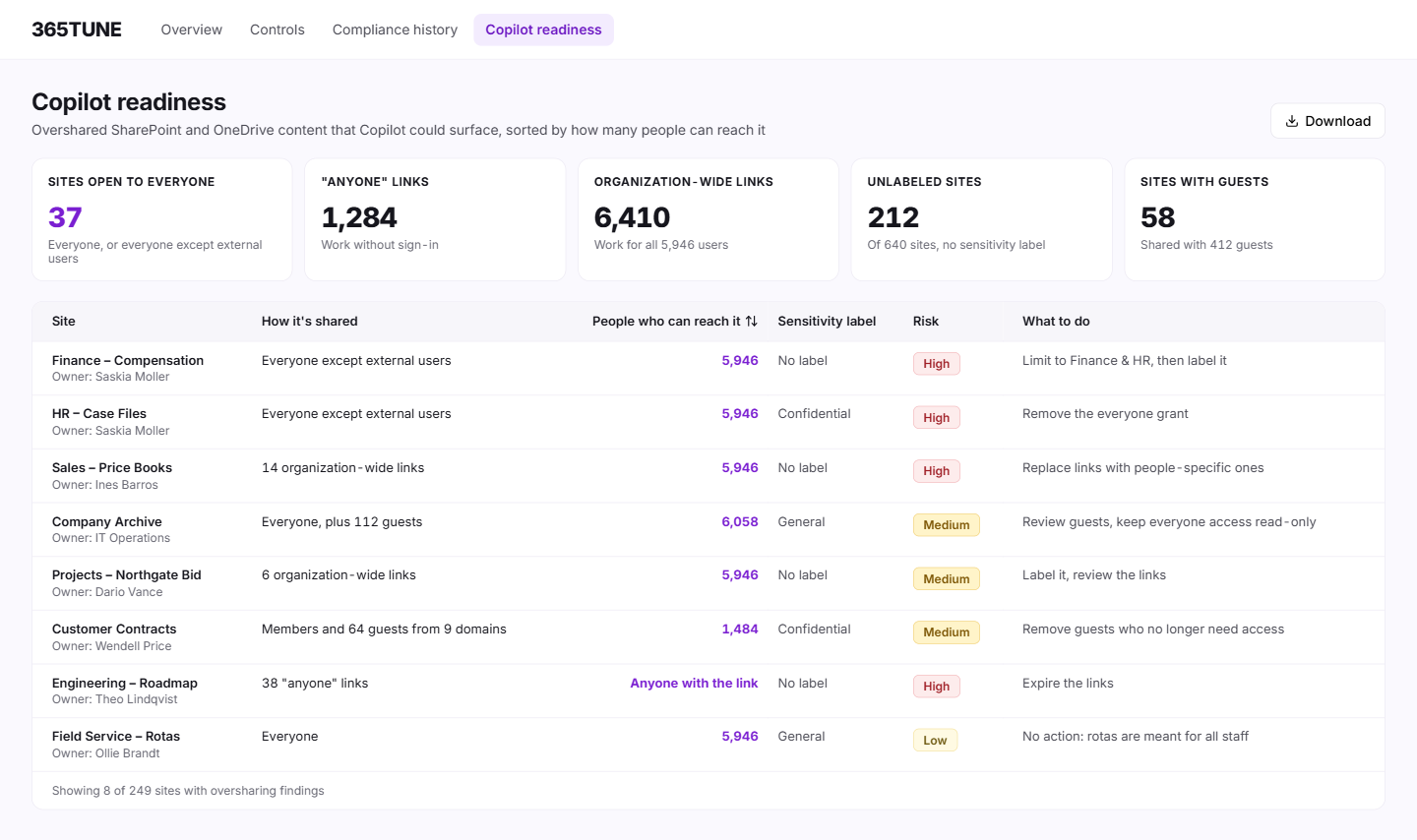
A Copilot readiness assessment checks what Microsoft 365 Copilot will be able to reach before you switch it on. Copilot answers from any content the user already has access to. It doesn't grant new access, but it makes old access easy to find. The assessment looks for sites, files and links shared more widely than they should be, and for sensitive content without a label.
365TUNE runs it from a read-only connection and lists each overshared site, link and unlabeled location with who can reach it, so site owners can fix them before rollout.
How oversharing turns into a Copilot answer
An illustrative example. In 2021, someone in finance shares a folder of salary bands with "Everyone except external users" so a manager can open it. Nobody opens it again. Three years later you roll out Copilot, and a sales rep asks it about pay ranges for their team. Copilot answers from the spreadsheet, because the rep has always had access.
Nobody broke a rule. The access was there all along; Copilot made it findable.
What Microsoft offers, and what it leaves out
Microsoft has its own oversharing reports, in SharePoint Advanced Management and in Purview Data Security Posture Management for AI. They work, but each lives in its own admin center, and the licensing for each is worth checking first.
365TUNE puts the oversharing findings in one list, next to your security posture and license data. MSPs get the same list for every customer tenant, so they can run readiness work before each customer buys Copilot licenses.
Microsoft's own deployment guidance covers the same ground: Secure and governed data foundation for Microsoft Copilot.
How it works
- Connect read-only. 365TUNE reads site permissions, sharing links and labels. The scan changes nothing.
- Scan. It finds sites and files shared with everyone, links anyone can open, and sites without a sensitivity label.
- Rank. Findings are sorted by how widely the content is shared.
- Fix and rescan. Site owners tighten access or add labels, and the next scan shows what's left.
What you get
| Finding | What 365TUNE checks | What you do next |
|---|---|---|
| Site open to everyone | Sites or libraries shared with "Everyone" or "Everyone except external users" | Ask the owner to limit it to the team that needs it |
| "Anyone" links | Links that work for anyone with the URL, no sign-in | Expire them or replace them with people-specific links |
| Organization-wide links | Links that work for everyone in the company | Review the ones on sensitive sites first |
| Unlabeled sites | Sites with no sensitivity label | Label them, starting with HR, finance and legal |
| External and guest access | Sites shared with guests | Remove guests who no longer need access |
For IT teams and MSPs
For IT teams
Show the CISO and the data owner what Copilot could reach, and fix it before the pilot instead of after the first complaint.
For MSPs
Run a readiness check on every customer tenant and turn the findings into the project that comes before each Copilot sale.
Security of the connection
365TUNE reads permissions and sharing settings with read-only access, is ISO 27001 certified, has a SOC 2 Type II report and doesn't use your data for training.
Find what Copilot could surface
Connect read-only and see your overshared sites before rollout.
Questions about Copilot readiness
Does Copilot give people access to files they couldn't open before?
No. Copilot only uses content the person can already open. The risk is that it finds content they had access to but never knew about, and summarizes it in seconds.
What should we fix before rolling out Copilot?
Start with sites shared with everyone, links anyone can open and sensitive sites without a label. Those are the widest-open doors. 365TUNE lists each one with who can reach it.
Do we need sensitivity labels before Copilot?
Not to switch it on. Labels let you apply protections that Copilot respects, and Copilot shows the label of the content it used in its answer. Label the sites that hold HR, finance and legal data first.
How is this different from tracking Copilot usage?
Readiness is before rollout: what Copilot could reach. Usage is after: who uses Copilot and how much, so you know whether the licenses pay off. Our Copilot usage report guide covers the second.