
Microsoft 365 adoption tracking
Month-by-month adoption for every team, so you can see who fell behind after a rollout and what their idle licenses cost.
What is Microsoft 365 adoption tracking?
Microsoft 365 adoption tracking measures how many of the people who have a service actually use it, and how that changes over time. It shows whether a rollout, such as Teams, OneDrive or Copilot, has taken hold, and where people went back to old habits.
365TUNE tracks adoption by service and by team, month by month, and adds the monthly cost of the licenses that low adoption leaves idle. The trend starts with Microsoft's last 180 days on the day you connect and runs up to 24 months.
What Adoption Score shows, and what it leaves out
Microsoft's Adoption Score, under Reports in the admin center, rates the whole organization on communication, meetings, content collaboration, teamwork, mobility and, with Copilot licenses, AI adoption. It compares you with similar organizations and suggests actions. It's calculated at the organizational level, with group filters from Entra ID, and shows 28-day and 180-day views.
That tells you how the company is doing. It doesn't name the team whose OneDrive use dropped after a reorganization, or put a price on the licenses that team stopped using. 365TUNE does both.
Microsoft describes Adoption Score in Microsoft Adoption Score.
Adoption by team, the way you'll see it
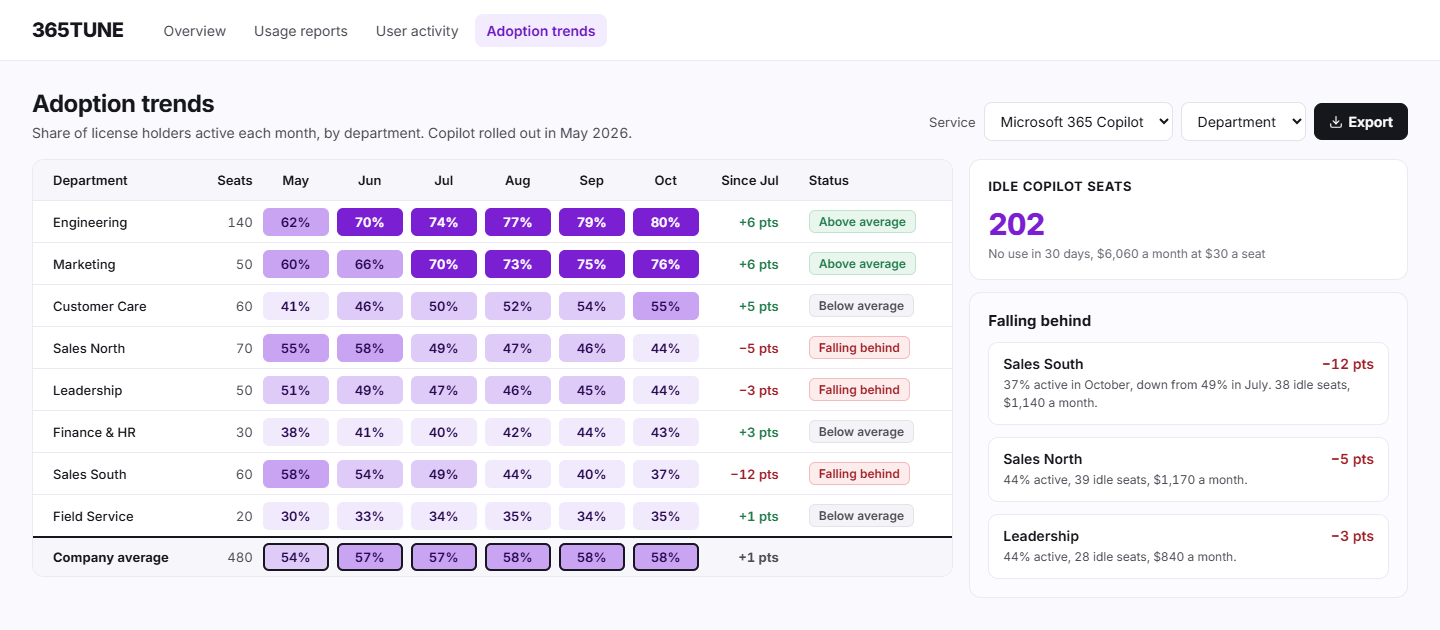
Sample data: Microsoft 365 Copilot adoption by department after a May 2026 rollout, share of license holders active each month.
| Department | Seats | Jul | Aug | Sep | Oct | Since Jul |
|---|---|---|---|---|---|---|
| Engineering | 140 | 74% | 77% | 79% | 80% | +6 |
| Marketing | 50 | 70% | 73% | 75% | 76% | +6 |
| Customer Care | 60 | 50% | 52% | 54% | 55% | +5 |
| Sales North | 70 | 49% | 47% | 46% | 44% | −5 |
| Leadership | 50 | 47% | 46% | 45% | 44% | −3 |
| Finance & HR | 30 | 40% | 42% | 44% | 43% | +3 |
| Sales South | 60 | 49% | 44% | 40% | 37% | −12 |
| Field Service | 20 | 34% | 35% | 34% | 35% | +1 |
| Company average | 480 | 57% | 58% | 58% | 58% | +1 |
The company average looks flat. Underneath it, Sales South fell 12 points while Engineering and Marketing climbed. The three teams below average and falling hold 105 idle seats, $3,150 a month at $30 a seat.
How it works
- Connect read-only. Consent to 365TUNE's read-only app.
- Scan. It loads the last 180 days from Microsoft when you connect, so you see a trend on day one, then keeps every scan for up to 24 months.
- Compare. Each team is shown against the company average for each service, and teams falling behind are flagged.
- Act. Plan training for the teams falling behind, and reclaim the licenses nobody will use.
What you get
| View | What it shows | Use it to |
|---|---|---|
| Adoption by service | The share of licensed users active each month, per service | See whether a rollout took hold |
| Adoption by team | The same trend for each department, against the company average | Find the teams falling behind |
| Idle licenses from low adoption | The licenses those teams hold and don't use, with the monthly cost | Decide between training and reclaiming |
| Copilot adoption | Copilot license holders active each month | Check a Copilot rollout before buying more seats |
For IT teams and MSPs
For IT teams
Show the change team whether a rollout worked, with numbers per department, and send training to the teams that need it.
For MSPs
Show each customer how adoption moved since their last review and which licenses they're paying for without using.
Security of the connection
Adoption tracking needs read-only access to your tenant. 365TUNE reads usage counts and activity dates, never the content of emails or files. It asks only for the permissions each feature needs, and you choose the level of access you grant. 365TUNE is ISO 27001 certified, has a SOC 2 Type II report and doesn't use your data for training.
See which teams fall behind
Connect read-only and see adoption by team during the 14-day trial.
Questions about Microsoft 365 adoption tracking
How do I measure Microsoft 365 adoption?
Take the people licensed for a service and count how many used it in a period, such as the last 30 days. Track that share month by month, per service and per team. Microsoft's Adoption Score does this for the whole organization; 365TUNE does it for each department.
What is a good Microsoft 365 adoption rate?
It depends on the service and the role. Email should be close to everyone; Power BI or Project only for the people whose work needs it. Compare each team with your company average rather than a target from another organization.
What's the difference between Adoption Score and adoption tracking?
Adoption Score rates the whole organization against similar organizations and suggests actions. Adoption tracking in 365TUNE follows each team and service month by month and prices the licenses that low adoption leaves idle.
Can I track Copilot adoption?
Yes. It shows the share of Copilot license holders who used it each month, by team, so you can see who stopped after rollout before you buy more seats.