Archie Nair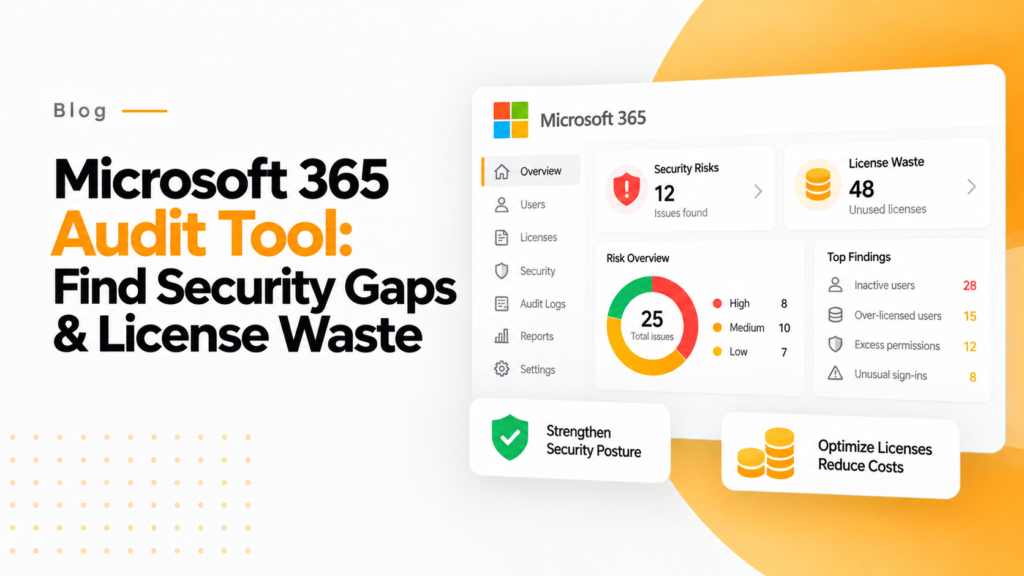
Key takeaways
- Audit tools that price each license turn activity data into cost, for example 150 inactive users at $30 each costing $4,500 a month.
- In a 500 user tenant averaging $25 per user per month, reclaiming 75 inactive licenses saves $22,500 a year.
- Moving 40 users who only use E3 features from E5 to E3 saves $21 per user per month, or $10,080 a year.
A Microsoft 365 Audit Tool is software that monitors license usage, user activities, and security events across your Microsoft 365 tenant. It helps organizations identify unused licenses, detect security risks, ensure compliance, and optimize costs by providing visibility into actual usage versus assigned licenses.
Many organizations pay for Microsoft 365 seats nobody uses. With Microsoft 365 business and enterprise plans costing about $7 to $60 per user per month, even small inefficiencies compound into tens of thousands in annual waste. For a company with 500 users at $25 per user per month, recovering typically 20–30% of license spend (365TUNE research) means $30,000 to $45,000 a year no longer thrown away on licenses that deliver zero business value.
If you’re an IT leader managing Microsoft 365 environments, you’ve likely faced frustrating questions: Which licenses are actually being used? How much are we spending on inactive accounts? Which departments are over-consuming expensive E5 licenses when E3 would suffice?
In this guide, we’ll show you how to eliminate Microsoft 365 license waste and recover budget without requiring PowerShell expertise or expensive consultants.
Quick Facts About Microsoft 365 Audit Tools
- Microsoft 365 E3 and E5 list prices: $39 and $60 per user per month, paid yearly
- ROI timeframe: Typically 30-60 days for complete payback
- Setup time: 15 minutes with modern tools vs. 8+ hours for PowerShell
- Audit log retention: 180 days (Audit Standard) / 1 year by default (Audit Premium, E5)
- Recoverable spend: typically 20–30% of license spend (365TUNE research)
- License types covered: E3, E5, F3, Business Basic/Standard/Premium, Power Platform
- Time to first insight: 5-10 minutes vs. weeks with custom solutions
Why Financial Visibility Separates Modern Audit Tools from Legacy Approaches
Traditional Microsoft 365 audit tools show you login frequencies and file access patterns. Our financial reporting dashboard shows you that the 216 users who joined this month will cost you $14,088 monthly if their licenses go unused: a distinction that transforms license management from an IT task into a strategic financial initiative.
Microsoft 365 continues to represent one of the largest line items in IT budgets, and unused or underutilized licenses are a common source of SaaS waste. The gap? Most audit approaches track activity but don’t quantify financial impact.
What is a Microsoft 365 Audit Tool?
A Microsoft 365 Audit Tool is a specialized software platform designed to monitor, analyze, and report on license usage, user activities, security events, and compliance across your entire Microsoft 365 environment. Unlike Microsoft’s native admin center that provides basic activity logs, dedicated audit tools deliver comprehensive visibility with automated cost analysis and actionable optimization recommendations.
These tools connect to your Microsoft 365 tenant via secure OAuth authentication and continuously analyze data from Azure Active Directory (now Microsoft Entra ID), Exchange Online, SharePoint, OneDrive, Teams, and Power Platform services. They track user sign-ins, file access patterns, mailbox usage, collaboration activities, and license assignments, then translate this raw data into financial intelligence showing exactly where money is being wasted.
The key differentiator: financial impact reporting. While native tools show “150 users haven’t logged in for 90 days,” modern audit platforms like 365TUNE show “150 inactive users costing $4,500 monthly: $54,000 annual waste that can be eliminated immediately.”
Modern Microsoft 365 Audit Tools provide three critical capabilities that manual approaches cannot match:
Cost visibility: See your monthly license spend, per-user costs, department-level attribution, and waste calculations updated on every scan rather than waiting for monthly billing reports.
Automated optimization recommendations: Automated analysis identifies specific licenses to reclaim, users to downgrade from E5 to E3, and opportunities to eliminate redundant subscriptions without requiring manual spreadsheet analysis.
Executive-ready financial reporting: Generate board-level presentations showing total waste in dollar amounts, projected savings from optimization actions, and ROI timelines that CFOs and finance teams immediately understand.
Unlike PowerShell scripts or native admin centers, modern audit tools like 365TUNE provide pre-built financial intelligence, automated alerting, and department-level cost attribution, delivering insights in 15 minutes instead of 40+ hours of manual analysis.
Why Do IT Leaders Need Microsoft 365 Audit Tools?
Organizations waste part of their cloud and SaaS spend on unused or underutilized resources. For Microsoft 365 specifically, 365TUNE research puts recoverable waste at typically 20–30% of license spend. This isn’t just an IT efficiency problem. It’s a financial crisis hiding in plain sight.
Consider the typical scenario we encounter: A 1,000-user organization with an average license cost of $30 per user spends $360,000 annually on Microsoft 365. If 30% of those licenses deliver zero value (inactive users, over-provisioned accounts, forgotten test users), that’s $108,000 thrown away every year. Over a three-year contract period, that’s $324,000 in pure waste that could fund strategic initiatives instead.
The Business Impact of Inadequate Auditing
License sprawl becomes uncontrollable: Without continuous monitoring, organizations accumulate “license debt” as employees join, change roles, and depart. HR processes the offboarding, but IT misses the license removal. A typical mid-size company has 20-50 forgotten licenses lingering for months after employee departures, costing $15,000-$40,000 annually.
Security risks multiply silently: Inactive accounts with active licenses represent security vulnerabilities. Former employees retaining access, dormant accounts with elevated permissions, and unmonitored external sharing create breach opportunities. A breach that starts from a dormant account can cost far more than the license itself.
Budget conversations become guesswork: When CFOs ask “Why did our Microsoft 365 spend increase 23% this quarter?”, IT leaders without audit tools resort to billing portal archaeology and manual user counts. With proper auditing, the answer is instant: “We added 47 users in sales, but also have 31 inactive licenses we can reclaim to offset 66% of that increase.”
Compliance requirements go unmet: GDPR, HIPAA, SOC 2, and industry-specific regulations require detailed audit trails of data access and user activities. Microsoft Purview Audit keeps records for 180 days with Audit (Standard) and for one year by default with Audit (Premium), or up to 10 years with an add-on license. Compliance audits often request 12-24 months of historical data, so plan for Audit (Premium), longer retention policies or a regular export.
The Financial Wake-Up Call
Here’s what typically triggers organizations to implement dedicated audit tools:
A departing employee’s license costs $468 annually (E3 at $39/month). If IT takes a month to notice and revoke it, that’s $39 wasted. With 20% annual turnover in a 500-person company (100 departures), delayed license removal costs $3,900 annually, and that’s just one waste vector.
Over-licensed users drain budgets silently. We regularly find users assigned E5 licenses ($60/month) who only use features available in E3 ($39/month, list prices paid yearly). A 100-user department with this mismatch wastes $25,200 annually. Without audit tools showing actual feature usage, these inefficiencies persist indefinitely.
Seasonal workers consume year-round licenses. Retail, hospitality, and education sectors often maintain full licenses for employees working 6-8 months annually. A company with 200 seasonal workers paying $20/month unnecessarily during off-seasons wastes $32,000+ yearly.
The organizations thriving in 2025 aren’t just tracking Microsoft 365 activity. They’re tracking every dollar, identifying waste early, and optimizing continuously. They’ve realized that license management without financial intelligence is like managing a budget without seeing the bank account.
How Does a Microsoft 365 Audit Tool Work?
Understanding the technical architecture of Microsoft 365 Audit Tools helps IT leaders evaluate solutions and set realistic expectations for deployment and results.
The Technical Foundation
Modern audit tools connect to your Microsoft 365 environment through Microsoft Graph API, the unified endpoint for accessing Microsoft 365 data and insights. This OAuth 2.0-based connection requires only read-only permissions, ensuring the audit tool cannot modify your environment. It can only observe and report.
Once connected, the audit tool begins continuous data collection:
Azure Active Directory (Entra ID) integration pulls user account information, license assignments, sign-in logs, group memberships, and role assignments. This reveals who has access to what resources and how licenses are distributed across your organization.
Exchange Online auditing monitors mailbox usage, storage consumption, email traffic patterns, and inactive mailboxes. This identifies users paying for 100GB mailboxes while using only 2GB: optimization opportunities for downgrades.
SharePoint and OneDrive tracking analyzes file storage patterns, sharing permissions, external collaboration, and access frequency. This surfaces security risks like overly permissive sharing and helps identify users with premium licenses who aren’t actually collaborating.
Microsoft Teams analytics tracks channel activity, meeting participation, chat usage, and app integrations. Organizations often discover entire departments with Teams licenses who haven’t sent a single message in 90 days.
Power Platform monitoring audits Power Apps, Power Automate flows, and Power BI usage to identify premium license waste when users aren’t actually building apps or automations.
From Raw Data to Financial Intelligence
Here’s where dedicated audit tools separate themselves from PowerShell scripts:
Automated cost attribution: The tool correlates license assignments with your actual Microsoft pricing (which varies by agreement type, volume discounts, and region). It calculates per-user costs, department-level spend, and identifies the exact dollar amount wasted on each inactive or under-utilized license.
Intelligent waste detection: Detection rules identify patterns that manual analysis misses: users who log in monthly but never use collaboration features, accounts with duplicate license assignments, and premium licenses assigned to users whose activity patterns indicate they only need basic features.
Trend analysis and forecasting: By tracking utilization patterns over time, audit tools predict future license needs, identify seasonal patterns, and forecast budget requirements. “Based on current growth, you’ll need 37 additional E3 licenses next quarter, costing $17,316 annually.”
Automated alerting: Instead of running reports manually, audit tools send proactive alerts: “5 new users added yesterday without manager approval,” “Department X exceeded their license budget by 18% this month,” or “12 users haven’t logged in for 60 days: reclaim $468 monthly in E3 licenses.”
The Time Advantage
Manual auditing with PowerShell: 4-8 hours to extract data, 2-4 hours to correlate with billing data, 3-6 hours to build reports, 1-2 hours to calculate financial impact. Total: 10-20 hours monthly for basic insights, and that’s assuming you have the scripting expertise.
Modern audit tools like 365TUNE: 15-minute OAuth connection, 5-10 minute initial scan, instant financial dashboard. Total: 20 minutes to complete visibility. After that, scheduled scans keep the data current with no ongoing effort.
The entire process takes minutes instead of days, requires no coding expertise, and delivers financial insights that PowerShell scripts simply cannot provide without extensive custom development.
What Can You Audit and Optimize in Microsoft 365?
A comprehensive Microsoft 365 Audit Tool monitors every aspect of your environment where waste occurs or security risks lurk. Here’s what modern platforms track and why each matters financially:
License Utilization and Assignment
What it tracks: Active vs. inactive licenses, last sign-in dates, license type assignments, duplicate licenses, unassigned purchased licenses.
Why it matters: This is where most waste hides. If 15-25% of licenses are assigned to users who haven’t logged in for 60+ days, then for a 500-user organization at $25/user/month average, that’s $22,500-$37,500 annual waste from inactive licenses alone.
To find unused Microsoft 365 licenses across a whole tenant, 365TUNE lists inactive, unassigned and oversized seats with the cost of each.
User Activity and Adoption
What it tracks: Login frequency, file access patterns, email activity, Teams usage, SharePoint collaboration, app usage across the Microsoft 365 suite.
Why it matters: Activity patterns reveal over-licensing. A user assigned an E5 license ($60/month) who only uses Outlook and Word should be downgraded to E3 ($39/month) or even Business Standard ($14/month), saving $21-$46 monthly per user (Microsoft prices from July 2026).
Security Events and Compliance
What it tracks: Failed login attempts, permission changes, external sharing activities, suspicious file access, administrator actions, security alerts, compliance violations.
Why it matters: Beyond cost optimization, audit tools prevent breaches. Recovering from a ransomware attack is expensive and slow. Early detection of suspicious activity patterns stops attacks before damage occurs.
Teams Collaboration Patterns
What it tracks: Channel activity, meeting participation, chat frequency, guest access, app integrations, file sharing within Teams.
Why it matters: Microsoft Teams licenses represent significant investment. Some departments have Teams-enabled E3/E5 licenses where many users haven’t sent a Teams message in 90 days. Moving users who don’t need the desktop Office apps to Office 365 E1 ($10 per user per month with Teams, or $6.79 without) saves $29-$50 per user monthly.
Exchange Mailbox Usage
What it tracks: Mailbox size, email traffic volume, sent/received message counts, storage consumption vs. quota, mailbox access patterns.
Why it matters: Many organizations pay for 100GB mailboxes (E3/E5) when users consume under 10GB, a perfect candidate for Exchange Online Plan 1 at significantly lower cost. Across 200 users, these downgrades save $3,600-$5,040 monthly.
SharePoint and OneDrive Activity
What it tracks: Storage consumption, file access frequency, sharing permissions, external collaboration, version history usage, workflow automation.
Why it matters: SharePoint/OneDrive Premium features (included in E5) often go unused by many assigned users. Identifying these users enables license downgrades while maintaining needed functionality.
Power Platform Consumption
What it tracks: Power Apps creation and usage, Power Automate flow executions, Power BI report access, premium connector usage, AI Builder credits consumption.
Why it matters: Power Apps Premium ($20/user/month) and Power Automate Premium ($15/user/month) licenses make sense only for active creators. Each user with one of these licenses who hasn’t created a single app or flow represents $180-$240 annual waste per user.
Guest User Access and External Sharing
What it tracks: Guest account creation, external user permissions, file sharing patterns, B2B collaboration scope, guest license costs.
Why it matters: Uncontrolled guest accounts consume licenses and create security risks. Proper auditing reveals forgotten external users, overly permissive sharing, and opportunities to revoke unnecessary access.
Each of these audit capabilities translates directly into financial optimization or security risk reduction. The comprehensive approach (monitoring all services simultaneously) reveals waste that single-service auditing misses.
Why PowerShell Scripts Fall Short
PowerShell is powerful for extracting Microsoft 365 data, and we use it internally at 365TUNE for development. However, building comprehensive financial audit capabilities requires:
Constant maintenance burden: Microsoft updates Graph API endpoints quarterly. Your custom scripts break, requiring 2-4 hours of developer time to fix each time. Over a year, that’s 8-16 hours of unplanned maintenance work valued at $2,000-$4,000 in IT staff time.
No real-time pricing integration: PowerShell can pull license assignments, but calculating actual costs requires you to manually maintain pricing tables for every license type, across multiple currencies, accounting for volume discounts and EA agreements. This alone requires 10-15 hours of initial development.
Limited visualization capabilities: PowerShell outputs CSV files or JSON data. Creating executive-friendly financial dashboards requires exporting to Excel, building charts manually, and updating them monthly. Each report generation: 2-3 hours of manual work.
High technical barrier: Most IT leaders and financial stakeholders cannot read PowerShell scripts. This creates a bottleneck where every insight request requires developer intervention, slowing decision-making from minutes to days.
Why Power BI Has Limitations
Power BI excels at data visualization, but financial reporting for Microsoft 365 requires more:
Data source complexity: You need to connect Microsoft 365 licensing data, Azure billing APIs, HR systems for user status, and departmental hierarchies. This integration work takes 15-25 hours of initial development and breaks whenever source schemas change.
Missing financial context: Power BI visualizes the data you feed it, but doesn’t include pre-built Microsoft 365 financial intelligence. You’re still building cost attribution logic, waste calculation formulas, and optimization algorithms from scratch: 20-40 hours of development.
Licensing costs: Comprehensive Power BI implementations require Power BI Pro ($14/user/month), Premium Per User ($24/user/month) or a Microsoft Fabric capacity. For a team of 10 stakeholders on Premium Per User, that’s $2,880 annually, approaching the cost of dedicated audit tools.
Expertise requirement: Building effective financial dashboards requires specialized knowledge of both Power BI DAX formulas and Microsoft 365 licensing complexity. This skillset intersection is rare, forcing organizations to hire consultants at $150-$250/hour.
The Purpose-Built Advantage
Dedicated Microsoft 365 Audit Tools like 365TUNE eliminate these challenges:
Pre-built financial intelligence: Years of Microsoft 365 expertise embedded into algorithms that automatically calculate waste, identify optimization opportunities, and quantify ROI in dollars, with no development required.
Automatic pricing updates: When Microsoft changes licensing models or prices, the audit tool updates automatically. You never need to maintain pricing tables or update calculations manually.
Out-of-the-box visualizations: Executive dashboards, department-level reports, and trend analysis designed specifically for license cost optimization, ready instantly, no BI expertise needed.
Self-service insights: Non-technical stakeholders (CFOs, department heads, procurement teams) can access financial data independently, eliminating the IT bottleneck for every report request.
Instant deployment: Connect via OAuth, run initial scan, see complete financial picture within 15 minutes. Compare this to 40-80 hours building custom solutions.
Continuous improvement: Purpose-built platforms add features based on customer needs: new license types, enhanced security monitoring, additional cost attribution methods. Your PowerShell scripts remain static unless you invest more development time.
You’re not just getting a reporting tool. You’re getting years of Microsoft 365 financial optimization expertise built into the platform, automatically updated, and immediately accessible.
How Much Does Microsoft 365 Auditing Cost (and What’s the ROI)?
Understanding both the cost of audit solutions and their financial return helps build business cases for investment. Let’s break down real numbers.
Solution Cost Comparison
Native Microsoft Admin Center: $0 (included with all Microsoft 365 subscriptions)
- What you’re actually paying: Staff time for manual analysis (4-8 hours monthly = $1,600-$3,200 annual value)
- Hidden cost: Missed optimization opportunities worth $50,000-$150,000 annually
Custom PowerShell Solution: $0 in license fees
- Development time: 40-80 hours initial build ($8,000-$16,000 in staff time)
- Monthly maintenance: 2-4 hours ($800-$1,600 annually)
- Total first-year cost: $8,800-$17,600 in opportunity cost
Power BI Custom Dashboards: per-user Power BI licenses, or a Fabric capacity
- Development time: 30-50 hours ($6,000-$10,000 initial)
- Power BI Pro: $14/user/month OR Premium Per User: $24/user/month (Fabric capacity priced separately)
- Maintenance: 1-3 hours monthly ($400-$1,200 annually)
- Total first-year cost: $8,080-$14,080 for 10 report users, before any Fabric capacity
Dedicated Audit Tools (365TUNE): Priced per tenant or per seat
- Pricing: Basic $20 per tenant/month; Standard $0.05 and Enterprise $0.09 per seat/month
- Setup time: 15 minutes (negligible staff cost)
- Maintenance: Zero (fully managed)
- Total first-year cost: depends on plan and seat count
Savings calculation: a worked example
Let’s calculate ROI for a typical 500-user organization:
Scenario Setup:
- 500 Microsoft 365 users
- Average license cost: $25/user/month
- Total annual Microsoft 365 spend: $150,000
- Conservative waste estimate: 25%
- Annual waste being missed: $37,500
Year 1 savings in this example:
Immediate savings identified:
- 75 inactive users × $25/month = $1,875/month saved
- Annual savings from inactive user reclamation: $22,500
Optimization opportunities:
- 40 users downgraded from E5 ($60) to E3 ($39) = $840/month saved
- Annual savings from right-sizing licenses: $10,080
Redundancy elimination:
- 15 duplicate license assignments eliminated = $375/month saved
- Annual savings from duplicate removal: $4,500
Total Annual Savings: $37,080
The Compounding Value
What these calculations miss: ongoing value beyond Year 1.
- Year 2+: Same savings continue with zero additional development or maintenance cost
- Prevented waste: Continuous monitoring stops new waste from accumulating (worth $10,000-$20,000 annually)
- Time savings: 6-10 hours monthly of staff time freed for strategic work (worth $2,400-$4,000 annually)
- Security value: Prevented breaches from inactive account monitoring (a single breach can cost far more than the licenses)
How to implement Microsoft 365 auditing with 365TUNE
Implementing comprehensive Microsoft 365 auditing doesn’t require months of planning or technical expertise. Here’s the step-by-step process:
Step 1: Connect 365TUNE to your Microsoft 365 environment (10 minutes)
Connect your tenant from the 365TUNE dashboard. You’ll authenticate using secure OAuth 2.0, the same authentication method Microsoft uses for first-party apps. This process:
- Requires only read-only permissions (365TUNE cannot modify your environment)
- Takes 5-10 minutes for global admin approval
- Uses Microsoft’s security standards (no credentials stored)
- Can be revoked instantly from Azure AD if needed
Once connected, 365TUNE immediately begins scanning your environment, with no software installation, no agent deployment, no complex configuration required.
Step 2: Run Initial Audit Scan (5-10 minutes)
The platform automatically analyzes:
- All user accounts and license assignments
- 90-180 days of historical activity (depending on your retention settings)
- Current pricing based on your Microsoft agreement type
- Department/organizational structure from Azure AD
This initial scan completes in 5-10 minutes for most organizations (under 5,000 users). Larger enterprises may take 15-20 minutes.
Step 3: Review Your Financial Impact Dashboard
Immediately upon scan completion, you’ll see:
Total monthly Microsoft 365 spend: Your complete licensing cost in a single number, updated on every scan as licenses are added or removed.
Waste identification with dollar values: Inactive users costing $X monthly, over-provisioned licenses wasting $Y annually, optimization opportunities worth $Z in savings.
Department-level cost attribution: Which teams are spending what, per-user costs by department, identifying high-waste areas for targeted optimization.
Utilization metrics: Active licenses vs. total licenses, utilization percentage, and the exact financial impact of under-utilization.
Step 4: Identify High-Priority Optimization Opportunities
365TUNE automatically flags the most impactful actions:
Quick wins (implement immediately):
- Users inactive 90+ days: Reclaim 47 licenses saving $3,525/month
- Departed employees still licensed: Revoke 12 licenses saving $900/month
- Duplicate license assignments: Remove 8 duplicates saving $600/month
Strategic optimizations (plan for next month):
- 65 users with E5 licenses using only E3 features: Downgrade and save $16,380/year
- 30 seasonal workers with year-round licenses: Move to on-demand licensing and save $7,200/year
- 15 users with Power Apps Premium not building apps: Downgrade and save $3,600/year
Each recommendation includes specific user names, current license costs, recommended actions, and projected savings, with no manual analysis required.
Step 5: Export Reports for Stakeholder Review
Generate executive-ready reports showing:
- Total waste identified with specific dollar amounts
- Recommended actions prioritized by financial impact
- Implementation timeline and resource requirements
- Projected ROI and payback period
These reports use language finance teams understand (annual waste in dollars) rather than IT jargon (“47 inactive user accounts”), making stakeholder buy-in straightforward.
Step 6: Implement License Reclamation
Take action directly in Microsoft 365 Admin Center using 365TUNE’s recommendations:
- Revoke licenses from confirmed inactive users
- Downgrade users from premium to standard licenses
- Eliminate duplicate assignments
- Remove unnecessary add-ons
365TUNE tracks implementation progress, showing the savings on each scan after you make changes.
Step 7: Set Up Ongoing Monitoring and Automated Alerts
Configure proactive notifications:
- Weekly digest of new joiners and their license costs
- Alerts when users go inactive 30/60/90 days
- Notifications when department spend exceeds budget thresholds
- Monthly optimization opportunities report
This continuous monitoring prevents new waste from accumulating, which is the key to long-term cost control.
Total time from start to full implementation: 2-3 hours over the first week. Compare this to 40-80 hours building custom PowerShell solutions that lack financial reporting capabilities.
Common Concerns About Microsoft 365 Audit Tools
“We already use PowerShell for auditing”
PowerShell is powerful, and many IT teams have invested time building custom scripts. We respect that expertise, and we use PowerShell internally at 365TUNE for development work.
However, scripts require ongoing maintenance burden that adds up quickly. Microsoft updates Graph API endpoints quarterly, Azure AD is transitioning to Microsoft Entra ID with schema changes, and licensing models evolve continuously. IT teams can spend 4-8 hours monthly maintaining audit scripts, time that could be spent on strategic initiatives instead of fixing broken API calls.
More critically, PowerShell scripts lack the financial intelligence layer that drives ROI. You can extract license assignments and sign-in data, but calculating the exact dollar amount of waste requires manually maintaining pricing tables, applying volume discounts, accounting for regional variations, and correlating usage with costs. This financial analysis takes another 3-6 hours monthly, work that purpose-built tools handle automatically.
Modern tools like 365TUNE complement PowerShell rather than replacing it. Use PowerShell for custom workflows and one-off automation. Use 365TUNE for comprehensive financial reporting and continuous cost optimization. 365TUNE automates what typically takes hours in PowerShell while adding financial impact analysis that scripts can’t provide without extensive custom development.
“Microsoft’s built-in reports are sufficient”
The Microsoft 365 Admin Center has improved significantly, and for organizations with simple needs and no cost optimization goals, native reports may suffice.
But native tools lack cost analysis: they show license counts, not dollar amounts. They have limited audit log retention, no automated waste detection beyond basic inactive user reports, no department-level cost attribution, and no actionable optimization recommendations with financial impact quantified.
If your goal is basic activity monitoring for security, native tools work. If your goal is recovering tens of thousands in wasted license spend annually, purpose-built financial audit tools deliver ROI that native tools cannot match.
“We can’t justify another tool subscription”
Tool sprawl is a real concern, and adding another SaaS subscription deserves scrutiny. However, when a tool pays for itself in the first month through license reclamation, it’s an investment with documented ROI rather than an expense.
Compare this ROI to other IT investments: security tools that prevent potential breaches (uncertain ROI), productivity software that may increase efficiency (difficult to measure ROI), or infrastructure upgrades that improve performance (intangible ROI). License optimization tools provide the most measurable, predictable ROI in your entire IT stack.
The real question isn’t “Can we afford another tool?” but rather “Can we afford to keep wasting $30,000-$100,000 annually by not having proper audit capabilities?”
Summary
While there are multiple approaches to Microsoft 365 auditing (native tools, PowerShell scripts, Power BI dashboards, and dedicated platforms), the most effective solutions combine automation, financial transparency, and ease of use. 365TUNE was specifically designed to address the limitations of DIY approaches by providing financial impact reports, automated recommendations, and executive-ready dashboards, all without requiring technical expertise.
The organizations winning at Microsoft 365 cost management aren’t just tracking user activity. They’re tracking every dollar, identifying waste early, and optimizing continuously through purpose-built tools that eliminate the technical barriers and maintenance burden of custom solutions.
Frequently asked questions
Is Microsoft 365 auditing free?
Basic auditing is included. Microsoft Purview Audit (Standard) is on by default for most Microsoft 365 subscriptions and records user and admin activity across Exchange, SharePoint, OneDrive and Teams. Cost analysis and license waste reporting need a separate tool or your own scripts.
How long does Microsoft 365 keep audit logs?
Audit (Standard) keeps records for 180 days. Audit (Premium), included with E5 and E5 Compliance, keeps Exchange, SharePoint and Entra ID records for one year by default, and the 10 year audit log retention add-on can extend that.
Can you audit Microsoft 365 without PowerShell?
Yes. The Microsoft Purview portal has an audit log search and the Microsoft 365 admin center has usage reports you can export to Excel. Third-party audit tools read the same data through Microsoft Graph and present it in dashboards, so no scripting is needed.
How do I know if I am wasting money on Microsoft 365 licenses?
Compare purchased and assigned licenses in the admin center, then look for users with no sign-in for 30 to 90 days, departed staff who still hold a license, and E5 users who only use email and Office apps. Each is a license you can remove or downgrade.
What permissions does a Microsoft 365 audit tool need?
Most connect through Microsoft Graph with read-only application permissions such as User.Read.All, Reports.Read.All and AuditLog.Read.All, which an admin grants once through consent. Read-only access lets the tool report on the tenant without changing users or licenses.