Mateo Luis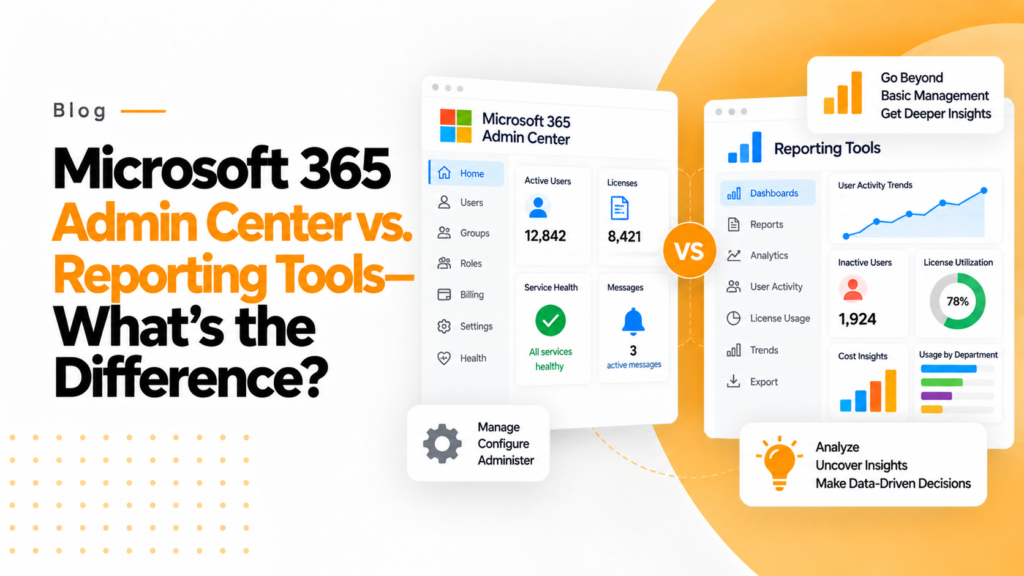
Key takeaways
- The Microsoft 365 admin center is built for daily operations: user and license changes, security settings and service health alerts.
- Admin center reports give limited department level insight and limited historical trend analysis, which dedicated reporting tools add.
- With a dedicated reporting tool you can ask how Teams is being used and by whom, not only whether people are using it.
If Microsoft 365 is your main enterprise software solution, then you’ve probably asked yourself this question at some point: “Do we really need a reporting tool if there are reports available in the M365 Admin Center?” It’s a valid and common question. The answer is very simple; the two tools serve different purposes.
Let’s explore the two products with no fluff and in a very straightforward manner.
What the Microsoft 365 admin center is built for
The Microsoft 365 admin center is the operational control room for your tenant. This is where IT administrators log in to manage and support their enterprise’s M365 environment. Think of it this way. The admin center is built for administrators and non-administrators to “manage” their enterprise environment daily, but it is NOT built for detailed analytics.
How do they differ?
Microsoft 365 Admin Center does a good job of providing the following administrative functions:
- User & License Management
- Security & Compliance Configuration
- Service Health Monitoring and Alerting
Basic usage reporting for the following applications:
- Microsoft Teams
- SharePoint
- OneDrive
- Outlook
Example of usage report questions:
- Are there any active users?
- Does the service have outages?
- How many users from last week used Teams?”
These types of usage & license reports are ideal for day-to-day administrative activities.
Where the admin center falls short
Although Admin Center reports are useful for basic functional reporting, when it comes to creating stories and making business decisions, they fall short.
The Admin Center’s Common Limitations Include:
- Data is gathered in many different report locations, creating silos.
- There is limited insight available at department or role levels.
- Limited historical trend analysis (usage reports cover the last 7, 30, 90 or 180 days)
- The use of technical jargon that business leaders may have difficulty understanding
- Difficulty relating usage data to productivity or outcomes
Essentially, you end up with only numbers rather than answers.
What reporting tools are built for
There are dedicated Microsoft 365 reporting tools developed for one simple reason:
To provide insight into usage data. These tools are focused not on administration but rather on providing insight into the adoption, behavior, and value derived from the services.
What Is Done Well By Reporting Tools: They
- Provide department/role-level visibility
- Clearly show adoption trends over time.
- Provide workload level insight (Teams + SharePoint + OneDrive)
- Provide user-friendly dashboards
- Provide actionable recommendations
Instead of asking, “Is Teams being used?”
You will be able to ask the question, “How is Teams being used and who is using it?”
Microsoft 365 admin center vs. reporting tools
| Area | Microsoft 365 Admin Center | Reporting Tools |
|---|---|---|
| Primary audience | IT administrators | IT + business leaders |
| Focus | Management & service health | Adoption & insights |
| Data depth | High-level | Deep & contextual |
| Department insights | Limited | Strong |
| Trend analysis | Basic | Advanced |
| Business storytelling | Minimal | Core strength |
These tools are not competitors. They are complements.
Where 365TUNE fits in
This is where 365TUNE aligns naturally. The Admin Center shows what has been created and how it’s working; 365TUNE shows how licenses are actually used across the Microsoft 365 suite and what that use costs.
With 365TUNE, organizations can:
- Monitor adoption across teams, not just at the user level
- Link usage to license cost, not just activity counts
- Translate usage data to meaningful business insights
- Provide evidence of adoption for change management versus making assumptions
365TUNE bridges the gap between usage data and license spend.
Do you need both? Honestly, yes.
The answer is yes, if you wish to run Microsoft 365 effectively. To be effective in using Microsoft 365, an organization must use both:
- Microsoft 365 Admin Center: run & maintain
- Reporting tools (i.e., 365TUNE): show true value
One is responsible for keeping the engine running. The other lets you know if you are going towards your desired destination.
Final takeaway
The Microsoft 365 Admin Center is very important; however, it was never meant to identify:
- Adoption
- Productivity
- Collaboration
- Business ROI
If your desire is more than simply “the lights are on” and includes collaboration, engagement, and measurable value, you will need reporting tools. Reporting tools are the missing layer.
This is precisely where 365TUNE comes into play.
Frequently asked questions
Can I see Microsoft 365 usage by department?
Not directly in the admin center, whose usage reports list users rather than departments. You can export the reports and join them to the Department attribute from Microsoft Entra ID, use the Microsoft 365 usage analytics template in Power BI, or use a third-party tool.
Do I need a third-party reporting tool for Microsoft 365?
Not for basic questions such as how many users are active or whether a service has an outage, which the admin center answers. A dedicated tool helps when you need long-term trends, department views, or cost and security reporting across one or many tenants.
Where do I check Microsoft 365 service health?
In the Microsoft 365 admin center, go to Health > Service health to see current incidents and advisories for each service. You can also set up email notifications for incidents and advisories that affect your tenant.
What is Adoption Score in Microsoft 365?
Adoption Score, under Reports in the admin center, rates how your organization uses Microsoft 365 for communication, meetings, content collaboration, teamwork and mobility, plus technology experience. It reports at organization level only, not for individual users.