
Microsoft 365 Copilot usage analytics
See who uses Copilot, how often and in which teams. Find the paid seats sitting idle, what they cost, and the Copilot Chat users ready for a license.
What is Microsoft 365 Copilot usage analytics?
Microsoft 365 Copilot usage analytics measures how many people with a Copilot license actually use it, how often, in which apps and teams, and how that changes after rollout. It tells you whether the licenses are paying off and where the next ones should go.
365TUNE builds that view from Microsoft’s Copilot usage reports and your license data. It shows the adoption funnel from licenses purchased to Copilot use that has become a habit, usage by department and person, idle seats priced at their monthly cost, and Copilot Chat users who may be worth a license.
Microsoft lists its own Copilot reports in Microsoft Copilot reports for IT admins.
To read Microsoft’s report step by step, see our guide to the Microsoft 365 Copilot usage report.
The Copilot adoption funnel
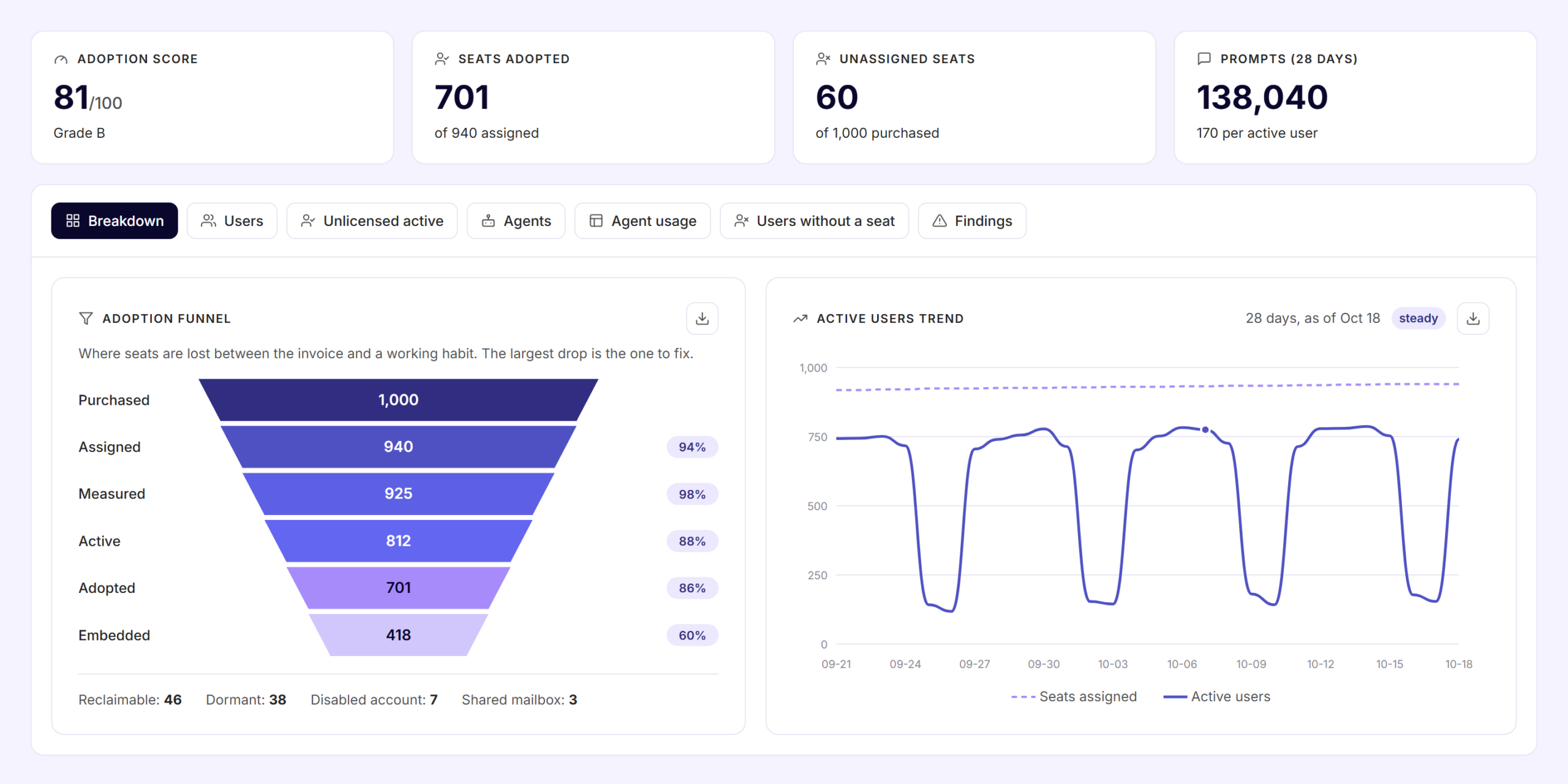
The funnel follows each Copilot seat in six stages, from the invoice to a working habit, and shows where seats drop out. In this sample tenant of 1,000 seats:
| Stage | Seats | What it means |
|---|---|---|
| Purchased | 1,000 | Copilot licenses on the subscription |
| Assigned | 940 (94%) | Licenses assigned to a person. 60 were never assigned. |
| Measured | 925 (98%) | Assigned seats that appear in Microsoft’s Copilot usage data |
| Active | 812 (88%) | Used Copilot in the last 28 days |
| Adopted | 701 (86%) | Use Copilot regularly |
| Embedded | 418 (60%) | Use Copilot often and deeply, as part of the job |
Each percentage is the share of the stage before it. In this sample, the largest drop is between Adopted and Embedded: 283 people use Copilot regularly but haven’t made it part of their work. That’s the drop to fix first.
Every seat that stops short of use is priced at its monthly cost. 365TUNE flags seats you can reclaim, dormant seats, and seats on disabled accounts or shared mailboxes, so you can reassign them or drop them at renewal.
It also checks that each Copilot user has an eligible base license, an Exchange Online mailbox and OneDrive. Copilot can’t do much without them.
For idle licenses beyond Copilot, see Unused license detection.
Copilot usage by department and by person
365TUNE shows which departments use Copilot and how often each person prompts, month by month. Group usage by any Entra ID or Active Directory attribute, such as department, cost center, project or location, and see which teams took to Copilot and which stopped after the first month.
The trend starts with Microsoft’s last 180 days on the day you connect, so you can see the rollout so far without waiting for new data.
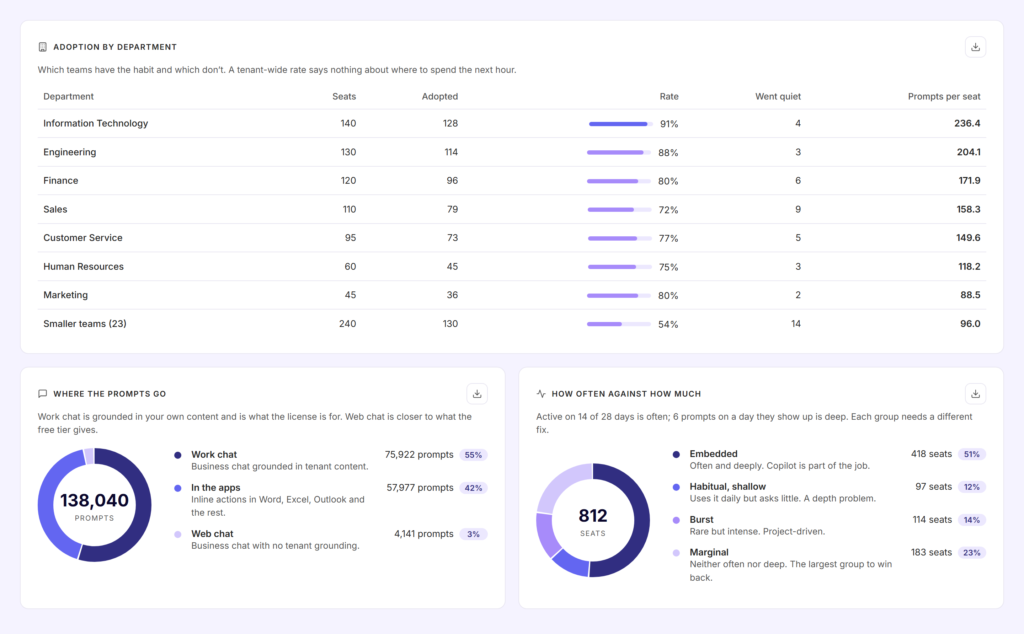
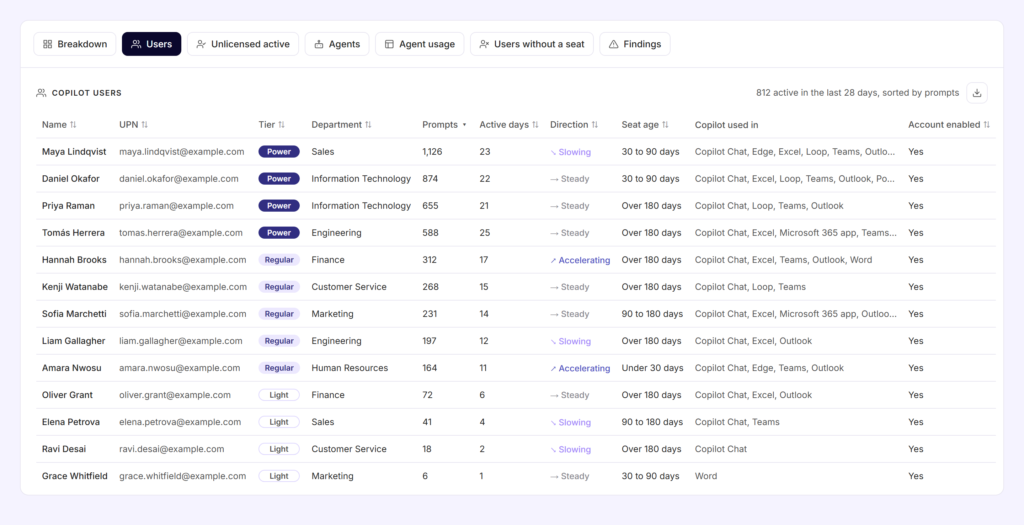
The users view lists every Copilot user with their tier, prompts, active days, seat age and the apps they use Copilot in. It also shows whether each person’s use is accelerating, steady or slowing. Sort by prompts to find your champions, or by direction to catch people drifting away before their seat goes idle.
Copilot Chat users who may need a license
Many people use the free Copilot Chat before anyone buys them a license. 365TUNE finds the heavy Copilot Chat users without a Microsoft 365 Copilot license, so the next licenses go to people who already use Copilot every day.
Microsoft describes the report in Microsoft Copilot Chat usage report.
Copilot agents in use
Usage now includes agents as well as prompts. 365TUNE lists every Copilot agent in the tenant with:
- Owner and hosting: who built it and where it runs.
- Model and instructions: what it runs on and what it’s told to do.
- Access and permissions: who can use it and what it can reach.
- Data sources and integrations: which sites, files and connected systems it draws on.
To find overshared content before Copilot and its agents reach it, see Copilot readiness.
How it works
- Connect read-only. Consent to 365TUNE’s read-only app.
- Scan. It loads Microsoft’s last 180 days of Copilot usage and your Copilot licenses, then keeps every scan for up to 24 months.
- Review. See the funnel, findings ranked by cost, usage by team and person, and Copilot Chat users without a license.
- Act. Reassign idle seats, train the teams that stopped, and license the people who already rely on Copilot Chat.
For IT teams and MSPs
For IT teams
Show finance whether the Copilot rollout is paying off, with numbers per department, and decide the renewal from use instead of requests.
For MSPs
Show each customer how Copilot use moved since the last review, which seats sit idle and who should get the next licenses, across every tenant in one dashboard.
Copilot findings and what to do about them
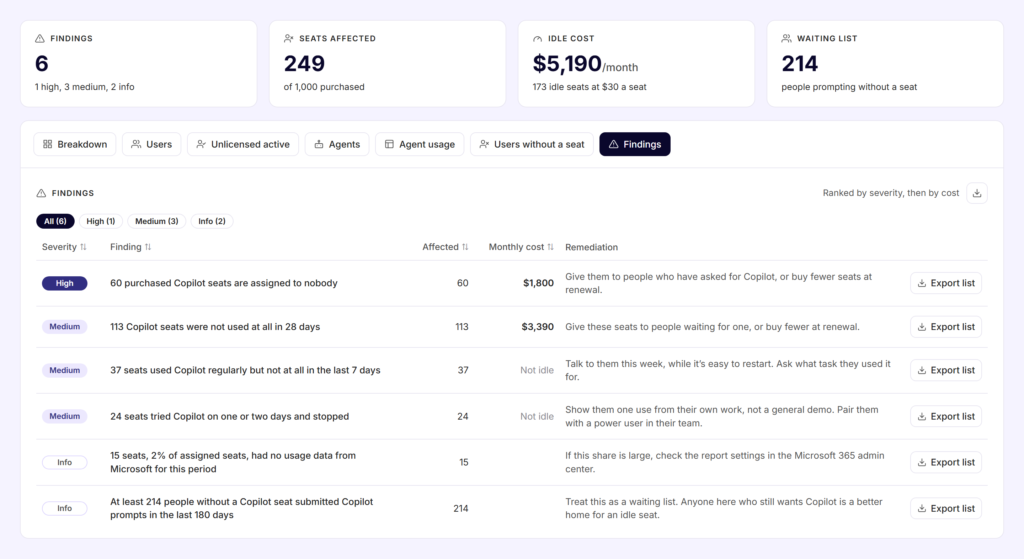
365TUNE turns each Copilot problem into a finding: seats assigned to nobody, seats nobody used, people who went quiet or stopped after a day or two, and people prompting without a seat. Findings are ranked by severity and monthly cost, each with what to do about it and a list of the seats affected that you can export.
Security of the connection
Copilot usage analytics needs read-only access to your tenant. 365TUNE reads usage counts and activity dates, never the content of prompts, emails or files. It asks only for the permissions each feature needs, and you choose the level of access you grant. 365TUNE is ISO 27001 certified, has a SOC 2 Type II report and doesn’t use your data for training.
See who uses your Copilot licenses
Connect read-only and see your Copilot funnel, idle seats and usage by team within minutes. 14-day free trial.
Questions about Copilot usage reports
How do I see Microsoft 365 Copilot usage?
In the Microsoft 365 admin center, go to Reports > Usage and open the Microsoft 365 Copilot page. It shows licensed users’ activity by app over 7, 30, 90 or 180 days. 365TUNE adds the license cost, usage by department and Copilot Chat users in one view.
What do Copilot usage reports show?
The Microsoft 365 Copilot usage report shows which licensed users used Copilot and when they last used it in each app, such as Teams, Outlook, Word, Excel and PowerPoint. A separate Copilot Chat report covers people without a Copilot license.
Can I see Copilot usage by user?
Yes, but the admin center hides user names by default. A global admin can turn off the concealed names setting under Org settings > Reports. 365TUNE shows usage by person once you connect.
Can I see Copilot usage by department?
Not in the admin center report. The Copilot Dashboard in Viva Insights can group by organizational data you upload. 365TUNE groups Copilot use by any Entra ID or Active Directory attribute, such as department, cost center or location.
How do I track Copilot Chat usage for people without a license?
Use the Copilot Chat usage report in the admin center, which covers only people without a Microsoft 365 Copilot license. 365TUNE flags the heavy users among them, who may be worth a license.
How do I measure Microsoft 365 Copilot adoption?
Follow each seat from purchase to habit: assigned, active in the last 28 days, used regularly, then used often and deeply. Compare the rates by department and fix the largest drop first. 365TUNE shows this adoption funnel, adoption by department and whether each person’s use is rising or falling.
How do I measure Copilot ROI?
Start with use: compare licenses purchased, assigned and active, and price the seats nobody uses. Then compare use by team before and after training. 365TUNE shows both; productivity gains depend on how each team works and need your own measures.
How current is Copilot usage data?
Microsoft usually publishes a day’s Copilot activity within 48 hours of the end of that day (UTC). 365TUNE reads the same data, so its figures follow the same delay.
Does 365TUNE read Copilot prompts?
No. It reads usage counts and activity dates, never the content of prompts, emails or files.