Archie Nair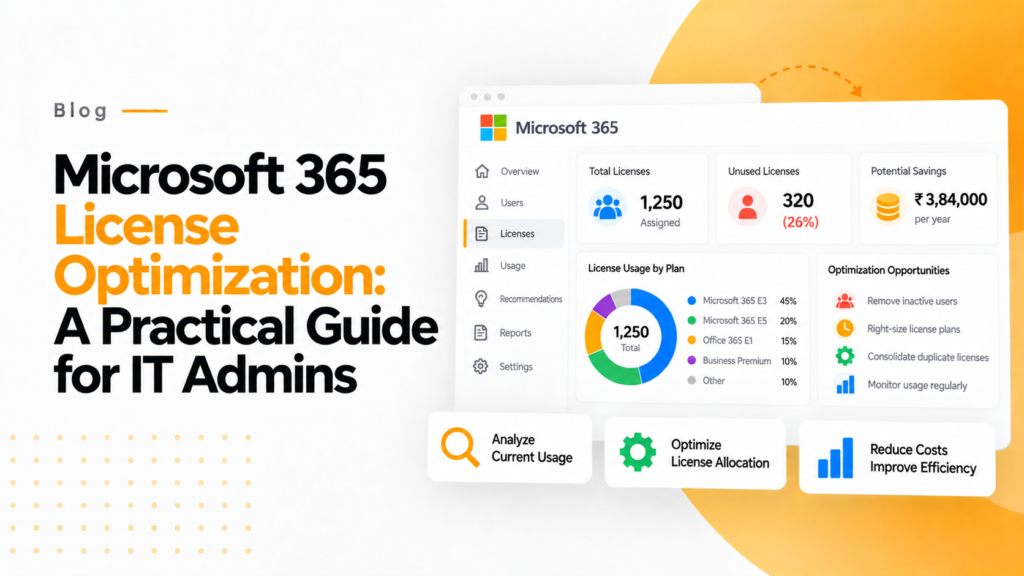
Key takeaways
- A license whose user has not signed in for 90 days is a candidate for reclaiming, once HR confirms the person has left or changed role.
- Chargeback models bill license costs to each department, which gives department heads a reason to give back seats they do not use.
- 365TUNE prices each license issue it finds, splits the spend by department and ranks the fixes by the saving they deliver.
Microsoft 365 License Optimization is crucial for IT administrators aiming to control costs, ensure compliance, and maximize the utility of their organization’s subscription. With a range of plans and features available, it’s easy to overspend or underutilize resources. This guide provides actionable strategies to optimize your Microsoft 365 licenses, leveraging insights from leading industry practices and modern tools like a dedicated Microsoft 365 reporting tool.
Understanding Microsoft 365 Licensing
Microsoft 365 offers various subscription plans tailored to different organizational needs. For detailed information about Microsoft 365 subscriptions and licensing, refer to the Microsoft 365 Licensing documentation. These include Microsoft 365 Business Basic, Standard, and Premium, as well as Enterprise plans such as E1, E3, and E5. Each plan includes a specific set of applications and services, from Office apps to advanced security features, analytics, and collaboration tools. Many of the features included in enterprise licenses go unused, which adds up to substantial financial waste.
For IT administrators, understanding which services are included in each license type is the first step toward optimization. The Microsoft 365 admin center provides a centralized view, but it often lacks the granular insights required to make data-driven decisions. That’s where a Microsoft 365 reporting tool becomes indispensable.
Common Challenges in License Management
Organizations often encounter several challenges when managing Microsoft 365 licenses:
- Over-Licensing: Purchasing more licenses than necessary, leading to unnecessary expenses.
- Underutilization: Not leveraging all features included in the licenses.
- License Mismatch: Assigning high-tier licenses to users who do not need advanced features.
- Compliance Risks: Mismanagement can result in non-compliance with licensing agreements, potentially leading to audits and penalties.
- Manual Tracking: Many organizations still rely on spreadsheets and manual processes for license tracking, increasing the risk of errors.
A robust Microsoft 365 reporting tool addresses these pain points by offering up-to-date visibility into license usage and utilization metrics.
Best practices for Microsoft 365 license optimization
365TUNE runs these checks across every license in your tenant: its Microsoft 365 cost optimization tools price what they find, split the spend by department and rank the fixes by saving.
1. Conduct regular license audits
Regular audits help identify inactive or underutilized licenses. For example, if a user hasn’t logged in for 90 days, that license could be reclaimed. Automating these audits helps you find inactive licenses sooner and cut licensing costs. A good Microsoft 365 reporting tool enables you to generate audit reports quickly and accurately.
2. Automate license provisioning and deprovisioning
Manual provisioning leads to inconsistencies and waste. Automate license assignment based on user roles using PowerShell scripts or third-party automation tools. Better yet, integrate automation features available in advanced Microsoft 365 reporting tools to manage lifecycle events more effectively.
3. Segment licenses by department or function
Different departments have varying needs. For instance, marketing teams might benefit from collaboration tools, while the finance department may not require Teams or Yammer. Segmenting licenses helps tailor features to needs and eliminate redundancies.
4. Optimize license types based on usage
Many users are assigned E3 or E5 licenses even though they use only basic Office apps. Analyze usage data to determine whether users can be downgraded to lower-tier plans. A Microsoft 365 reporting tool can highlight such trends, allowing informed decision-making.
5. Implement chargeback models
Assigning licensing costs to specific departments promotes accountability. When departments bear the cost, they are more likely to manage their licenses effectively. Use reporting tools to generate department-wise usage and cost reports.
6. Monitor third-party app integrations
Third-party app licenses that integrate with Microsoft 365 can also lead to hidden costs. Monitoring these apps through a centralized Microsoft 365 reporting tool helps identify unused integrations that can be canceled or renegotiated.
7. Leverage Microsoft 365 usage analytics
Tools like Microsoft Graph API, Power BI, and built-in reports offer insights, but they often require customization. A dedicated Microsoft 365 reporting tool simplifies this by offering ready-to-use dashboards tailored for IT admins.
8. Align licenses with business goals
Evaluate whether your licensing strategy aligns with business priorities. For example, if remote work is a priority, ensure collaboration tools are adequately licensed. If cost-cutting is a goal, aggressively audit and reallocate unused licenses.
9. Educate users
Employees often don’t utilize available tools due to lack of awareness. Conduct training to improve adoption of licensed services, increasing ROI. Reporting tools can help identify underused features and inform training priorities.
10. Set up alerts and thresholds
Configure alerts for anomalies, such as spikes in inactive users or license assignment errors. A modern Microsoft 365 reporting tool enables timely alerts, helping you respond quickly and mitigate risks.
The strategic role of Microsoft 365 reporting tools
A Microsoft 365 reporting tool plays a strategic role in license optimization by offering:
- Visibility: Up-to-date dashboards showing license assignments, user activity, and cost distribution.
- Automation: Streamlined provisioning and deactivation workflows.
- Cost Control: Detailed usage reports identifying optimization opportunities.
- Security & Compliance: Insights into access patterns, audit trails, and policy violations.
- Forecasting: Predictive analytics for future license requirements based on usage trends.
Organizations using such tools can cut licensing costs, improve compliance readiness, and save admin time.
Compliance and audit preparedness
Microsoft and third-party vendors often conduct licensing audits. Being audit-ready requires detailed documentation and transparent processes. A Microsoft 365 reporting tool ensures you are always prepared by maintaining historical logs, user activity records, and license change histories. This not only reduces audit risks but also instills confidence in stakeholders.
How 365TUNE can help
365TUNE is a purpose-built Microsoft 365 reporting tool that empowers IT administrators with deep visibility into license usage, user activity, and subscription costs. With automated dashboards and intelligent alerts, 365TUNE helps you identify inactive licenses, right-size plans based on actual usage, and generate financial reports for leadership and compliance audits. Hosted securely on Microsoft Azure and certified to ISO 27001, 365TUNE ensures that your data is safe while simplifying license management at scale. Whether you’re optimizing costs, preparing for audits, or aligning licenses with business growth, 365TUNE equips you with the tools and insights you need.
Conclusion
Optimizing Microsoft 365 licenses requires a strategic and data-driven approach. By conducting regular audits, automating provisioning, segmenting licenses by roles, and using an advanced Microsoft 365 reporting tool, IT administrators can significantly cut costs, reduce waste, and improve user satisfaction.
The digital workplace depends heavily on licensing decisions. Investing in the right tools and practices can transform license management from a cost center into a driver of business value.
Frequently asked questions
What is Microsoft 365 license optimization?
It is matching each user to the cheapest license that covers the features they actually use and removing licenses nobody uses. In practice it means reclaiming inactive seats, downgrading over-provisioned users and cancelling add-ons that sit idle.
How many users can a Microsoft 365 Business plan have?
Business Basic, Business Standard and Business Premium are each capped at 300 users. Larger organizations move some or all users to Enterprise plans such as E3 or E5, and a tenant can mix Business and Enterprise plans.
How do I see unassigned Microsoft 365 licenses?
In the Microsoft 365 admin center go to Billing, then Licenses. Each product lists how many licenses you bought and how many are assigned, and the difference is what you pay for without using.
Is 365TUNE secure?
365TUNE is ISO 27001 certified and has a SOC 2 Type II report. Alongside license reporting it assesses tenant security against more than 300 controls drawn from the CIS and CISA SCuBA baselines.