
The CoreView alternative with prices on the page and savings in dollars
See every unused Microsoft 365 license priced in dollars, the downgrades worked out from what people actually use, and a score against 300+ CIS and CISA controls. Prices start at $20 a month, and the 14-day free trial starts with a read-only connection.
Getting started with CoreView
Demo and quote
- Book a demo
- Get a quote for your tenant
- Onboarding
The platform is priced by quote, per licensed identity.
Getting started with 365TUNE
Free trial
- Sign up
- Consent to read-only access
- See findings within minutes
Published pricing from $20 a month.
CoreView facts reviewed from its own website.
What is CoreView, and how does 365TUNE compare?
CoreView is a SaaS platform for Microsoft 365 tenant resilience and management, covering Entra ID, Exchange Online, Teams, SharePoint, OneDrive and Intune. It is sold as three plans, Tenant Resilience, Tenant Management and Tenant Control, with optional modules. Every plan is priced by quote, based on the number of licensed identities in your tenant.
365TUNE gives you the administration and governance, with drift alerts that show who changed what, restore of supported settings, and hybrid Active Directory and Exchange. Where it pulls ahead is cost: every unused or oversized license priced at Microsoft’s list prices, downgrades worked out from what each person does in each app, chargeback by any Entra ID attribute, 300+ CIS and CISA checks and Copilot readiness.
Prices are published from $20 a month. Connect with read-only consent, see your first findings within minutes, and every plan starts with a 14-day free trial.
CoreView vs 365TUNE: feature comparison
| CoreView | 365TUNE | |
|---|---|---|
| Buying | ||
| Pricing | By quote, per licensed identity; contact CoreView for plan pricing | Published: from $20 a month per tenant; Standard $99 + $0.05 per seat |
| How to try it | Demo and product tour; a free, read-only Tenant Observer | 14-day free trial of any plan, on a read-only connection |
| Built for | Enterprise, public-sector and education IT teams | IT teams and MSPs, from one tenant to many |
| Configuration and security | ||
| Security baselines | CIS, Essential 8 and Microsoft baselines | 300+ CIS and CISA SCuBA controls, scored per tenant, with step-by-step remediation and a retest |
| Configuration drift | Yes Near-real-time, with who, what and when | Yes Every scan, with what changed, when and who changed it |
| Configuration restore | Yes Versioned configuration backup and one-click rollback | Yes Restore approved settings across Entra ID, Exchange, Teams and SharePoint, on Enterprise |
| Conditional Access review | Policies included in configuration backup and restore | Every policy checked against the benchmarks and Microsoft’s templates |
| Administration | ||
| Users, mailboxes and licenses | Yes | Yes |
| Delegated admin | Yes Virtual tenant segmentation | Yes Predefined or custom roles, scoped by attribute such as department or region |
| Automation | Yes No-code automation actions | Yes Onboarding and offboarding policies, scheduled tasks and bulk actions; approvals on Enterprise |
| Hybrid AD and Exchange | Yes Hybrid Connector add-on | Yes |
| Many tenants | Yes One central view | Yes Multi-tenant dashboard on Standard; GDAP-based management on Enterprise |
| Cost | ||
| License optimization | Yes Optimization Center for unused and duplicated licenses, with service usage | Yes Usage-based recommendations at Microsoft list prices, with estimated savings ranked by value |
| Downgrade recommendations from app activity | Not documented | Yes Per app, including Power BI Premium Per User, Pro or Free |
| Copilot and AI | ||
| Copilot | Copilot eligible-user and usage reports, low-usage policies; SharePoint oversharing control in Tenant Control, an add-on on other plans | Copilot adoption, SharePoint exposure down to file level and an inventory of Copilot agents |
| AI assistant | Corey AI, in every plan | AI agent that answers from your tenant data |
Pricing you can see before you talk to sales
CoreView prices each tenant by quote, based on its licensed identities, with optional add-ons such as Control for SharePoint, Hybrid Connector and SIEM Connector. 365TUNE publishes its prices, so you can work out the cost before you speak to anyone:
| Plan | Price | Includes |
|---|---|---|
| Basic | $20 per tenant | Up to 300 Microsoft 365 base licenses |
| Standard | $99 + $0.05 per seat | Multi-tenant management, drift analysis, task automation |
| Enterprise | $199 + $0.09 per seat | Adds GDAP, drift restore and approval workflows |
For 1,000 seats, Standard costs $149 a month and Enterprise $289 a month. Annual billing takes 20% off, and MSPs can apply to the partner program for a partner discount.
Turn license usage into savings you can act on
365TUNE puts a monthly cost on every license nobody uses, so you see the saving before you change anything. In a 6,000-user sample tenant, that looks like this:
Each assignment is matched with application-level usage and its monthly cost at Microsoft’s list prices, so you can see which subscriptions to remove, reassign or downgrade before you change anything.
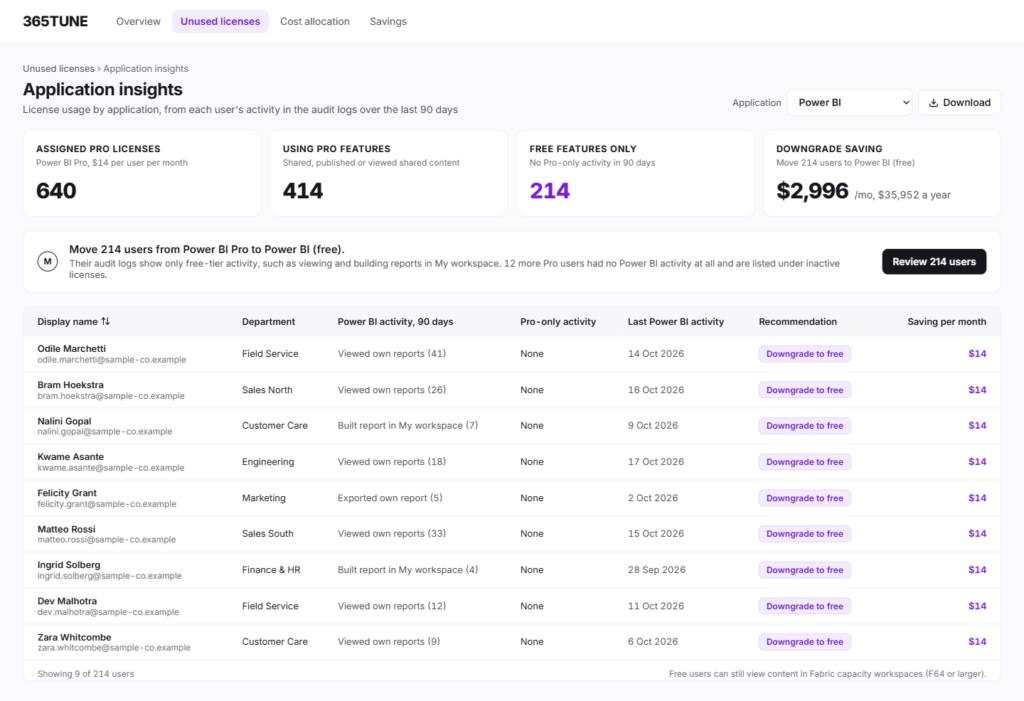
Example: Power BI licenses. 365TUNE reads what each person does in Power BI and recommends the license they need:
- Premium Per User, never opened: flagged for removal.
- Only free features used: downgrade to Power BI (free).
- More than Free, but not Premium: move to Pro.
Chargeback then splits the spend by any Entra ID or Active Directory attribute, such as department, cost center, project or location, so each budget holder sees their own figure.
Configuration drift with who changed it, and restore
365TUNE compares each tenant with a named baseline on every scan and shows what changed, when and who changed it. On Enterprise, it restores the approved settings across Entra ID, Exchange, Teams and SharePoint.
Example: a Conditional Access policy that changed 70 times stands out in the drift report, along with the person who changed it, so you can ask why before you restore the approved setting.
300+ CIS and CISA security checks
365TUNE checks each tenant against 300+ controls from the CIS Microsoft 365 Foundations Benchmark, CISA’s SCuBA baselines and community best practices, and scores it. Every failed control comes with step-by-step remediation; fix it from 365TUNE where the setting is supported, or in the admin portal, then retest.
Conditional Access gets its own review against the benchmarks and Microsoft’s policy templates, and sign-in reports show who has a passkey and who still relies on SMS.
Administration and delegation
- Users, mailboxes and licenses: create and edit users, change authentication settings, manage Exchange Online mailboxes and assign licenses.
- Roles scoped by attribute: give a regional admin or a finance contact access to only their department or region.
- Automation: onboarding and offboarding policies, scheduled tasks and bulk actions, with a manager’s approval on Enterprise.
- Hybrid: connect on-premises Active Directory and Exchange alongside Microsoft 365.
Reports in 365TUNE use the read-only connection; every change asks for write consent first.
Copilot readiness and AI
Before Copilot goes live, 365TUNE checks SharePoint permissions at site, library, folder and file level, because Copilot shows people whatever they can already open. After rollout, the adoption funnel shows licenses bought, assigned and used, and an inventory lists every Copilot agent with its owner, access and data sources.
The AI agent answers questions about a tenant in plain English, such as “which E5 users haven’t signed in for 60 days?”. Your data is never used for training.
Built for MSPs as well as enterprises
Every client tenant sits in one dashboard, with reclaimable dollars and security posture side by side, so you can see which clients need attention first. The multi-tenant dashboard comes with Standard, Enterprise adds GDAP, and the partner program gives MSPs a partner discount.
Why IT teams and MSPs choose 365TUNE
- Prices on the page: plans from $20 a month and a 14-day free trial.
- Results the same day: findings within minutes of a read-only connection.
- Savings in dollars: license waste at Microsoft list prices, downgrades from app activity and Power BI advice.
- Chargeback finance trusts: license spend split by department, cost center or any Entra ID attribute.
- A security score per tenant: 300+ CIS and CISA controls with remediation steps and a retest.
- Drift with who and when: every change tracked against your baseline, with restore on Enterprise.
- Built for many tenants: an MSP dashboard, GDAP on Enterprise and a partner discount.
- Copilot ready: oversharing found before rollout and every agent inventoried after it.
Switching from CoreView
Start 365TUNE’s free trial alongside CoreView. It connects in minutes with read-only consent, so you see your license savings, security score and drift report before you change anything. The two run side by side with separate consents, so you can compare them on your own tenant before your CoreView renewal.
Sources
CoreView’s features, checked 20 November 2026: coreview.com.
CoreView’s plans, pricing model and Tenant Observer, checked 20 November 2026, from its pricing page.
CoreView’s license optimization, checked 20 November 2026, from its help center.
365TUNE’s plans and prices are on the pricing page.
See what your licenses really cost, in minutes
Find unused and oversized licenses with their monthly cost, split spend by department and score your security settings. Start read-only with a 14-day free trial.
Questions about CoreView alternatives
What is CoreView?
CoreView is a SaaS platform for Microsoft 365 tenant resilience and management, sold as three plans, each priced by quote per licensed identity. 365TUNE publishes its prices from $20 a month per tenant and adds license costs in dollars, with downgrades worked out from what each person uses.
What is a good CoreView alternative?
For IT teams and MSPs that want published pricing and a free trial, 365TUNE brings Microsoft 365 administration, configuration monitoring and restore, and hybrid AD together with license optimization, financial reporting and 300+ CIS and CISA checks.
How much does CoreView cost?
CoreView prices by quote, per licensed identity, with optional add-ons. 365TUNE publishes its prices: Basic is $20 a month per tenant, and Standard is $99 plus $0.05 per seat.
Is there a free trial of CoreView?
CoreView’s platform plans are sold after a demo and a quote, with no free trial of the full platform. 365TUNE gives you a 14-day free trial of any plan, starting with a read-only connection, and your first findings arrive within minutes.
Can 365TUNE restore Microsoft 365 configuration?
Yes, for supported settings. 365TUNE Enterprise compares each tenant with your approved baseline on every scan, shows what changed, when and who changed it, and restores the approved settings across Entra ID, Exchange, Teams and SharePoint.
Does 365TUNE support hybrid Active Directory and Exchange?
Yes. On-premises Active Directory and Exchange can be connected alongside Microsoft 365.
Does 365TUNE manage Intune?
Not yet. Device management is on the 365TUNE roadmap, with no confirmed date.
Which is better for MSPs?
365TUNE is built for multi-tenant work: one dashboard for every client on Standard, GDAP-based management on Enterprise, prices from $20 a month per tenant and a partner discount for MSPs.
What security certifications does 365TUNE hold?
365TUNE’s controls are independently audited under SOC 2 Type II, and its security management system is ISO 27001 certified. Reports are available on request.
Does 365TUNE change anything in my tenant?
Not for its reports, which need only read-only access. Tasks that write, such as offboarding or restoring a setting, ask for their own consent, and offboarding runs only after approval.
Can I try 365TUNE alongside CoreView?
Yes. 365TUNE connects with its own read-only consent and changes nothing in CoreView, so you can compare license savings, security scores and drift reports on your own tenant during the 14-day free trial.