
Syskit Point alternative for Microsoft 365 governance and cost
365TUNE brings Microsoft 365 governance, license cost and security together for IT teams and MSPs. Find oversharing before Copilot does, see every unused license in dollars, split spend by cost center, and check 300+ security controls. On Enterprise, leavers are offboarded after a manager approves.
Getting started with Syskit Point
Per user per year
- Pick an edition
- Pay per user per year
- Buy for 100 users or more
From €10 per user per year; license optimization is an add-on.
Getting started with 365TUNE
Free trial
- Sign up
- Consent to read-only access
- See findings within minutes
Published pricing from $20 a month per tenant.
Syskit Point facts reviewed from its own website.
What is Syskit Point, and how does 365TUNE compare?
Syskit Point is a Microsoft 365 governance platform from Syskit, based in Zagreb, Croatia. It inventories every workspace and permission, cleans up access, runs workspace lifecycle and provisioning policies, manages external users, and checks Copilot readiness and AI agents. It is priced per user per year in euros, for 100 users or more, and license optimization is sold as an add-on.
365TUNE starts from cost and security. Every unused or oversized license is priced in dollars, spend is split by cost center, each tenant is scored against 300+ CIS and CISA controls. On Enterprise, leavers are offboarded once a manager approves. Copilot readiness checks SharePoint permissions down to file level. On Standard and above, MSPs see every client tenant in one dashboard.
Prices are published from $20 a month per tenant, the platform is SOC 2 Type II audited and ISO 27001 certified, and every plan starts with a 14-day free trial.
Syskit Point vs 365TUNE: feature comparison
| Syskit Point | 365TUNE | |
|---|---|---|
| Buying | ||
| Pricing | Per user per year: Management €10, Security €20, Governance €30; Enterprise by quote | Per tenant per month: Basic $20; Standard $99 + $0.05 per seat |
| Minimum | 100 users (1,000 on Enterprise) | None: start with one tenant |
| Built for | Organizations governing their own tenant | IT teams and MSPs, from one tenant to hundreds |
| Governance | ||
| Permissions | Yes Permissions matrix across workloads, automated cleanup, owner access reviews | Yes SharePoint permissions checked at site, library, folder and file level |
| Copilot and AI agents | Yes AI readiness, agents and apps inventory | Yes Oversharing check before rollout, adoption funnel and agent inventory |
| User onboarding and offboarding | Not listed on Syskit’s website | Yes Policies that remove licenses, sign-in blocked, mailbox and files handed over |
| Cost | ||
| License optimization | Add-on, priced on request | Yes Included: every unused, inactive or oversized license priced at Microsoft list prices |
| Spend by cost center | Not listed on Syskit’s website | Yes Spend by department, cost center, project or any Entra ID attribute |
| Security and administration | ||
| Security benchmarks | Vulnerabilities dashboard, auditing and alerts | Yes 300+ CIS and CISA SCuBA controls scored per tenant, with step-by-step remediation and a retest |
| Configuration drift | Not listed on Syskit’s website | Yes Every scan, with what changed, when and who changed it; restore on Enterprise |
| Users, mailboxes and licenses | Reporting and permission management | Yes Manage users, authentication settings, Exchange Online mailboxes and licenses |
| Many tenants (MSPs) | Not listed on Syskit’s website | Yes Multi-tenant dashboard on Standard; GDAP on Enterprise |
What is the best Syskit Point alternative?
365TUNE is the Syskit Point alternative for teams that want license cost and security in the base price. License optimization comes with every plan, every finding is priced in dollars, and each tenant is scored against 300+ CIS and CISA controls. Plans start at $20 a month per tenant, with no 100-user minimum and a 14-day free trial.
Syskit Point vs 365TUNE pricing
Syskit Point is priced per Microsoft 365 user per year in euros, for at least 100 users. 365TUNE is priced per tenant per month in US dollars, with license optimization included in every plan.
| Plan | Price | Notes |
|---|---|---|
| Syskit Point Management | €10 per user per year | Inventory, reports, permissions, external sharing; 100 users minimum |
| Syskit Point Security | €20 per user per year | Adds auditing, alerts and report subscriptions |
| Syskit Point Governance | €30 per user per year | Adds lifecycle, provisioning, access reviews and storage optimization |
| Syskit Point Enterprise | By quote | Hosted in your own Azure tenant; 1,000 users minimum |
| 365TUNE Basic | $20 per tenant per month | Up to 300 Microsoft 365 base licenses |
| 365TUNE Standard | $99 + $0.05 per seat per month | Multi-tenant management, drift analysis, task automation |
| 365TUNE Enterprise | $199 + $0.09 per seat per month | Adds GDAP, drift restore and approval workflows |
Syskit sells license optimization and Power Platform governance as add-ons. Annual billing takes 20% off every 365TUNE plan.
Syskit’s editions, minimums and add-ons are from its pricing page.
Is license optimization included in 365TUNE?
Yes. Syskit sells license optimization as an add-on, and in 365TUNE it comes with every plan. Each unused, inactive or oversized license is priced at Microsoft’s list prices or yours, based on what each person uses, and the savings are ranked by value. An illustrative 6,000-user sample tenant:
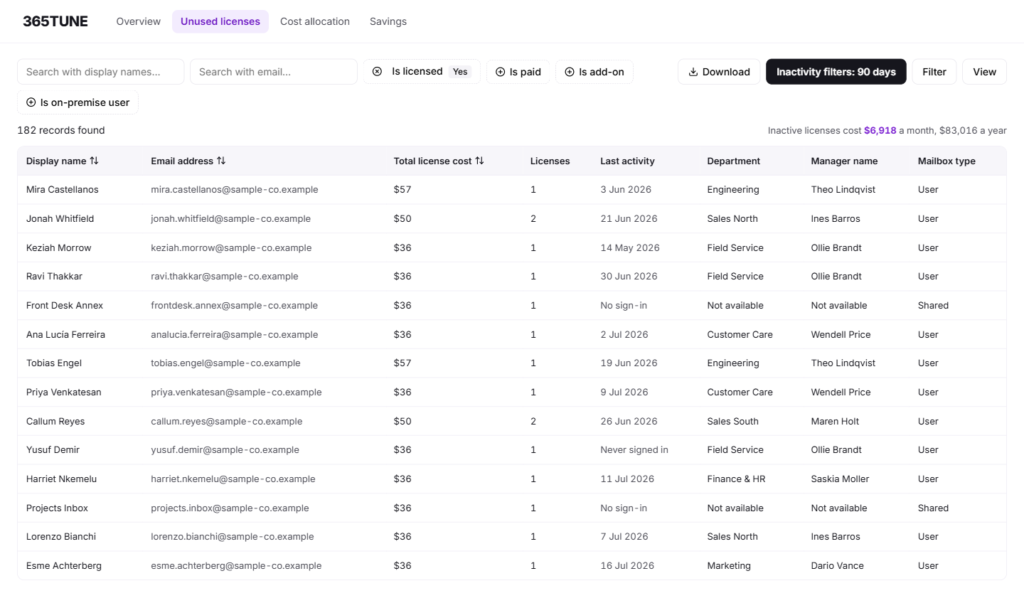
Inactivity rules, downgrades and storage checks are on the unused license detection page.
Can 365TUNE allocate Microsoft 365 costs to departments?
Syskit Point’s plans don’t list cost allocation. 365TUNE totals license spend by department, cost center, project or location from Entra ID attributes, including custom ones, with the users behind every figure. Finance gets a monthly number per budget holder that it can charge back.
How the split works is on the cost allocation page.
How does 365TUNE check Copilot readiness?
Syskit Point covers AI readiness and an agents inventory. 365TUNE checks SharePoint permissions at site, library, folder and file level before rollout, then tracks adoption from licenses bought to active users. It also finds heavy Copilot Chat users who don’t have a license yet, and lists each agent with its data sources.
Every Copilot check is on the Copilot readiness page.
How does 365TUNE score Microsoft 365 security?
Syskit Point has a vulnerabilities dashboard with auditing and alerts. 365TUNE scores each tenant against 300+ controls from the CIS Microsoft 365 Foundations Benchmark and CISA’s SCuBA baselines, covering Entra ID, MFA, Exchange Online, SharePoint, Teams and logging. Every failed control has step-by-step remediation and a retest.
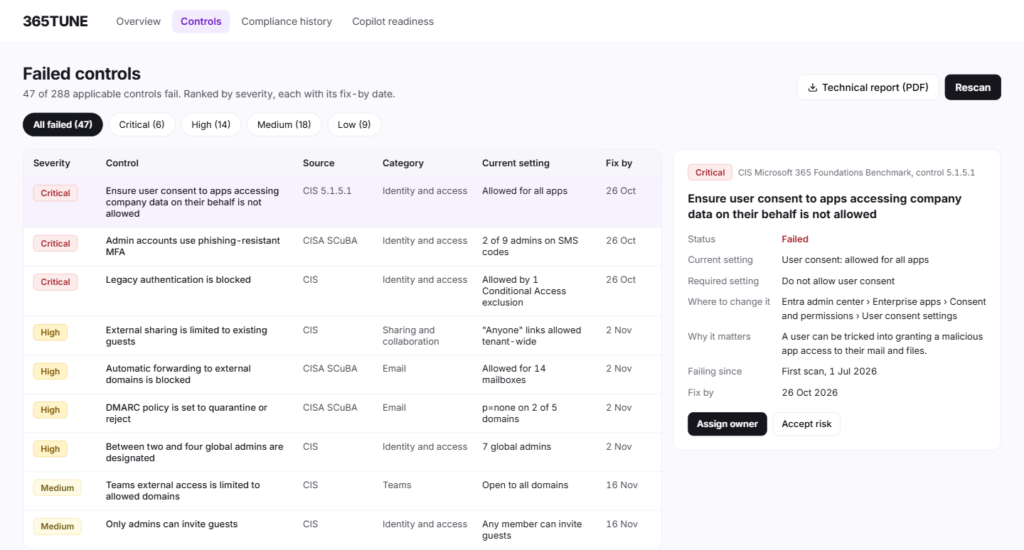
Every control area is listed on the security posture assessment page.
Does 365TUNE automate offboarding and track drift?
User offboarding and configuration drift aren’t listed in Syskit Point’s plans. 365TUNE runs onboarding and offboarding policies that remove licenses and hand over a leaver’s mailbox and files, with manager approval on Enterprise. Every scan also shows what changed in the tenant, when and who made the change.
Drift alerts and restore are explained on the configuration drift page.
Why IT teams and MSPs choose 365TUNE
- Cost built in: every unused or oversized license priced in dollars, with no add-on to buy.
- Spend by cost center: license spend split by department, cost center or project, with the users behind each figure.
- A security score per tenant: 300+ CIS and CISA controls per tenant, with step-by-step fixes and a retest.
- Leavers handled with sign-off: offboarding that waits for a manager’s approval on Enterprise, with a 24-month log.
- Drift tracked on every scan: every scan shows what changed, when and who made the change.
- Copilot checks to file level: oversharing found down to file level before rollout, adoption and agents tracked after it.
- One tenant or hundreds: MSPs manage every client from one dashboard on Standard, with no user minimum.
How to try 365TUNE alongside Syskit Point
- Connect your tenant. Start the 14-day free trial with one read-only consent. Syskit Point keeps running as it is.
- See your waste in dollars. Review unused and oversized licenses with a monthly price on each, with no add-on to buy.
- Check the security score. Read your security score and the fix for each failed control.
- Run a chargeback report. Split your license spend by department or cost center and share it with finance.
Sources
Syskit Point’s features, checked 19 November 2026: Syskit Point product page.
Syskit’s editions, minimums and add-ons, checked 19 November 2026, from its pricing page.
365TUNE’s plans and prices are on the pricing page.
See what your Microsoft 365 tenant costs and risks
Connect read-only and get license waste in dollars, a security score and Copilot oversharing findings within minutes. 14-day free trial.
Questions about Syskit Point alternatives
Is 365TUNE a Syskit Point alternative?
Yes, for teams that want Microsoft 365 governance together with license cost and security. 365TUNE checks SharePoint oversharing before Copilot, prices every unused license, splits spend by cost center, scores 300+ CIS and CISA controls and, on Enterprise, automates offboarding with manager approval.
What is Syskit Point?
Syskit Point is a Microsoft 365 governance platform from Syskit. It inventories workspaces and permissions, automates workspace lifecycle and provisioning, manages external users and checks Copilot readiness and AI agents.
How much does Syskit Point cost?
Syskit lists Management at €10, Security at €20 and Governance at €30 per user per year, for at least 100 users, with Enterprise by quote. License optimization and Power Platform governance are add-ons. 365TUNE starts at $20 a month per tenant, with license optimization included.
Does 365TUNE manage SharePoint permissions?
365TUNE checks SharePoint permissions at site, library, folder and file level and flags oversharing, such as a finance site the whole company can edit, with the fix. It doesn’t provision workspaces or run owner access reviews.
Does 365TUNE work for MSPs?
Yes. On Standard, MSPs see every client tenant in one dashboard, with reclaimable dollars and security posture side by side, and can apply to the 365TUNE partner program for a partner discount.
Can I try 365TUNE alongside Syskit Point?
Yes. 365TUNE connects to your tenant with its own read-only consent and changes nothing in Syskit Point, so you can compare the two on your own tenant during the 14-day free trial.
Does 365TUNE change anything in my tenant?
Not for its reports, which need only read-only access. Tasks that write, such as offboarding or restoring a setting, ask for their own consent, and on Enterprise, offboarding runs only after approval.
Is there a free trial?
Yes. Every 365TUNE plan starts with a 14-day free trial, connected read-only.