
Microsoft 365 reporting dashboard and scheduled reports
License spend, waste, security score and active users on one screen, and the reports behind them emailed as PDF and CSV on the schedule you set.
What is a Microsoft 365 reporting dashboard?
A Microsoft 365 reporting dashboard puts the numbers about a tenant on one screen: what the licenses cost, how many are wasted, how secure the settings are and how many people use the services. The admin center's Reports dashboard covers usage. Cost and security sit in other places, or nowhere.
The 365TUNE dashboard shows all four together from one read-only connection. Every figure opens the report behind it, which you can export as PDF or CSV or email on a schedule.
One dashboard, the way you'll see it
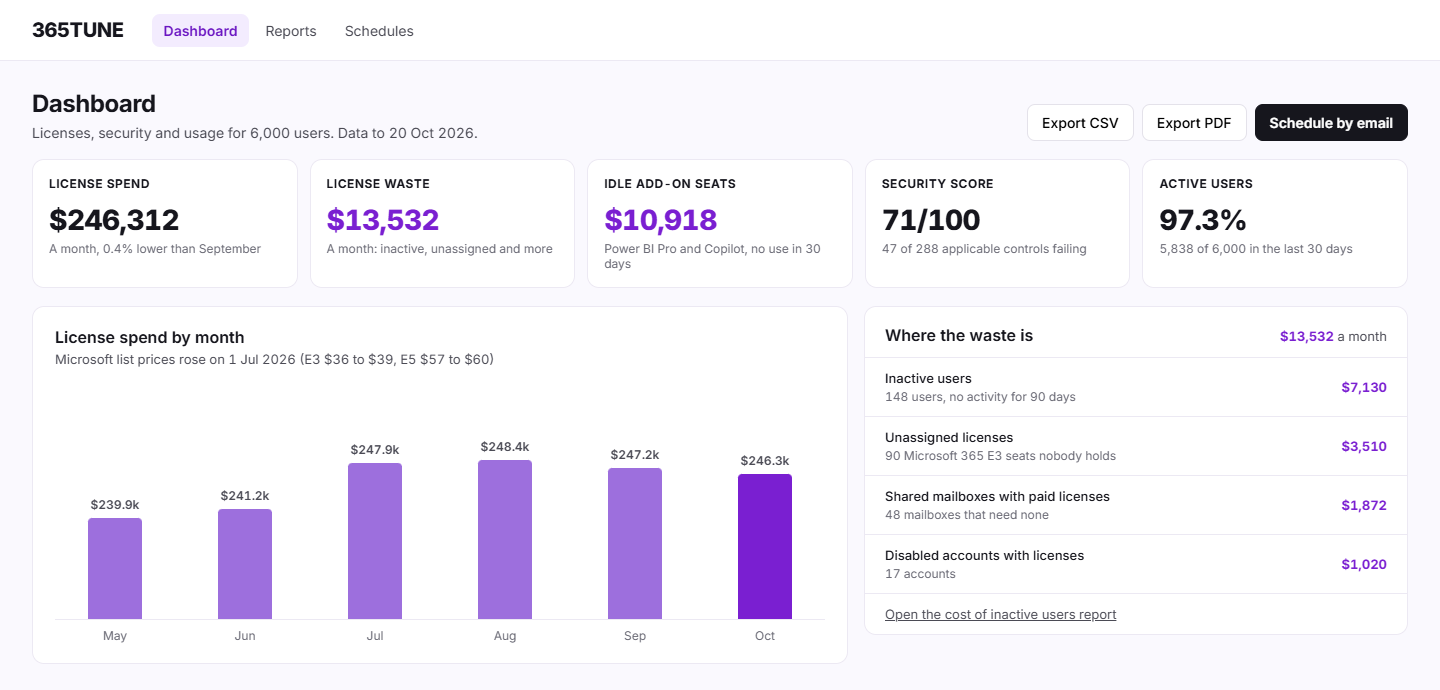
Sample data for a 6,000-user company, October 2026:
| Measure | Value |
|---|---|
| License spend | $246,312 a month |
| License waste | $13,532 a month: 148 inactive users ($7,130), 90 unassigned E3 seats ($3,510), 48 shared mailboxes with paid licenses ($1,872), 17 disabled accounts ($1,020) |
| Idle add-on seats | $10,918 a month, Power BI Pro and Copilot with no use in 30 days |
| Security score | 71 out of 100, 47 of 288 applicable controls failing |
| Active users | 97.3%, 5,838 of 6,000 in the last 30 days |
A scheduled report, the way finance gets it
The cost of inactive users report, sent as a PDF with the CSV attached on the 1st of each month:
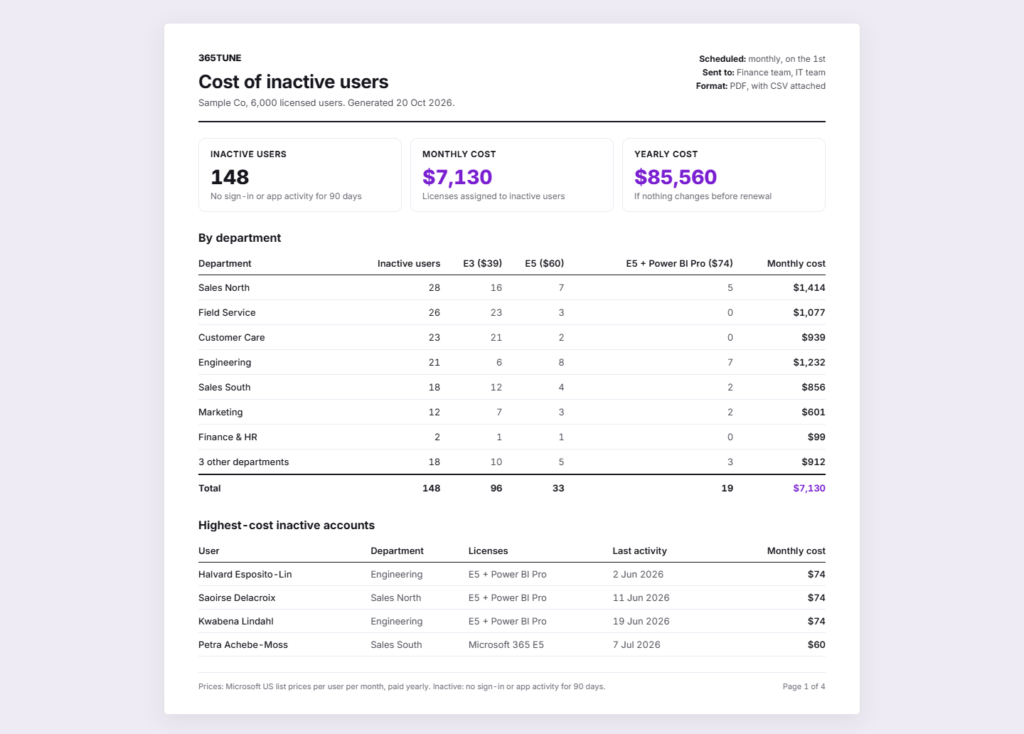
| Department | Inactive users | Monthly cost |
|---|---|---|
| Sales North | 28 | $1,414 |
| Field Service | 26 | $1,077 |
| Customer Care | 23 | $939 |
| Engineering | 21 | $1,232 |
| Sales South | 18 | $856 |
| Marketing | 12 | $601 |
| Finance & HR | 2 | $99 |
| 3 other departments | 18 | $912 |
| Total | 148 | $7,130 ($85,560 a year) |
Inactive means no sign-in or app activity for 90 days. Each license is priced at Microsoft list price, or at your own price once you enter it.
What the admin center offers, and what it leaves out
The Microsoft 365 admin center's Reports dashboard shows activity across services, and each report exports to CSV when you click Export. It doesn't send reports on a schedule, and it doesn't show what licenses cost or how your security settings score. 365TUNE adds both, and sends the reports for you.
Microsoft describes its reports in Microsoft 365 reports in the admin center.
Reports you can send
| Report | Format | Typical recipients |
|---|---|---|
| Cost of inactive users | PDF with CSV | Finance, IT |
| Unused licenses, priced | CSV, PDF | IT, procurement |
| Cost by department or cost center | CSV, PDF | Finance, budget holders |
| Security posture | CISO, auditors | |
| Usage by department | CSV, PDF | IT, change team |
Every report can be downloaded when you need it, or emailed on a schedule you set.
How scheduling works
- Pick a report. Any report in 365TUNE, for one tenant.
- Pick the format. PDF, CSV or both.
- Pick the schedule and the recipients. For example, the 1st of every month to finance and IT.
- It arrives. Each run uses the latest scan, so the numbers are current when it lands.
For IT teams and MSPs
For IT teams
Send finance the cost of inactive users every month without building it in Excel, and answer leadership from one screen.
For MSPs
Send each customer a monthly report of their waste and security score, under your own brand.
Security of the connection
The dashboard and reports need read-only access to your tenant. Reports are emailed only to the recipients you choose. 365TUNE is ISO 27001 certified, has a SOC 2 Type II report and doesn't use your data for training.
See your spend, waste and security on one screen
Connect read-only and get your first dashboard during the 14-day trial.
Questions about Microsoft 365 reporting dashboards
Can I build my own dashboard?
Not today. The dashboard is a fixed view of spend, waste, security and usage, and each figure opens its full report.
Which export formats are there?
PDF and CSV. Excel opens the CSV files directly; there's no Power BI connector yet.
Can reports be emailed automatically?
Yes. Choose a report, a format and a schedule, and add the recipients. Each run uses the latest scan.
Does the Microsoft 365 admin center have a reporting dashboard?
Yes, under Reports. It shows usage across services and exports each report to CSV. It doesn't show cost or security, and it doesn't send reports on a schedule.