
Inforcer alternative for multi-tenant Microsoft 365 management
365TUNE is Microsoft 365 management for MSPs and IT teams, with published prices from one tenant up. Manage users, mailboxes and licenses across client tenants, see each client’s license waste in dollars, split their spend by cost center and check 300+ security controls.
Getting started with Inforcer
Quote and commitment
- Request a quote
- Agree a 12-month term
- Commit to 20 or more tenants
365 Manager is priced by quote, per tenant.
Getting started with 365TUNE
Free trial
- Sign up
- Consent to read-only access
- See findings within minutes
Published pricing from $20 a month per tenant.
Inforcer facts reviewed from its own website.
What is Inforcer, and how does 365TUNE compare?
Inforcer is a multi-tenant Microsoft 365 platform built for MSPs. Its 365 Manager deploys policies from shared baselines across Intune, Defender, Entra ID, Purview, Exchange Online, SharePoint, Teams and Copilot, backs them up and restores them, and handles users, groups and offboarding across client tenants. Inforcer TDR adds threat detection and response. Both are priced by quote on a 12-month term, and 365 Manager starts at 20 tenants.
365TUNE focuses on what each client pays for and how secure their tenant is. It manages users, mailboxes and licenses across client tenants, prices every unused or oversized license in dollars, splits spend by cost center and scores each tenant against 300+ CIS and CISA controls. On Enterprise, offboarding waits for a manager’s approval.
There is no quote to request and no 20-tenant floor. Plans are published from $20 a month per tenant, the platform holds a SOC 2 Type II report and ISO 27001 certification, and the 14-day free trial starts with a single client.
Inforcer vs 365TUNE: feature comparison
| Inforcer | 365TUNE | |
|---|---|---|
| Buying | ||
| Pricing | By quote: 365 Manager per tenant, TDR per user with a mailbox | Published: from $20 a month per tenant; Standard $99 + $0.05 per seat |
| Commitment | 12 months; at least 20 tenants for 365 Manager, 50 users for TDR | No minimum: start with one tenant, monthly or annual |
| Built for | MSPs | MSPs and in-house IT teams, from one tenant to hundreds |
| Configuration and security | ||
| Baselines | Yes Shared baselines deployed across tenants, with policy backup and restore | Yes 300+ CIS and CISA SCuBA controls scored per tenant, with step-by-step remediation and a retest |
| Configuration drift | Yes Drift against shared baselines | Yes Every scan, with what changed, when and who changed it; restore on Enterprise |
| Conditional Access review | Part of its baselines | Every policy checked against the benchmarks and Microsoft’s templates |
| Administration | ||
| Users, groups and licenses | Yes Including MFA resets and password changes | Yes Users, authentication settings, Exchange Online mailboxes and licenses |
| Offboarding | Yes Guided offboarding that can be scheduled | Yes Onboarding and offboarding policies with a 24-month log; manager approval on Enterprise |
| Access for your team | Yes Role-based permissions | Yes Predefined or custom roles per tenant: admin, technical, financial and approver |
| Many tenants | Yes Bulk tenant onboarding through Partner Center | Yes Multi-tenant dashboard on Standard; GDAP on Enterprise |
| Cost | ||
| License usage | Yes License usage on the dashboard | Yes Every unused, inactive or oversized license priced at Microsoft list prices, with savings ranked by value |
| Spend by cost center | Not listed on Inforcer’s website | Yes Spend by department, cost center, project or any Entra ID attribute |
| Copilot and AI | ||
| Copilot | Yes Copilot readiness assessments and Copilot Manager | Yes SharePoint oversharing check, adoption funnel and agent inventory |
| AI | Yes AI-powered alerts and automated response in TDR | Yes An AI agent that answers questions about a tenant, with sources |
What is the best Inforcer alternative for MSPs?
365TUNE is the Inforcer alternative for MSPs who want published prices and no tenant minimum. Plans start at $20 a month per tenant, with the multi-tenant dashboard from Standard and no 12-month commitment. Every client gets license waste in dollars, spend by cost center and a score against 300+ CIS and CISA controls.
Inforcer vs 365TUNE pricing
Inforcer prices by quote, based on the products you choose, your tenants and users, and your volume commitment. 365TUNE publishes every plan, so you can work out a client’s cost before you talk to anyone.
| Plan | Price | Notes |
|---|---|---|
| Inforcer 365 Manager | By quote, per tenant | 12-month term, at least 20 tenants |
| Inforcer TDR | By quote, per user with a mailbox | 12-month term, at least 50 users |
| 365TUNE Basic | $20 per tenant | Up to 300 Microsoft 365 base licenses |
| 365TUNE Standard | $99 + $0.05 per seat | Multi-tenant management, drift analysis, task automation |
| 365TUNE Enterprise | $199 + $0.09 per seat | Adds GDAP, drift restore and approval workflows |
Annual billing takes 20% off every 365TUNE plan, and MSPs can apply to the partner program for a partner discount.
Inforcer’s pricing model and minimum commitments are from its request pricing page.
How can MSPs find unused Microsoft 365 licenses across clients?
Inforcer shows license usage on its dashboard. 365TUNE prices each unused, inactive or oversized license, using Microsoft’s list prices or the prices you agreed with the client. The biggest savings come first in the client review. Here is an illustrative 6,000-user sample tenant:
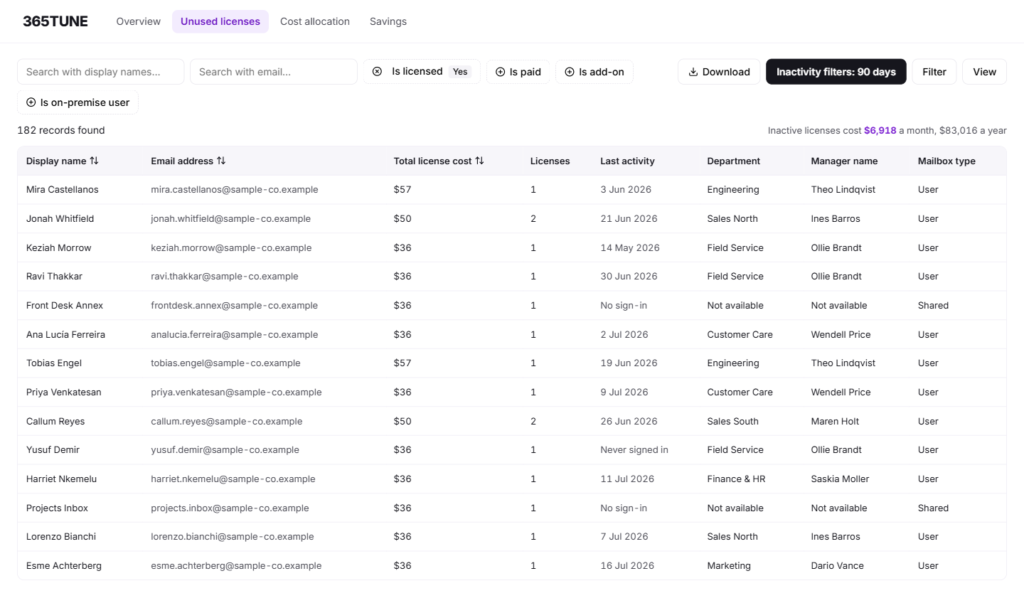
Inactivity rules, downgrades and storage checks are on the unused license detection page.
Can MSPs charge back Microsoft 365 costs by department?
Group a client’s license spend by department, cost center, project or any other Entra ID attribute, and 365TUNE totals the monthly cost of each group. Each budget holder gets their own figure, and the users behind it, to review at renewal. Cost allocation isn’t listed on Inforcer’s website.
How the split works is on the cost allocation page.
How do 365TUNE’s security checks compare with Inforcer baselines?
Inforcer deploys policies from shared baselines across tenants. 365TUNE scores each client tenant against 300+ controls from the CIS Microsoft 365 Foundations Benchmark and CISA’s SCuBA baselines, with step-by-step remediation and a retest for every failed control. A score is kept for every scan, so a quarterly review can show the trend.
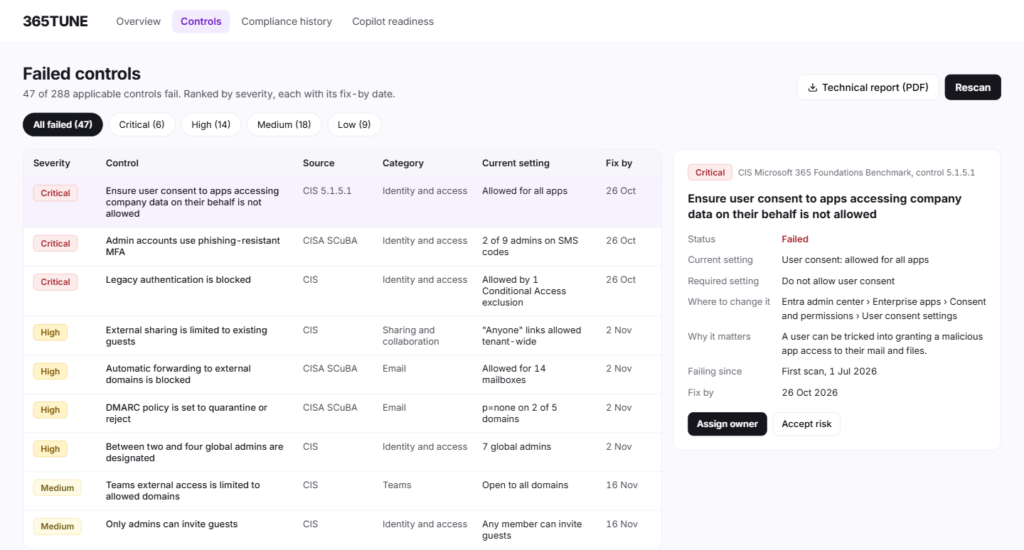
Every control area is listed on the security posture assessment page.
How does 365TUNE handle drift and offboarding across clients?
Inforcer tracks drift against its shared baselines and offers guided offboarding. 365TUNE shows what changed on every scan, when, and who made the change. On Enterprise, offboarding waits for the client’s manager to approve, then removes licenses, resets sign-in methods and hands over the mailbox and files. Every step is logged for 24 months.
Drift alerts and restore are explained on the configuration drift page.
Can 365TUNE check a client’s Copilot readiness?
Copilot can surface anything a user can open, so 365TUNE checks SharePoint permissions down to file level before a client switches it on. After rollout, it tracks adoption from licenses bought to people actively using Copilot. Every agent is listed with its data sources and permissions.
Every Copilot check is on the Copilot readiness page.
Why MSPs and IT teams choose 365TUNE
- No tenant floor: start with one client and add tenants as you sign them.
- Prices on the website: every plan published per tenant, billed monthly or annually.
- A dollar figure per client: license waste priced at Microsoft list prices, and spend by cost center.
- A security review per client: 300+ CIS and CISA controls with a score per tenant and step-by-step fixes.
- Change tracking: drift on every scan shows what changed, when and who made the change.
- Client sign-off: offboarding waits for the client’s manager on Enterprise, with a 24-month log.
- Audited platform: a SOC 2 Type II report and ISO 27001 certification.
How to try 365TUNE alongside Inforcer
- Connect one client. Start the 14-day free trial and give one client tenant read-only consent. Nothing in Inforcer changes.
- Price the waste. Open that client’s license findings and see the monthly waste, ranked by value.
- Compare the security view. Read the client’s security score and the fix for each failed control.
- Add clients as you go. Move to Standard to see every client in one dashboard. There is no tenant minimum.
Sources
Inforcer’s products and features, checked 19 November 2026: inforcer.com.
Inforcer’s pricing model and minimum commitments, checked 19 November 2026, from its request pricing page.
365TUNE’s plans and prices are on the pricing page.
See what each client’s Microsoft 365 costs them
Connect one tenant read-only and get its license waste, security score and findings within minutes. 14-day free trial.
Questions about Inforcer alternatives
Is 365TUNE an Inforcer alternative?
Yes. It manages users, Exchange Online mailboxes and licenses across client tenants, monitors configuration drift and checks 300+ CIS and CISA controls, and adds license costs in dollars, chargeback by cost center and, on Enterprise, offboarding with manager approval.
What is Inforcer?
Inforcer is a multi-tenant Microsoft 365 platform for MSPs. 365 Manager deploys, backs up and restores policies from shared baselines and manages users and groups across client tenants; Inforcer TDR adds threat detection and response.
How much does Inforcer cost?
Inforcer doesn’t publish prices. 365 Manager is priced per tenant with a minimum of 20 tenants, and TDR per user with a mailbox with a minimum of 50 users, both on a 12-month term. 365TUNE publishes its prices, from $20 a month per tenant.
Is there a minimum number of tenants for 365TUNE?
No. You can start with one tenant on a 14-day free trial and add clients as you go, paying monthly or annually.
Does 365TUNE manage Intune policies?
Not yet. Device management is on the 365TUNE roadmap, with no confirmed date.
Does 365TUNE include threat detection and response?
No. 365TUNE finds configuration gaps against 300+ controls, alerts on drift and shows who made each change. It works alongside the security tools you use for detection and response.
Can I try 365TUNE alongside Inforcer?
Yes. 365TUNE connects to each client tenant with its own read-only consent and changes nothing in Inforcer, so you can compare the two on real clients during the 14-day free trial.
Is 365TUNE SOC 2 certified?
365TUNE has a SOC 2 Type II report and is ISO 27001 certified.
Does 365TUNE change anything in my tenants?
Not for its reports, which need only read-only access. Tasks that write, such as offboarding or restoring a setting, ask for their own consent, and on Enterprise, offboarding runs only after approval.
Is there a free trial?
Yes. Every 365TUNE plan starts with a 14-day free trial, connected read-only.