
CIPP alternative for Microsoft 365 multi-tenant management
365TUNE is hosted Microsoft 365 management for MSPs and IT teams. Manage users, mailboxes and licenses across client tenants, see each client’s license waste in dollars, split their spend by cost center and check 300+ security controls, with nothing to deploy or patch.
Connecting a tenant to CIPP
Setup wizard
- Dedicated service account
- CIPP-SAM app registration
- Your partner tenant
- Each client tenant
- Baselines and alerts
Self-hosting adds the Azure resources CIPP runs on, which you keep updated.
Connecting a tenant to 365TUNE
One consent screen
- An admin consents to read-only access
First findings within minutes. Nothing to deploy or patch.
CIPP facts reviewed from its own website.
What is CIPP, and how does 365TUNE compare?
CIPP (CyberDrain Improved Partner Portal) is an open-source portal MSPs use to manage Microsoft 365 tenants. You can host it in your own Azure subscription, or subscribe to CyberDrain’s hosted version for €99 a month. Either way, you run its setup wizard: a dedicated service account, the CIPP-SAM app registration, then your partner tenant and each client tenant.
365TUNE is a hosted platform with no app to deploy. An admin consents to read-only access, and the first findings arrive within minutes. It manages users, Exchange Online mailboxes and licenses across client tenants, puts a dollar figure on each client’s unused licenses, splits their spend by cost center, scores them against 300+ CIS and CISA controls, and, on Enterprise, offboards leavers once a manager approves.
Prices are published from $20 a month per tenant, the platform is SOC 2 Type II audited and ISO 27001 certified, and every plan starts with a 14-day free trial.
CIPP vs 365TUNE: feature comparison
| CIPP | 365TUNE | |
|---|---|---|
| Setup and price | ||
| Where it runs | Your Azure subscription, or hosted by CyberDrain | Hosted by 365TUNE, nothing to deploy or patch |
| Price | Free to self-host plus your Azure costs; hosted by CyberDrain for €99 a month | From $20 a month per tenant; 14-day free trial |
| Updates | From its Status & Updates page, automatically or on demand, then a permissions check | Applied by 365TUNE; nothing for you to update |
| Connecting a tenant | Service account, CIPP-SAM app registration and setup wizard | Admin consent to read-only access |
| Changes to a tenant | Made from the portal through its CIPP-SAM app and GDAP | Each write task asks for its own consent, and offboarding waits for approval |
| Platform security | ||
| Security certifications | No SOC 2 report published; working towards ISO 27001 | Yes SOC 2 Type II report; ISO 27001 certified |
| Who secures it | Self-hosted: you do, from the Azure resources to updates, access and monitoring. Hosted: CyberDrain | 365TUNE does, under its SOC 2 and ISO 27001 controls |
| Administration | ||
| Multi-tenant management | Yes | Yes On Standard and Enterprise; GDAP on Enterprise |
| User, mailbox and license admin | Yes | Yes Users, authentication settings, Exchange Online mailboxes and licenses |
| Access for your team | Role-based access to the portal | Predefined or custom roles per tenant: admin, technical, financial, approver |
| All clients on one screen | All Tenants dashboard | Reclaimable dollars and security posture for every client tenant, side by side |
| Tenant security | ||
| Standards and baselines | Standards and Baselines applied across tenants | Named baselines per tenant: drift alerts show what changed, when and who changed it, with one-click restore on Enterprise |
| Cost and finance | ||
| License savings | Optimization tab with estimated savings from per-seat prices you enter, and a client PDF | Inactive, unassigned, disabled and oversized licenses priced in dollars a month, downgrades from activity in each app, ranked by value |
| Chargeback by cost center | Not documented | Yes Spend by department, cost center, project or location from Entra ID attributes |
| Usage and adoption | Microsoft 365 usage reports | Use of Exchange, Teams, OneDrive, SharePoint, Viva Engage and Copilot by department, over time |
| Copilot and AI | ||
| Copilot readiness | Readiness tests for licensing, assignment and app use, plus Copilot settings | Permissions checked down to file level, Copilot adoption from purchased to active, and every agent with its owner, access and data sources |
| Plain-English questions | MCP server, to query CIPP from your own AI tool | Built-in AI agent that answers from tenant data and shows its sources |
Self-hosting CIPP: what installing and running it takes
Self-hosted CIPP has no license fee. CyberDrain’s documentation sets out what it asks of you instead:
- An Azure subscription: CIPP’s Deploy to Azure template creates a web app, a storage account, a Key Vault for its secrets and an App Service plan, all billed to you.
- Azure skills: the prerequisites assume you’re comfortable with Azure Web Apps, Key Vault, Storage and Cost Management, and warn that costs can grow if the deployment isn’t looked after.
- Updates: they install from CIPP’s Status & Updates page, automatically or when you check, then you run a permissions check so new permissions are granted. Older self-hosted instances update by syncing their GitHub forks instead.
- Security: the Azure resources, who can reach them and how they’re monitored are yours to secure, and to evidence to clients and auditors.
365TUNE is hosted, updated and secured by 365TUNE under its SOC 2 Type II and ISO 27001 controls. There is no Azure resource, template or update for you to run.
The requirements above are from CIPP’s installation documentation.
Connecting tenants: the CIPP-SAM wizard or a consent screen
CIPP’s setup wizard registers the CIPP-SAM application with a dedicated service account, connects your partner tenant, then each client tenant, and asks you to pick baselines and alerts. CIPP signs in to Microsoft Graph, Exchange Online and Partner Center as that app, so its certificate or secret needs protecting like any admin credential. These steps are the same whether CyberDrain hosts CIPP or you do.
With 365TUNE there is no app for you to register or host:
- Sign up. Create an account with your work email. Every plan starts with a 14-day free trial.
- Consent to read-only access. A Microsoft 365 admin reviews the permissions and approves them. Reports never need write access.
- Read the first scan. License waste, security findings and usage for the tenant, within minutes.
- Add clients. Repeat the consent for each client tenant, or use GDAP on Enterprise.
Users, mailboxes and licenses across tenants
Day-to-day work happens in 365TUNE too. Admins can create and edit users, change their authentication settings, manage Exchange Online mailboxes and assign or remove licenses, for each client tenant from one place.
Invite colleagues into the tenants they look after with a predefined or custom role: admin, technical reporting, financial reporting or approver. A finance contact can see the spend without touching settings, and an approver signs off offboarding without admin rights.
Reports use the read-only connection. Every change asks for write consent first, and only for the permissions that task needs.
License waste per client, in dollars
CIPP’s license optimization estimates savings from the per-seat prices you enter. 365TUNE prices every finding at Microsoft’s list prices, or at the prices you enter, and looks at what each person actually does. In an illustrative 6,000-user sample tenant, the first scan finds $13,532 a month:
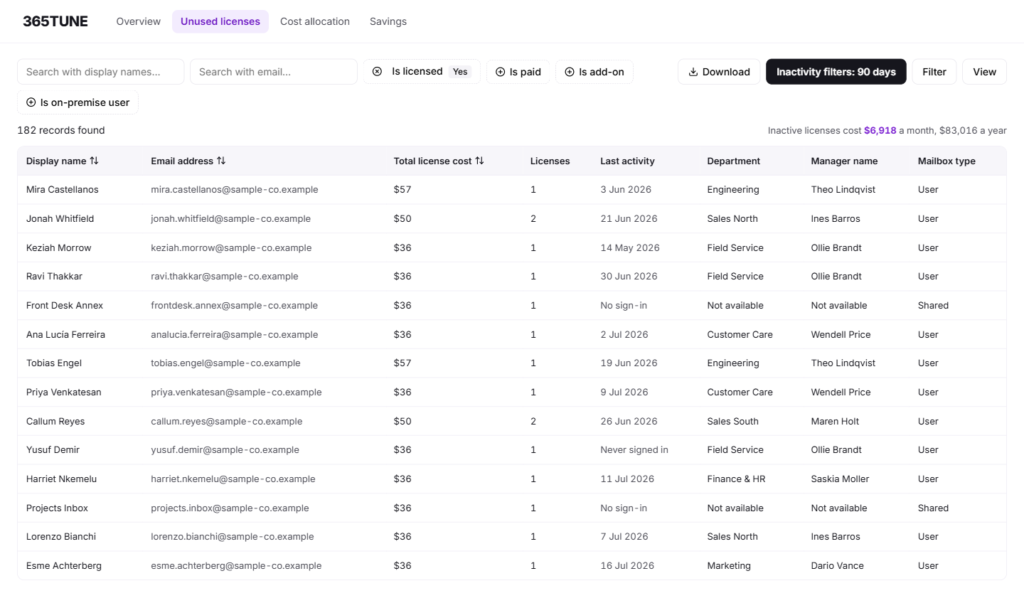
Downgrades are based on what each person uses, app by app, not only on their last sign-in. Inactivity is configurable: days without activity in Exchange or Teams, or a minimum number of emails sent and received, 90 days by default.
Power BI shows how far the advice goes. A Premium Per User license nobody opens is flagged for removal; someone who only uses free features can drop to Free; someone who needs more than Free but not Premium can move to Pro.
Storage counts too. 365TUNE lists inactive SharePoint sites to archive or delete, and old file versions taking up space you pay for.
Savings are ranked by dollar value, and each client’s figures export to Excel, so every review can open with the changes worth the most.
Split each client’s spend by cost center
365TUNE reads each licensed user’s department, cost center, project or location from their Entra ID attributes, including custom ones, and totals the monthly license cost per group. Finance teams get a figure per budget holder, and the users behind every line.
For an MSP that turns a Microsoft 365 renewal into an advisory meeting: what each department spends, what it wastes, and who needs to approve the change.
300+ CIS and CISA security checks per tenant
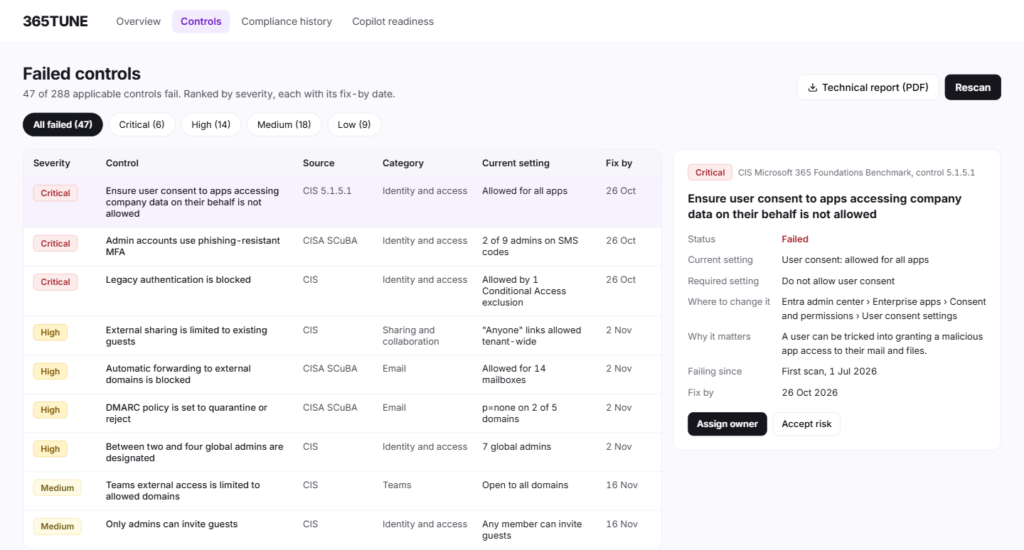
365TUNE checks each tenant against 300+ controls from the current CIS Microsoft 365 Foundations Benchmark, CISA’s SCuBA secure configuration baselines and community-driven best practices: Entra ID and privileged access, MFA and authentication, Exchange Online, SharePoint and OneDrive sharing, Teams, and logging. Each tenant gets a score you can track scan by scan.
Every failed control comes with step-by-step remediation and links to Microsoft’s guidance. Fix it, from 365TUNE where the setting is supported or in the admin portal, then retest to see it pass.
Conditional Access gets its own review: each policy is checked against the benchmarks, along with which of Microsoft’s policy templates are switched on. A missing policy for high-risk users, or phishing-resistant MFA not required for admins, shows up as a finding.
Sign-in reports show who has a passkey, who still relies on SMS and each user’s authentication methods, so you can plan a passkey rollout and remove SMS sign-in.
Configuration drift and automated offboarding, with approvals
- Offboarding policies: users inactive for 60 or 90 days, or past their leave date, go to their manager or a designated approver by email. Once confirmed, 365TUNE removes licenses, resets the password and MFA methods, ends sessions and hands the mailbox and files to someone. Onboarding policies work the same way.
- Shared mailboxes: a leaver’s mailbox can become a shared mailbox, which needs no license under 50 GB without an archive or hold.
- An audit trail: every step is logged and kept for 24 months.
- Drift alerts: baselines are compared on every scan, showing what changed, when and who made the change. A Conditional Access policy changed 70 times stands out. On Enterprise, “Restore configuration” puts the approved settings back.
Admins can also pick inactive users straight from a report and remove their licenses, or add them to a policy. Policies are set per tenant; approval workflows and drift restore come with Enterprise.
Copilot readiness, adoption and agents
Before a client switches on Microsoft 365 Copilot, 365TUNE checks SharePoint permissions at site, library, folder and file level, because Copilot shows people whatever they can already open. A finance or HR site editable by the whole company is a finding, with the fix.
After rollout, the adoption funnel shows licenses bought, assigned and actively used, which departments use Copilot and how often each person prompts. It also finds people using Copilot Chat heavily without a license, who may be worth one.
Copilot agents get an inventory: how many exist and how many are active, and for each one the model behind it, where it runs, its instructions, who can use it, its integrations, data sources and permissions.
Usage analytics and an AI agent
365TUNE shows who uses Exchange, Teams, OneDrive, SharePoint, Viva Engage and Copilot, by department and over time, so you can see who has adopted a new service and who hasn’t. When Teams is busy in chats but quiet in channels, that’s the coaching to do next.
The AI agent answers questions about a tenant in plain English and shows the sources behind each answer. AI insights list what to fix in five areas: licenses and cost, security, user activity, applications and compliance. Your data is never used for training, and AI can be turned off per tenant. Questions people ask:
- Cost: “Which E5 users haven’t signed in for 60 days?”
- Spend: “Which departments pay most for licenses nobody uses?”
- Power BI: “Which Power BI Pro users have low activity?”
- Security: “Which critical controls are failing?”
Multi-tenant Microsoft 365 management for MSPs
Bring every client tenant into one dashboard: reclaimable dollars and security posture for each, side by side, with the clients that need attention first. Open any tenant for its findings and the step-by-step fixes.
Each of these can become a repeatable service: license optimization, security posture assessments, configuration monitoring, offboarding and governance, Copilot readiness, and cost and usage reporting.
MSPs can apply to the 365TUNE partner program for a partner discount.
CIPP vs 365TUNE pricing
| Plan | Price | Notes |
|---|---|---|
| CIPP, self-hosted | Free | You pay for the Azure resources and keep it updated |
| CIPP, hosted by CyberDrain | €99 a month | Hosted in CyberDrain’s Azure tenant |
| 365TUNE Basic | $20 per tenant | Up to 300 Microsoft 365 base licenses |
| 365TUNE Standard | $99 + $0.05 per seat | Multi-tenant management, drift analysis, task automation |
| 365TUNE Enterprise | $199 + $0.09 per seat | Adds GDAP, drift restore and approval workflows |
Annual billing takes 20% off every 365TUNE plan, and MSPs can apply to the partner program for a partner discount. Every 365TUNE price includes hosting, updates and a SOC 2 Type II audited platform.
CIPP’s hosted price is from CyberDrain’s pricing page.
Why MSPs and IT teams choose 365TUNE
- Nothing to run: no Azure resources, app registration or updates to keep up with.
- SOC 2 your clients can see: a SOC 2 Type II report and ISO 27001 certification cover the platform, so you don’t have to secure and evidence it yourself.
- Admin and insight in one place: users, mailboxes and licenses next to what they cost and how secure they are.
- Every client’s waste in dollars: license waste priced at Microsoft list prices, and spend by cost center, per client.
- A security review per client: 300+ CIS and CISA controls with a score per tenant.
- Changes with sign-off: offboarding that waits for a manager’s approval on Enterprise, with a 24-month log.
- Copilot ready: oversharing found before rollout, adoption tracked after it.
- Roles for the whole team: access per tenant for admins, technical staff, finance and approvers.
Switching from CIPP
Connect one client tenant to 365TUNE’s free trial alongside CIPP. It takes one read-only consent, so you see that client’s license waste, security score and drift report before you change anything.
The two run side by side with separate consents, so you can move clients over at your own pace.
Sources
CIPP’s features, checked 20 November 2026, from CyberDrain’s CIPP page.
CIPP’s hosted price, checked 20 November 2026, from CyberDrain’s pricing page.
Hosting options and installation, checked 20 November 2026, from CIPP’s installation documentation.
Updates, checked 20 November 2026, from CIPP’s updating documentation.
Certification status, checked 20 November 2026, from CIPP’s security and compliance page.
365TUNE’s plans and prices are on the pricing page.
See what each client’s Microsoft 365 costs them
Connect one tenant read-only and get its license waste, security score and findings within minutes. 14-day free trial.
Questions about CIPP alternatives
Is 365TUNE a CIPP alternative?
Yes. It manages users, Exchange Online mailboxes and licenses across client tenants from one hosted platform, with nothing to deploy, and adds license cost, chargeback, CIS and CISA checks, Copilot governance and, on Enterprise, approvals.
Is 365TUNE easier to set up than CIPP?
Yes. 365TUNE is hosted, so there’s nothing to deploy and no app to register: an admin consents to read-only access and the first findings arrive within minutes. CIPP needs a service account, its app registration and the setup wizard, and self-hosting adds the Azure resources.
Can 365TUNE manage users and mailboxes across client tenants?
Yes. Admins can manage users, their authentication settings, Exchange Online mailboxes and licenses for every client tenant, with roles that decide who can do what in each one. Every change needs write consent, granted separately from the read-only connection.
Is CIPP free?
The CIPP software is free and open source to self-host. You pay for the Azure resources it runs on and keep it updated, and CyberDrain’s hosted version is €99 a month. 365TUNE’s price, from $20 a month per tenant, includes hosting, updates and license costs in dollars.
What is CIPP-SAM?
CIPP-SAM is the app registration CIPP’s setup wizard creates in your partner tenant, following Microsoft’s Secure Application Model. CIPP signs in to Microsoft Graph, Exchange Online and Partner Center as this app, with a certificate or client secret. 365TUNE needs no app registration: an admin consents to its read-only app in each tenant.
How do you install CIPP?
Hosted: subscribe, then deploy your instance from CyberDrain’s management portal. Self-hosted: run CIPP’s Deploy to Azure template in your own subscription. Either way, you then create a service account, run the setup wizard to create CIPP-SAM and onboard each client tenant. 365TUNE needs only an admin’s consent per tenant.
Is CIPP SOC 2 compliant?
CyberDrain hasn’t published a SOC 2 report for CIPP, and says it is working towards ISO 27001 certification. If you self-host CIPP, it runs in your own Azure subscription, so securing it, and showing auditors how, is your responsibility. 365TUNE has a SOC 2 Type II report and is ISO 27001 certified.
Does 365TUNE manage Intune devices?
Not yet. Device management is on the 365TUNE roadmap, with no confirmed date.
Can 365TUNE fix security findings automatically?
For supported settings, yes, once you grant write access, and drift restore puts approved settings back on Enterprise. Every failed control also comes with step-by-step remediation, and you can retest after fixing it in the admin portal.
Does 365TUNE monitor configuration drift?
Yes. It compares each tenant with a named baseline on every scan and shows what changed, when and who changed it. Restore is included with Enterprise.
Do I need to register an app or set up GDAP for 365TUNE?
No app registration. An admin consents to read-only access for each tenant. Multi-tenant management comes with Standard, and Enterprise adds GDAP.
Does 365TUNE change anything in my tenants?
Not for its reports, which need only read-only access. Tasks that write, such as offboarding or restoring a setting, ask for their own consent, and on Enterprise, offboarding runs only after approval.
Can I try 365TUNE alongside CIPP?
Yes. 365TUNE connects to each client tenant with its own read-only consent and changes nothing in CIPP, so you can compare the two on real clients and move them over at your own pace.
How much does 365TUNE cost compared with CIPP?
365TUNE starts at $20 a month per tenant on Basic; Standard is $99 plus $0.05 per seat. Self-hosted CIPP has no license fee but has Azure costs; hosted CIPP is €99 a month.
Is there a free trial?
Yes. Every 365TUNE plan starts with a 14-day free trial, connected read-only.