
Microsoft 365 compliance monitoring
Your auditor asks two questions: which controls do you meet, and since when? 365TUNE re-checks your tenant against CIS and CISA controls and keeps the dated answer to both.
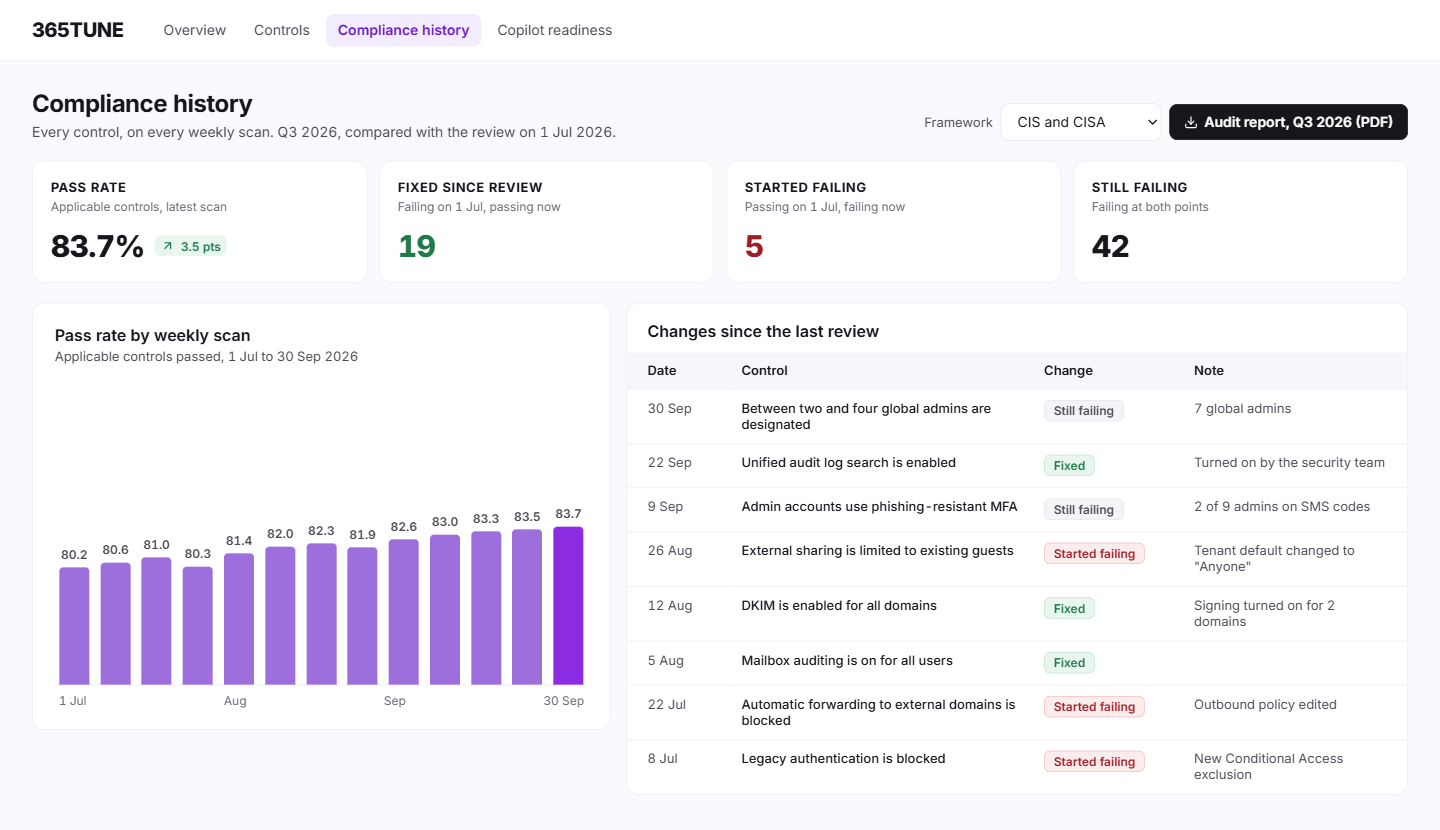
What is Microsoft 365 compliance monitoring?
Microsoft 365 compliance monitoring means checking your tenant against a set of controls on a schedule and keeping the results, so you can show which controls you met on any date. A one-off assessment tells you where you stand today. Monitoring tells you when a control started failing, who fixed it and when.
365TUNE re-checks your tenant against CIS and CISA controls daily, or on a schedule you set, and keeps every result with its date for two years. Reports show what passed, what failed and what changed since the last review, in a form you can hand to an auditor.
What Purview shows, and what it leaves out
Microsoft Purview has two tools people reach for. Compliance Manager scores improvement actions against regulation templates, but which regulations you can use depends on your licensing, and many actions it can't test for you, so your team records the evidence by hand. Purview Audit logs who did what, and keeps it for 180 days on Audit (Standard). It can tell you who changed the sharing setting; it can't tell you whether the tenant met the control on the day of the audit.
365TUNE checks the settings themselves and keeps the result for each control on each date. The question "did we meet this in March?" has an answer with a date on it.
CISA publishes its secure configuration baselines for Microsoft 365 through the Secure Cloud Business Applications (SCuBA) project.
How it works
- Connect read-only. 365TUNE reads your tenant's settings. It changes nothing.
- Set the baseline. The first scan records which controls pass and fail.
- Re-check. Each scan, daily or on your schedule, compares the results with the last one, flags fixes and alerts you to new failures.
- Report. Export a dated PDF report for the review period: controls passed, failed, fixed and newly failing.
What you get
| Output | What it shows | Who uses it |
|---|---|---|
| Control status by date | Pass or fail for every control, on every scan | IT, the auditor |
| Changes since last review | Controls that started failing and controls that were fixed, with dates | Security lead, at each review |
| Open gaps with deadlines | Each failing control, its severity and fix-by date | The team doing the fixes |
| Audit-ready report | Summary and detail for a chosen period, as PDF | Auditors, the board, cyber insurers |
An example review
An illustrative timeline, not customer data.
| Date | Control | Result | Note |
|---|---|---|---|
| 2 June | Unified audit log enabled | Pass | |
| 9 June | External sharing limited to existing guests | Fail | Changed on a project site to "anyone" |
| 11 June | External sharing limited to existing guests | Pass | Site owner reverted it |
| 30 June | Admins use phishing-resistant MFA | Fail | 2 of 6 admins still on SMS codes |
For IT teams and MSPs
For IT teams
Stop rebuilding the evidence before every audit. The report for the period is already there.
For MSPs
Give each customer a monthly compliance report from their own tenant, under your brand, and catch a customer's change before it becomes your incident.
Security of the connection
365TUNE reads your tenant with read-only access, is ISO 27001 certified, has a SOC 2 Type II report and doesn't use your data for training.
Have the answer before the auditor asks
Connect read-only and start the record today.
Questions about Microsoft 365 compliance monitoring
What's the difference between a security assessment and compliance monitoring?
An assessment is a snapshot: which controls you pass today. Monitoring repeats it and keeps the history, so you can show when a control passed or failed. 365TUNE does both from the same scan; security posture assessment is the snapshot and compliance monitoring is the record.
Which compliance frameworks does 365TUNE cover?
365TUNE checks controls from the CIS Microsoft 365 Foundations Benchmark, CISA's SCuBA baselines and community-driven best practices. It doesn't map results to frameworks such as HIPAA, NIST or ISO 27001. You can use the CIS and CISA results as evidence for the Microsoft 365 settings those frameworks ask about; your auditor decides what they accept.
Does 365TUNE make us compliant with HIPAA?
No tool can. HIPAA covers people and processes as well as settings. 365TUNE checks your Microsoft 365 settings against CIS and CISA controls and keeps dated evidence of the results. Our HIPAA compliance guide covers how those settings relate to HIPAA, and the rest of the work.
How long do you keep results?
Two years. Every scan result is kept with its date, so you can report on any review period in that window.
Is this the same as the Purview audit log?
No. The audit log records who did what. 365TUNE records whether each control passed on each date. Use the audit log to investigate an incident and 365TUNE to show an auditor where you stood.