
Microsoft 365 security and compliance monitoring
Know which security controls your tenant fails today, and prove which it passed last quarter. 365TUNE checks your settings against CIS and CISA controls and keeps the record.
What is Microsoft 365 security monitoring?
Microsoft 365 security monitoring covers two jobs. One watches events as they happen: risky sign-ins, malware, suspicious mail. Microsoft Defender and a SIEM do that. The other checks how the tenant is configured: whether MFA is enforced, who can share files outside the company, whether audit logging is on. That second job is the one auditors and cyber insurers ask about.
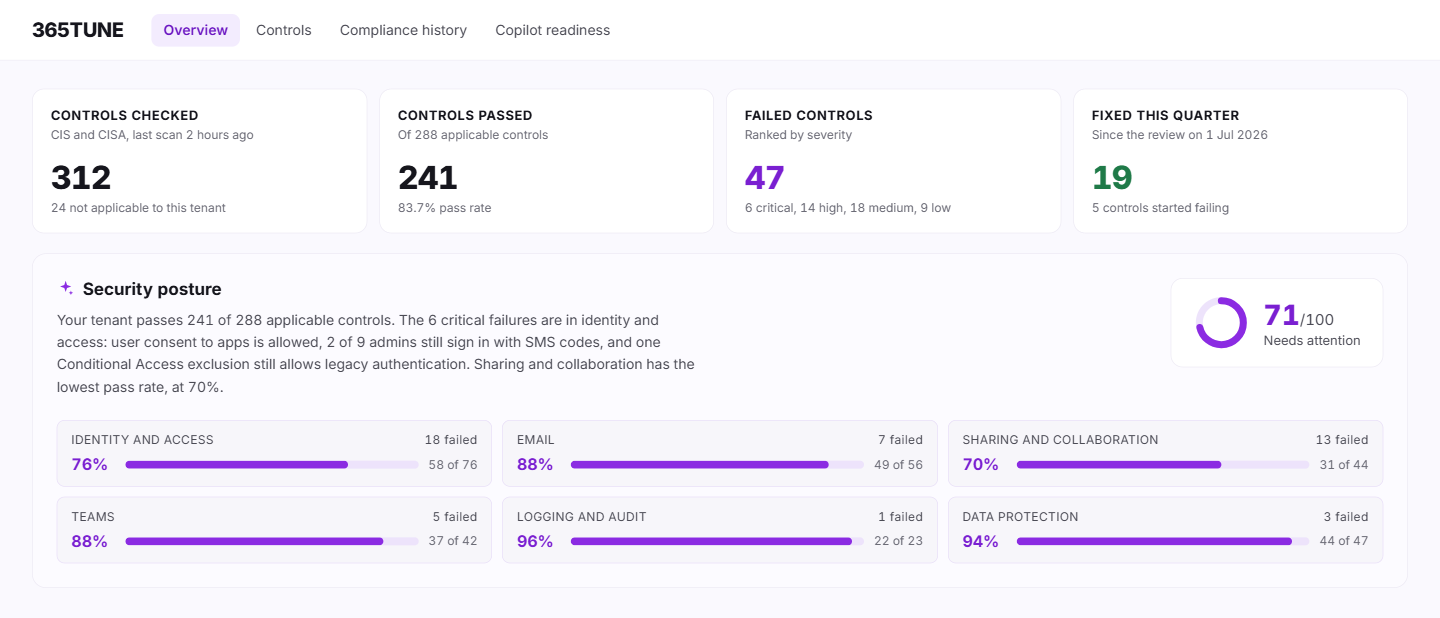
365TUNE does the configuration job from one read-only connection. It checks your tenant's settings against CIS and CISA controls, shows each failed control with the setting behind it, and keeps a dated record of every result.
365TUNE checks 300+ controls from the current CIS Microsoft 365 Foundations Benchmark, CISA's SCuBA secure configuration baselines and community-driven best practices.
Many of the controls come from public benchmarks such as the CIS Microsoft 365 Benchmarks.
What Microsoft 365 security monitoring covers
Security posture assessment
Secure Score lists Microsoft's own recommendations, but auditors, cyber insurers and customers ask about CIS and CISA. 365TUNE checks your tenant against both and lists each failed control with its benchmark ID and the setting to change, highest risk first.
See security posture assessmentCompliance monitoring
Auditors want to know which controls passed, and since when. 365TUNE re-checks your controls on a schedule and keeps the history, so you can hand over a dated report of what passed, what failed and what changed since the last review.
See compliance monitoringCopilot readiness
Copilot answers from anything a user can open, including files shared with the whole company years ago. 365TUNE finds overshared sites, open sharing links and unlabeled files before you roll Copilot out.
See Copilot readinessHow the three work together
- Assess. Security posture assessment gives you today's score and the list of failed controls.
- Monitor. Compliance monitoring re-checks them daily, or on a schedule you set, and alerts you when a control starts failing, so a fix stays fixed.
- Prepare. Copilot readiness takes the same data-access findings and asks one more question: what could Copilot surface, and to whom?
All three read the same scan of your tenant's settings. A control that fails in the posture assessment shows up in the compliance history, and the sharing findings behind the score are the same ones Copilot readiness checks, so one fix improves all three views.
For IT teams and MSPs
For IT teams
One report for the CISO, the auditor and the cyber insurance questionnaire, with the benchmark ID next to every answer.
For MSPs
Every customer tenant scored against the same controls in one dashboard. In our sample data that's 104 tenants and 49,839 seats. Show each customer where they stand and what you fixed.
See which controls your tenant fails
Connect read-only and get your first security findings during the 14-day trial.
Questions about Microsoft 365 security monitoring
Is 365TUNE a SIEM?
No. A SIEM and Microsoft Defender watch sign-ins and threats as they happen. 365TUNE checks how your tenant is configured against CIS and CISA controls and tracks those results over time. Most security teams use both.
How is this different from Microsoft Secure Score?
Secure Score ranks Microsoft's own recommendations by points. 365TUNE checks the CIS and CISA controls that auditors and insurers ask about, gives each failed control its benchmark ID and keeps a dated history you can show.
Does 365TUNE change our security settings?
The assessment is read-only and changes nothing. Features that write, such as restoring a drifted setting, ask for their own consent and only the permissions that task needs.
Is it safe to connect?
365TUNE connects with read-only access, is ISO 27001 certified, has a SOC 2 Type II report and doesn't use your data for training.