
Microsoft 365 cost allocation and chargeback
Microsoft sends one invoice. 365TUNE splits it by department, cost center, project or location, so every budget holder sees their share and the users behind it.
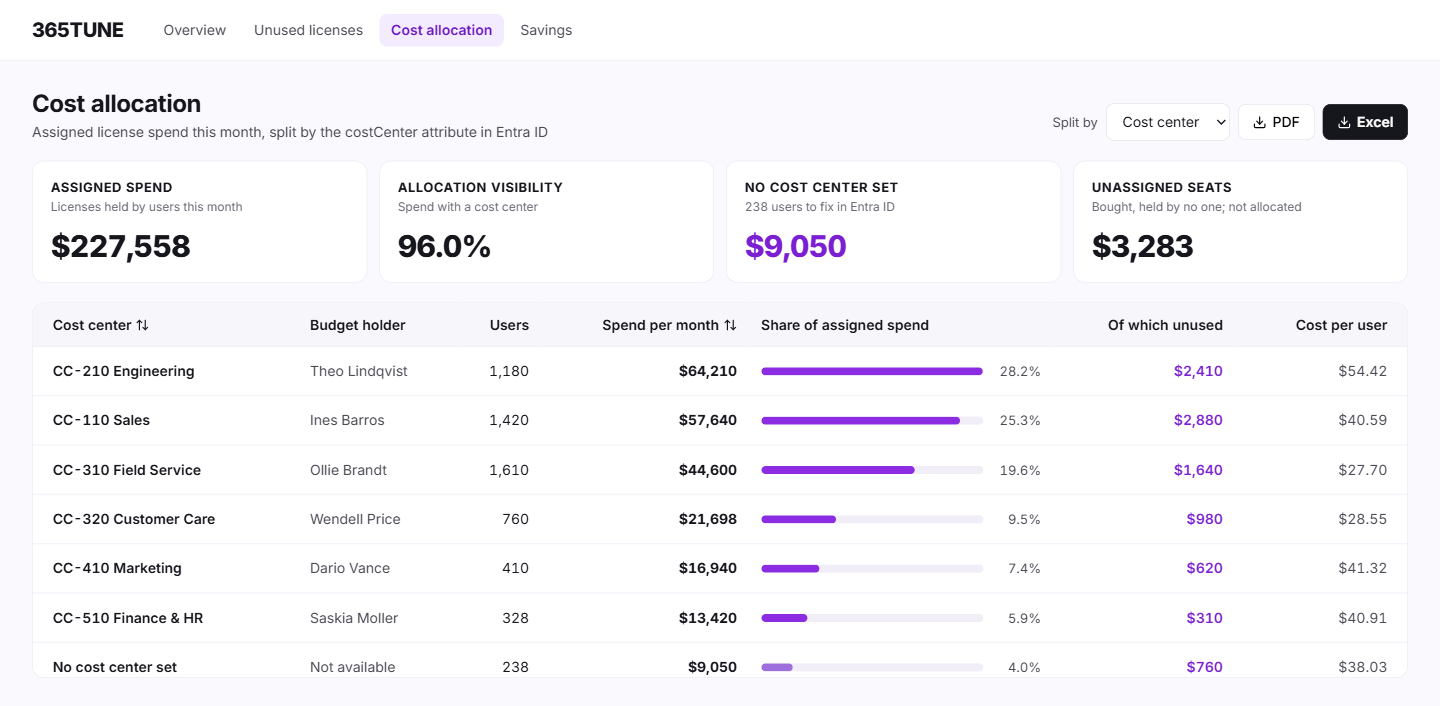
What is Microsoft 365 chargeback?
Microsoft 365 chargeback means billing each department for the licenses its people use. Showback is the softer version: each department sees its cost, but no money moves. Most organizations start with showback and move to chargeback once budget holders trust the numbers.
365TUNE supports both. It takes each licensed user's department, cost center, project or location from its Entra ID user attributes, including custom ones, adds the monthly cost of their licenses, and totals it per group. Budget holders see their figure and the users behind it, so a disputed line can be checked in minutes.
Department, office and custom fields live on each user in Entra ID. Microsoft explains how to manage user profile information in Microsoft Entra.
Why a headcount split doesn't hold up
The quick method divides the invoice by headcount. It charges a sales team of 50 on E3 the same per head as an engineering team of 50 on E5 with Power BI Pro, so the team with cheaper licenses pays for the other's. Budget holders notice, and the split loses credibility.
The admin center doesn't solve it either. It shows what you've bought and who has it, but not what each department costs. 365TUNE allocates per user, by the licenses each person actually holds, so each team pays for its own.
How it works
- Connect read-only. 365TUNE reads users, their attributes and their licenses.
- Choose the split. Department, cost center, project or location.
- Review. Each group shows its monthly cost, its users and any user with no group, so gaps in your directory show up too.
- Share. Send each budget holder their figure, or export the full table to Excel or PDF for finance.
A worked example
| Department | Users | Licenses | Monthly cost | Of which unused |
|---|---|---|---|---|
| Sales | 120 | Microsoft 365 E3 | $4,680 | $585 (15 inactive) |
| Engineering | 80 | Microsoft 365 E5 | $4,800 | $210 (10 oversized, E5 to E3) |
| Finance | 25 | Microsoft 365 E3 | $975 | $0 |
| No department set | 18 | Microsoft 365 E3 | $702 | Unknown until an owner is set |
What you get
| Output | Detail | Who uses it |
|---|---|---|
| Spend by group | Monthly cost per department, cost center, project or location | Finance, budget holders |
| Users behind each figure | The licenses each user holds and their cost | IT, for disputed lines |
| Unused spend per group | Inactive and oversized licenses within each team | Budget holders, at review time |
| Directory gaps | Licensed users with no department or cost center | IT, to fix the source data |
| Renewal-ready report | Totals by group for budgeting and renewal, in Excel or PDF | Finance, leadership |
For IT teams and MSPs
For IT teams
Stop answering "why is our Microsoft 365 bill so high?" one department at a time. Each budget holder sees their own figure.
For MSPs
Give each customer a breakdown of their own spend by department, and show the savings you found in their terms.
Security of the connection
Reporting needs read-only access to your tenant. Anything that writes asks for its own consent, and only for the permissions that task needs. 365TUNE is ISO 27001 certified, has a SOC 2 Type II report and doesn't use your data for training.
Give every budget holder their own figure
Connect read-only and see your Microsoft 365 spend by department.
Questions about Microsoft 365 chargeback
What's the difference between showback and chargeback?
Showback reports each department's Microsoft 365 cost without billing it. Chargeback bills the department. Start with showback so budget holders can check the figures, then switch once they agree with them.
Where does 365TUNE get each user's department?
From any user attribute in Entra ID, such as department, office location or a cost-center field, including custom attributes. Users with no value appear in their own row so you can fix them.
Can we allocate by project as well as department?
Yes. Store the project in a custom attribute in Entra ID, and 365TUNE splits spend by it the same way it does by department, cost center or location.
How do we get the figures into our finance system?
Export the allocation table to Excel and load it into your finance or ERP system. Budget holders who only need to read their figure can get it as a PDF.
Does it include add-ons like Power BI Pro or Teams Premium?
Yes. Add-on licenses are priced and allocated to the user who holds them, along with their base license.