

The $12 Million Question Every MSP Dreads
Picture this: You’re in a quarterly business review with your biggest client, and the CFO asks the question that makes every consultant’s stomach drop: “Can you show me exactly what we’re spending on Microsoft 365 licenses and whether we’re getting our money’s worth?”
If you’ve ever scrambled to pull together spreadsheets, PowerShell scripts, and half-baked reports just to answer this seemingly simple question, you’re not alone. Microsoft 365 License Reports have become the missing link between technical excellence and financial transparency that clients desperately need.
The harsh reality? Organizations waste an average of 32% of their software license spend annually, with Microsoft 365 being one of the biggest culprits. For a mid-sized company with 500 users, that’s potentially $50,000+ in unnecessary costs every year. Yet most reporting tools focus on usage metrics rather than the financial insights that actually drive business decisions.
Here’s what you’ll discover in this comprehensive guide:
- Why traditional Microsoft 365 reporting falls short of financial expectations
- How to transform license data into actionable cost optimization strategies
- The specific financial metrics that prove ROI to C-suite executives
- Advanced techniques for identifying and eliminating license waste
- A proven framework for ongoing M365 optimization that keeps clients engaged
Ready to turn your reporting capabilities into a competitive advantage? Let’s dive into the financial insights that will transform how you deliver value to your clients.
Why MSPs Are Losing the Financial Reporting Game
After working with over 200 MSPs and analyzing millions of dollars in Microsoft 365 spend, one pattern emerges consistently: technical expertise isn’t enough when finance teams demand accountability.
Recent research from our partner network reveals that 78% of MSPs struggle to provide clear financial breakdowns of Microsoft 365 costs, despite having comprehensive technical monitoring in place. This gap becomes critical when clients face budget pressures or when competitors promise “cost optimization” services.
The traditional approach to Microsoft 365 reporting focuses heavily on user adoption, security compliance, and technical health metrics. While these are important, they don’t answer the fundamental business question: “Are we spending our licensing budget effectively?”
Consider the typical MSP reporting scenario: You can tell a client that 89% of their users are actively using SharePoint, but can you quantify whether their current SharePoint plan tier is cost-effective compared to alternatives? You might track email usage patterns, but do you know if they’re paying for Exchange Online Plan 2 features that 80% of users never touch?
This is where M365 optimization becomes a strategic service offering rather than just a technical checkbox. By shifting focus from utilization metrics to financial impact analysis, MSPs can position themselves as trusted business advisors rather than just technology providers.
The companies that crack this code aren’t just delivering reports – they’re providing ongoing financial intelligence that helps clients make informed decisions about their technology investments. This approach creates deeper client relationships, higher retention rates, and opportunities for expanded service offerings.
How to Build Microsoft 365 License Reports That Finance Teams Actually Want
Understanding the Financial Lens: Beyond Usage Statistics
When finance teams evaluate Microsoft 365 License costs, they’re not interested in how many SharePoint sites exist or average email send rates. They want to understand cost per user, return on investment, and budget variance analysis.
The most effective approach starts with license cost mapping – connecting every assigned license to its monthly cost and usage patterns. For example, if you have 100 E3 licenses at $32/month each, but only 60 users are accessing the advanced features that justify the E3 tier, you’ve identified a $1,280 monthly optimization opportunity.
Key financial metrics to track:
- License cost per active user (not just assigned user)
- Feature utilization rates weighted by license tier costs
- Monthly spend variance and trending analysis
- ROI calculation for premium features and add-ons
- Comparative cost analysis across license tiers
The PowerShell Approach: Automating Financial Data Collection
While many MSPs rely on built-in admin center reports, PowerShell reports provide the granular financial data needed for comprehensive cost analysis. Here’s a practical framework:
# Sample financial reporting logic
$LicenseData = Get-MsolUser -All | Select-Object UserPrincipalName, Licenses, LastLogonTime
$CostMapping = @{
    "E1" = 8.00
    "E3" = 32.00
    "E5" = 38.00
}
The key is correlating license assignments with actual usage patterns and calculating the financial impact of different optimization scenarios. This transforms raw data into actionable insights that finance teams can immediately understand and act upon.
Advanced Attribution: Connecting Licenses to Business Outcomes
Smart MSPs go beyond basic cost analysis to demonstrate business value. This involves tracking metrics like:
- Productivity gains per license tier: How much time do E5 features save compared to E3?
- Security incident reduction: What’s the financial impact of advanced threat protection?
- Collaboration efficiency: Can you quantify the ROI of Teams Premium features?
By connecting license costs to business outcomes, you transform cost reporting from a defensive exercise into a strategic business discussion.
Real-Time Optimization Opportunities
The most valuable Microsoft 365 License Reports don’t just show current state – they identify immediate cost-saving opportunities. This includes:
- Inactive license identification: Users who haven’t logged in for 60+ days
- Underutilized premium features: E5 users who never use advanced compliance tools
- License tier mismatches: E3 users who only need E1 functionality
- Seasonal usage patterns: Temporary licenses that weren’t properly decommissioned
Each optimization opportunity should include specific dollar amounts and implementation timelines, making it easy for clients to prioritize and take action.
Building Automated Financial Dashboards
Manual reporting doesn’t scale, especially when managing multiple clients. The solution is automated financial dashboards that update in real-time with current licensing costs and optimization opportunities.
Essential dashboard components:
- Monthly spend trending with budget variance alerts
- License utilization heat maps by department/cost center
- Top 10 optimization opportunities ranked by potential savings
- Comparative analysis showing cost per user across different license tiers
- Compliance and security cost justification metrics
These dashboards transform periodic reporting into ongoing financial intelligence, positioning you as an indispensable business partner rather than just a service provider.
Advanced Strategies: How to Reduce Unused Microsoft 365 Licenses
The $10,000 Discovery: Identifying Hidden License Waste
Most organizations have significant unused Microsoft 365 licenses hiding in plain sight. The challenge isn’t just finding inactive users – it’s understanding the complex web of license assignments, feature usage, and business requirements that determine true optimization potential.
The systematic approach to license waste identification:
- Behavioral Analysis: Track not just login frequency but actual feature usage patterns
- Departmental Mapping: Understand which teams need which features based on job functions
- Seasonal Patterns: Identify temporary users, contractors, and seasonal employees
- License Cascading: Determine if users can be moved to lower-cost tiers without functionality loss
The 90-Day License Audit Framework
Implementing a comprehensive license audit requires a structured approach that balances cost optimization with business continuity. Here’s the proven framework:
Phase 1 (Days 1-30): Data Collection and Analysis
- Export complete license assignment reports
- Correlate with actual usage data from the past 90 days
- Identify users with zero activity or minimal feature usage
- Calculate potential savings by license tier optimization
Phase 2 (Days 31-60): Stakeholder Validation
- Work with department heads to validate findings
- Identify business-critical users who may have low technical usage
- Confirm seasonal or project-based license requirements
- Develop transition plans for license tier changes
Phase 3 (Days 61-90): Implementation and Monitoring
- Execute license changes in phases to minimize business disruption
- Monitor user feedback and functionality issues
- Document savings achieved and ROI metrics
- Establish ongoing monitoring processes
Tools to Audit Microsoft 365 Usage: Beyond Built-In Reports
While Microsoft provides basic usage reports, comprehensive tools to audit Microsoft 365 usage require more sophisticated approaches:
Third-party solutions often provide:
- Cross-application usage correlation
- Financial impact analysis
- Automated optimization recommendations
- Historical trending and forecasting
- Integration with business systems for complete cost attribution
Key evaluation criteria for audit tools:
- Real-time data accuracy and update frequency
- Granular feature usage tracking capabilities
- Financial reporting and ROI calculation features
- Automated alert systems for optimization opportunities
- Integration capabilities with existing MSP tools
The Psychology of License Optimization
Understanding the human element is crucial for successful license optimization. Common resistance points include:
Fear of functionality loss: Users worry about losing access to features they might need Status concerns: Premium licenses are often seen as status symbols Change resistance: Any modification to existing workflows creates anxiety
Overcoming these challenges requires:
- Clear communication about what changes and what stays the same
- Pilot programs that demonstrate maintained functionality
- Success stories from other departments or organizations
- Quantified benefits that justify the optimization effort
Overcoming Common Objections: Why CFOs Resist License Optimization
“We Can’t Risk Disrupting Productivity”
This is the most common objection when presenting Microsoft 365 License costs optimization opportunities. The fear is understandable – technology changes can disrupt workflows and create user frustration.
The data-driven response: Modern license optimization isn’t about removing functionality; it’s about right-sizing licenses based on actual usage patterns. When you can demonstrate that 70% of E5 users never access advanced features, the conversation shifts from risk to waste elimination.
Practical mitigation strategies:
- Pilot programs with volunteer departments
- Gradual rollout with rollback procedures
- Comprehensive user communication and training
- Success metrics that prove maintained productivity levels
“The Savings Aren’t Worth the Administrative Overhead”
Some finance teams worry that license management costs more than the potential savings. This objection often stems from previous experiences with manual, time-intensive optimization processes.
The automation answer: Modern Microsoft 365 reporting tools eliminate most administrative overhead through automated monitoring, alerts, and optimization recommendations. The initial setup investment pays for itself within 2-3 months for most organizations.
Quantifying the business case:
- Calculate current waste as a percentage of total IT budget
- Compare one-time optimization costs with ongoing savings
- Factor in reduced management overhead from automated systems
- Include indirect benefits like improved security posture and compliance
“We Might Need Those Features in the Future”
The “what if” mentality leads many organizations to over-provision licenses based on hypothetical future needs rather than current requirements.
The strategic response: Effective license management isn’t about cutting capabilities – it’s about building flexibility. Modern Microsoft 365 subscriptions allow for rapid scaling up when business needs change, making over-provisioning an expensive insurance policy.
Building confidence through:
- Historical analysis showing actual vs. projected usage growth
- Flexible licensing strategies that enable quick scaling
- Cost comparison of on-demand scaling vs. permanent over-provisioning
- Success stories from similar organizations
Your Next Steps: Transforming License Reporting into Client Retention
The difference between MSPs who struggle with client retention and those who build lasting partnerships often comes down to one factor: the ability to demonstrate ongoing business value beyond technical service delivery.
Microsoft 365 License Reports that focus on financial insights represent more than just cost optimization – they position you as a strategic business advisor who understands the intersection of technology and finance. When you can walk into a quarterly business review and present clear, actionable insights about license spend optimization, you’ve transcended the traditional MSP role.
The immediate actions that drive results:
- Implement automated financial reporting for your top 5 clients
- Calculate and present current license waste as dollar amounts, not percentages
- Develop optimization roadmaps with specific timelines and savings projections
- Create quarterly business reviews focused on technology ROI rather than just technical health
The long-term strategic advantage: Organizations that master financial-focused Microsoft 365 reporting don’t just reduce costs – they create competitive moats. When clients see consistent, measurable value from their MSP relationship, they become advocates rather than just customers.
The consulting landscape is evolving rapidly. Finance teams are demanding more accountability from technology investments, and MSPs who can deliver sophisticated financial insights will capture the highest-value client relationships.
How 365tune.com Solves the Financial Reporting Challenge
While many Microsoft 365 reporting tools focus on technical metrics, 365tune.com addresses the specific financial intelligence gap that MSPs face when working with finance teams and C-suite executives.
The 365tune.com Advantage: Financial-First Reporting
365tune.com bridges the gap between technical data and financial insights by providing:
Real-Time Cost Analysis: Unlike traditional reporting tools that show usage statistics, 365tune.com automatically calculates the financial impact of every license assignment, feature utilization, and optimization opportunity. You get dollar amounts, not just percentages.
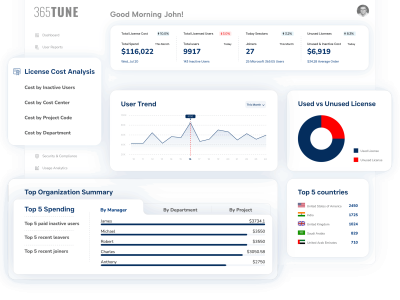
Executive-Ready Dashboards: Finance teams don’t want to interpret technical graphs. 365tune.com delivers boardroom-ready reports that clearly show ROI, cost per user, and budget variance analysis that CFOs can immediately understand and act upon.
Optimization Opportunity Quantification: Every recommendation comes with specific savings projections and implementation timelines. When 365tune.com identifies 50 underutilized E5 licenses, it shows exactly how much money you’ll save monthly by right-sizing them.
Multi-Tenant Financial Comparison: MSPs can compare cost efficiency across multiple clients, identifying best practices and standardizing optimization approaches that deliver consistent results.
Why 365tune.com Works Where Others Fall Short
Most Microsoft 365 reporting tools were built by technical teams for technical audiences. 365tune.com was designed specifically to answer the financial questions that drive business decisions:
- “What’s our true cost per active user?” – Not just assigned licenses, but actual utilization costs
- “Which departments are over-provisioned?” – Department-level cost analysis with optimization recommendations
- “What’s the ROI of our premium features?” – Quantified business value of E5 vs E3 features
- “How much can we save without affecting productivity?” – Risk-assessed optimization scenarios with savings projections
The Strategic Value of Financial-Focused Reporting
When you can walk into a quarterly business review with 365tune.com reports that show:
- Specific dollar amounts in potential savings
- Risk-assessed optimization roadmaps with implementation timelines
- Comparative cost analysis showing your client’s efficiency vs industry benchmarks
- Trend analysis demonstrating your ongoing value delivery
You transform from a service provider into a strategic business advisor. This positioning leads to longer contracts, higher retention rates, and premium pricing for your optimization services.
Ready to transform your Microsoft 365 reporting approach?
Start Your Free Trial with 365tune.com →
Join the MSPs who’ve discovered that financial-first reporting is the key to deeper client relationships and sustainable business growth. See why finance teams prefer 365tune.com’s approach to traditional Microsoft 365 reporting.
Questions about implementing financial-focused Microsoft 365 reporting? Share your biggest challenges in the comments below – our team monitors these discussions and provides personalized guidance to help you succeed.