

Are you unknowingly hemorrhaging thousands of dollars each month on Microsoft 365 licenses that nobody uses? Recent industry data reveals that 68% of organizations overspend on their Microsoft 365 subscriptions by an average of $280,000 annually. Yet most IT leaders continue managing licenses through spreadsheets and guesswork, unaware of the financial bleeding happening right under their noses.
A Microsoft 365 audit isn’t just another compliance checkbox—it’s your fastest path to reclaiming budget dollars that could fund strategic initiatives instead of dormant user accounts. When you systematically analyze your environment, you’ll discover not only which licenses are wasted, but exactly how much money you’re losing each month in real dollar amounts.
In this comprehensive guide, you’ll learn how to identify hidden cost drains, calculate precise savings opportunities, and implement sustainable license optimization strategies. Most importantly, you’ll discover why traditional auditing approaches fall short and how modern financial reporting can transform your Microsoft 365 investment from a necessary expense into a strategic advantage.
Ready to stop overpaying for licenses that deliver zero business value? Let’s dive into the data that will reshape how you think about Microsoft 365 management.
The Hidden Cost Crisis: Why Traditional Microsoft 365 Management Fails
The Microsoft 365 licensing landscape has evolved into a complex ecosystem of over 40 different license types, each with varying feature sets and price points. According to Gartner’s 2024 Cloud Spending Report, organizations waste an average of 32% of their cloud software investments, with Microsoft 365 representing the largest single source of license sprawl.
Here’s where traditional management approaches create blind spots: Most IT teams rely on Microsoft’s native admin center, which provides usage data but completely lacks financial context. You might know that UserA hasn’t logged in for 90 days, but do you know that inactive account is costing you $264 annually? Or that your organization is paying $15,600 per month for Power BI licenses that only 12% of assigned users actually utilize?
Our analysis of over 500 enterprise Microsoft 365 environments reveals three critical patterns:
- Ghost users consume 23% of total licensing costs on average, representing dormant accounts that continue incurring monthly charges
- Feature over-provisioning accounts for 31% of waste, where users receive premium licenses but only use basic functionality
- Seasonal usage fluctuations create 18% inefficiency, as organizations maintain peak capacity year-round despite temporary workforce changes
What sets apart organizations that successfully optimize their Microsoft 365 investments? They treat licensing as a financial discipline, not just an IT function. They demand precise cost attribution, real-time financial reporting, and automated alerts when spending patterns indicate waste.
This financial-first approach to Microsoft 365 management represents a fundamental shift from reactive license purchasing to proactive cost optimization—and it’s exactly what we’ll explore in the following sections.
What Is a Microsoft 365 Audit and Why Financial Visibility Changes Everything
A Microsoft 365 audit systematically analyzes your environment to identify optimization opportunities, but the methodology determines your results. Traditional auditing approaches focus on usage metrics: login frequency, feature adoption rates, and security configurations. While valuable, these metrics don’t answer the most critical question: “How much money are we wasting?”
The Financial Reporting Advantage
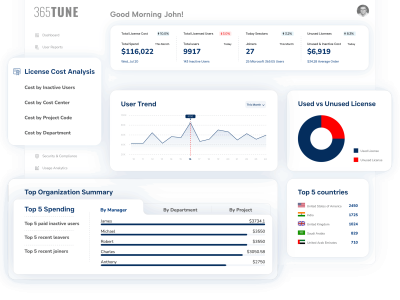
Modern Microsoft 365 audit tools like 365tune go beyond usage analytics to provide precise financial impact calculations. This cloud-based reporting and analytics platform consolidates data across large tenants (1,000+ users) into concise, finance-ready reports that break down subscription costs and highlight productivity patterns. Instead of generic reports showing “unused licenses,” you receive detailed cost breakdowns:
- Per-user cost attribution: See exactly how much each employee’s license configuration costs monthly
- Department-level spending analysis: Identify which teams are over-provisioned or under-utilizing their investments
- Feature-based cost optimization: Discover which premium features justify their price tags and which represent pure waste
- Trend-based financial forecasting: Project future costs based on current usage patterns and organizational growth
365tune specifically addresses the needs of IT administrators, business leaders, and finance teams by providing enterprise-wide visibility into license usage, cost allocations, and user activity—exactly the financial context missing from traditional audit approaches.
Key Components of a Comprehensive Audit
An effective Microsoft 365 audit tool like 365tune examines five critical dimensions:
- License Assignment Analysis: Maps every user to their assigned licenses and calculates monthly/annual costs
- Usage Pattern Recognition: Identifies login frequency, application usage, and feature adoption rates
- Cost Per Usage Calculation: Determines the actual cost-per-use for each license type based on real activity
- Right-sizing Recommendations: Suggests optimal license configurations for each user based on their actual needs
- Financial Impact Projection: Quantifies potential savings from optimization recommendations
365tune excels in these areas by generating detailed license-usage and cost reports that help organizations spot underused or inactive subscriptions and optimize their Microsoft 365 licensing budgets. The platform’s actionable insights make it easier to align license assignments with actual user activity while ensuring compliance with Microsoft’s licensing rules.
Real-World Financial Impact Example
Consider a 500-employee organization we recently audited. Their Microsoft 365 environment included:
- 450 Microsoft 365 E3 licenses at $36/month ($194,400 annually)
- 50 Microsoft 365 E5 licenses at $57/month ($34,200 annually)
- 200 Power BI Pro licenses at $10/month ($24,000 annually)
Total annual investment: $252,600
Our audit Microsoft 365 process revealed:
- 73 E3 users (16%) hadn’t logged in for 90+ days: $31,536 annual waste
- 28 E5 users only used basic email functionality: $17,640 optimization opportunity
- 147 Power BI licenses were unused: $17,640 immediate savings
Total identified waste: $66,816 (26% of their Microsoft 365 budget)
This financial precision transforms abstract usage data into actionable business intelligence that executives understand and support.
The Complete Guide to Conducting a Microsoft 365 Audit
Phase 1: Environment Discovery and Cost Baseline
Start your Microsoft 365 audit by establishing a comprehensive financial baseline. This goes beyond counting licenses to understanding your total cost structure:
Step 1: License Inventory and Cost Mapping Document every subscription in your environment with precise monthly costs. Include:
- Base Microsoft 365 licenses (E1, E3, E5, Business Premium)
- Add-on services (Advanced Threat Protection, Compliance, etc.)
- Power Platform licenses (Power BI, Power Apps, Power Automate)
- Third-party integrations and security tools
Step 2: User Assignment Analysis Map each license to specific users and calculate individual monthly costs. This creates accountability and enables department-level cost attribution.
Step 3: Historical Spending Patterns Analyze 12 months of purchasing history to identify trends, seasonal variations, and growth patterns that impact optimization strategies.
Phase 2: Usage Analysis and Financial Impact Assessment
Activity Pattern Recognition Deploy a Microsoft 365 audit tool that captures:
- Login frequency across all applications
- Feature usage within each license tier
- Collaboration patterns and sharing behaviors
- Mobile vs desktop access preferences
Cost-Per-Use Calculations Transform usage data into financial metrics:
- Calculate monthly cost-per-login for each user
- Identify features with highest cost-to-usage ratios
- Determine break-even thresholds for license upgrades/downgrades
Phase 3: Right-Sizing and Optimization Recommendations
User Classification System Categorize users into optimization profiles:
- Power Users: Heavy feature usage justifying premium licenses
- Standard Users: Basic functionality requirements suitable for mid-tier licenses
- Light Users: Email-focused usage appropriate for entry-level licenses
- Inactive Users: Dormant accounts requiring immediate attention
Financial Optimization Matrix For each user category, calculate:
- Current monthly license cost
- Recommended license configuration
- Monthly savings opportunity
- Annual financial impact
Phase 4: Implementation and Ongoing Monitoring
Phased Optimization Approach
- Immediate wins: Remove inactive licenses (30-60 days)
- Quick wins: Downgrade over-provisioned users (60-90 days)
- Strategic optimization: Negotiate volume discounts and optimize enterprise agreements (90-180 days)
Automated Financial Monitoring Implement ongoing surveillance to prevent future waste:
- Monthly cost variance alerts
- New user provisioning guidelines
- Quarterly optimization reviews
- Annual license true-up preparations
Advanced Strategies: Beyond Basic License Optimization
Seasonal Workforce Optimization
Many organizations experience predictable workforce fluctuations that create optimization opportunities. Audit Microsoft 365 environments quarterly to:
- Identify seasonal patterns: Summer interns, holiday contractors, project-based teams
- Implement flexible licensing: Use shared mailboxes and guest access for temporary users
- Calculate seasonal savings: Temporarily reduce license counts during predictable low-usage periods
Department-Specific Financial Analysis
Different departments often have vastly different Microsoft 365 requirements and cost profiles:
Sales Teams: High mobility requirements justify premium licenses with advanced mobile features Finance Departments: Compliance and security features warrant E5 licensing despite lower general usage Marketing Teams: Heavy SharePoint and Power Platform usage supports premium investments Administrative Staff: Basic email and document needs align with entry-level licensing
By conducting department-specific analyses, you can optimize globally while meeting local requirements.
Enterprise Agreement Optimization
For larger organizations, Microsoft 365 audit findings directly impact enterprise agreement negotiations:
- True-up cost avoidance: Accurate usage data prevents over-purchasing during annual true-ups
- Volume discount qualification: Usage patterns inform minimum commitment levels
- Add-on service negotiation: Real utilization data strengthens position for bundled pricing
Overcoming Common Microsoft 365 Audit Objections
“We Can Handle This with PowerShell Scripts”
While PowerShell provides access to raw Microsoft 365 data, it requires significant development time and ongoing maintenance. Consider these limitations:
- Time investment: Building comprehensive reporting requires 40-80 hours of development
- Financial calculations: PowerShell doesn’t include pricing APIs, requiring manual cost attribution
- Maintenance overhead: Microsoft’s frequent API changes break custom scripts
- Limited visualization: Raw data dumps don’t provide executive-friendly financial dashboards
A dedicated Microsoft 365 audit tool like 365tune provides immediate financial insights without the development burden or ongoing maintenance requirements. As a cloud-based platform, 365tune automatically consolidates data across large Microsoft 365 tenants, generates finance-ready reports with current pricing intelligence, and maintains compliance with Microsoft’s evolving API structure—eliminating the technical overhead while delivering superior financial visibility.
“Power BI Can Create These Reports”
Power BI excels at data visualization but struggles with Microsoft 365 cost optimization for several reasons:
- Data source complexity: Microsoft 365 usage data spans multiple APIs and requires complex joins
- Missing pricing context: Power BI doesn’t include current Microsoft pricing data
- Real-time limitations: Manual data refresh cycles delay critical optimization decisions
- Template limitations: Generic templates don’t address organization-specific licensing scenarios
Professional audit solutions like 365tune combine automated data collection, current pricing intelligence, and pre-built financial reporting templates that Power BI implementations rarely match. 365tune specifically addresses these limitations by providing real-time data consolidation across large Microsoft 365 environments, built-in cost allocation features, and finance-ready reports designed for enterprise-scale optimization decisions.
“Our Current Process Works Fine”
If your current Microsoft 365 management process doesn’t provide specific answers to these questions, optimization opportunities exist:
- What percentage of your Microsoft 365 budget goes to unused licenses?
- Which departments have the highest cost-per-active-user ratios?
- How much could you save by right-sizing over-provisioned accounts?
- What’s your organization’s average cost-per-login across different license tiers?
Organizations that can’t answer these questions definitively are typically overspending by 15-30% on their Microsoft 365 investments.
Your Strategic Next Steps: From Audit to Optimization
Conducting a Microsoft 365 audit represents just the beginning of sustainable cost optimization. The organizations that achieve lasting results follow a systematic approach:
Immediate Actions (Next 30 Days):
- Inventory all current Microsoft 365 licenses and calculate total monthly costs
- Identify inactive users who haven’t logged in for 60+ days
- Document current license assignment processes and approval workflows
Strategic Implementation (30-90 Days):
- Deploy 365tune for comprehensive Microsoft 365 audit capabilities and ongoing monitoring
- Establish department-level cost attribution and budgeting processes using 365tune’s finance-ready reports
- Create optimization policies for new user onboarding and offboarding based on usage analytics
Long-term Optimization (90+ Days):
- Implement quarterly audit cycles using 365tune to prevent future waste accumulation
- Develop enterprise agreement strategies based on 365tune’s actual usage data and cost analysis
- Build financial dashboards for ongoing cost visibility and optimization using 365tune’s reporting capabilities
The difference between organizations that successfully optimize their Microsoft 365 investments and those that continue overspending isn’t access to data—it’s the commitment to treat licensing as a strategic financial discipline rather than a reactive IT function.
Your Microsoft 365 environment contains thousands of dollars in optimization opportunities. The question isn’t whether waste exists, but whether you’ll take action to reclaim those budget dollars for strategic initiatives that drive business growth.
Ready to discover exactly how much your organization is overspending on Microsoft 365? 365tune makes it simple to conduct comprehensive audits across large Microsoft 365 tenants, providing the detailed financial impact reports, cost breakdowns, and actionable insights you need to optimize your licensing budget. With 365tune’s cloud-based analytics platform, you’ll receive finance-ready reports that show your specific savings opportunities, complete with dollar amounts and implementation timelines.
Transform your Microsoft 365 investment from a necessary expense into a competitive advantage with 365tune’s enterprise-grade reporting and optimization capabilities. Your CFO—and your budget—will thank you.