

Introduction
Microsoft 365 Exchange Online is the foundation of an organization’s daily communications through email as well as through collaboration and sharing of sensitive information with customers. As the environment becomes more complicated, so do the associated risks for organizations. Examples include improperly configured emails, excessive permission groups, rules that create unnoticed forwarding of emails, lack of audit capability leading to an organization being at risk for a security incident or regulatory non-compliance.
IT Teams require visibility as a basis for control of their systems. If an organization’s IT Team does not know what has been configured in Exchange Online and how it is used; their governance process must be reactive instead of proactive. Therefore, visibility will continue to be a challenge for many organizations as the number of ways of working in Microsoft 365 increases. The Microsoft 365 has many native tools to get started however they do not provide organizations the ability to make adequately informed decisions with confidence about their environment based on context or detailed insights. 365Tune assist organizations in optimising their environments for security, governance and operational efficiency related with how you use Microsoft 365.
Why Native Exchange Online Reporting Falls Short
The Microsoft 365 Admin and Exchange Admin Centres have a variety of reporting capabilities built into the product. Although these tools are helpful for performing initial evaluations, they were never intended to provide on-going governance and support extensive investigations.
|
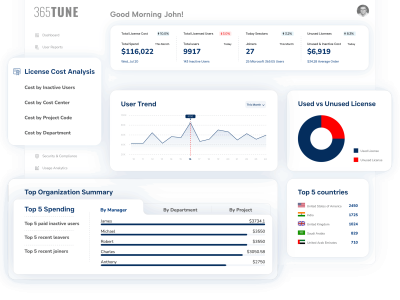
Microsoft 365 reporting tool with deeper insights Empower your IT and Finance teams
|
The most significant disadvantage is the short retention period for reporting. Most reports only allow for reporting data from 7–30 days ago; therefore, it would be challenging to determine long-term trends or to fully investigate incidents that emerge weeks later. For organizations that are required to be compliant, this leaves them with potential gaps in their audit reporting.
A second disadvantage is the “fragmentation” of reporting. For example, although mailbox usage information, mailbox permissions, message tracing, and security settings are stored in their own unique portals, IT administrators still need to use multiple portals, export CSV files, and manually correlate information. Therefore, the process is very time-consuming, and also increases the likelihood of not identifying problems.
Thirdly, the reports generated in the early versions of Microsoft 365 provide little to no actionable context. Although a report may show that a mailbox is being used, it cannot tell you if that mailbox is inactive, over-licensed, has messages being sent from it to an external source, or the mailbox owner has too many access rights to it. Therefore, it becomes nearly impossible for IT administrators to assign risk priorities and justify remediation to the business, without clear understanding of the full picture.
The reality of these limitations is clear; unreported or unidentified security gaps, escalating licensing costs, and emergency audit preparation become the norm.
What metrics should an organization track within Exchange Online?
Mailbox visibility is one of the main metrics. Many organizations face mailbox sprawl with Microsoft 365. This has resulted in the creation of many shared mailboxes, former employees’ mailboxes, service mailboxes, etc., which may go unchecked regularly, as mailbox sums/balances tend to grow.
Every IT team should be able to answer questions such as:
- Which mailboxes are currently being accessed?
- Where has the largest amount of data increased?
- Are there licenses associated with the mailbox that are not being used?
Unless there is clarity around mailbox access levels, defunct mailboxes could be used as a way into the organization for attack. Regular mailbox visibility enables organizations to reduce wasted licenses and fits within their overall security plan as well.
Mailbox Permissions and Access Control
Another area an organization needs to monitor continuously is permissions/access of mailboxes. One of the biggest risk areas of Exchange Online are the mailbox permissions. “Send As”, “Send on Behalf”, and “Full Access permission” is usually granted since it may be easier and not reviewed again.
Over time this leads to:
- Users maintaining a higher level of authority than necessary
- Agencies continuing access when an employee has changed roles
- An increase in insider threat risk
Every permission needs a reason for granting and also a responsible party, so an organization’s continuing mailbox permissions audit helps fulfill the organization’s business needs through least privilege use of their mail services, and provides organisations with the means for proving to their audits/investigators that they were able to maintain control.
External and Automatic E-mail Forwarding
Automatic e-mail forwarding is one of the few methods available to organizations that provides an ability for employees to send large amounts of confidential data to an unauthorized third party without detection, as well as one of the main causes of sensitive data loss. Automatic e-mail forwarding can occur via hidden e-mail forwarding rules, automatic (unintentional) forwarding to personal or other non-company hosted e-mail accounts, or creating hidden e-mail forwarding rules that are triggered by incoming messages.
In addition, attackers exploit automatic e-mail forwarding and other rules set up to provide mail access after a compromised mailbox and therefore these accounts should be diligently monitored for these activities. Without monitoring e-mail forwarding and rules that have been set up for a specific mailbox these activities go undetected for months, if not longer, and give a malicious user access to a large amount of information.
Companies should maintain constant visibility of the following:
- Automatic e-mail forwarding rules to external domains
- Newly created or Modified e-mail rules in a mailbox
- Exceptions to a company e-mail policy
All Other Communication Protocols
Legacy e-mail protocols (POP, IMAP and SMTP AUTH) continue to be at risk and therefore should not be enabled if they are not required for legitimate business purposes. These protocols can often bypass modern Authentication controls and are among the most common attack methods used by attackers.
In addition, allowing un-managed devices to connect to the organization’s e-mail through ActiveSync can add significant risk to an organization. If a company does not know which protocols/devices are being used by its users (and whether they are being utilized in compliance with company policy) it will be very difficult to adequately monitor Exchange Online in a timely fashion.
Exchange Online Security & Compliance
Gone are the days where security and compliance were an afterthought. Global regulatory requirements, including GDPR (General Data Protection Regulation), ISO (International Organization for Standardization) and others, require organizations to be in control of their email systems.
Being audit-ready is much more than simply having logging turned on. Organizations must also be able to reconstruct events, answer the question, “Who accessed what and when,” and provide reason for configuration changes. Audits will require organizations to track mailbox activity, all permission changes, and how those changes and mailbox activity evolved over time.
Focusing solely on reactive investigations places organizations in a defensive posture. When organizations monitor their environments proactively, they can identify risky configuration changes earlier, correct misconfigurations before they become an issue, and maintain a proper security posture.
Organizationally, this helps to prevent incidents from occurring, shorten audit cycles, and create confidence with stakeholders. Compliance reporting for Exchange Online is not simply a technology-enabled task: it is an essential governance capability.
How 365tune Organisations Optimise Exchange Online
365tune takes a consulting-led approach towards Exchange Online versus a “tool first” mindset as there are years of growth, change and compromise within each organisation’s Microsoft 365 environment.
Our goal is to bring clarity and structure back into this complexity.
We support organisations by offering:
- Assessing and tuning their Microsoft 365 environment to identify areas of risk and lack of visibility.
- Reviewing the security posture of their Exchange Online environment for compliance with business and regulatory requirements.
- Help design a governance / reporting strategy in a way consistent with how their IT departments actually operate.
- Providing ongoing optimisation and advisory support to keep pace with Microsoft’s continued evolution of 365
Our focus is on the end results of reducing risk, increasing visibility, improving audit confidence, and reducing administrative overhead, allowing IT departments to spend less time reacting to business needs and more time enabling the business.
The Conclusion Is That Visibility Is Key to Gaining Control over Exchange Online
Exchange Online’s importance means that companies cannot make informed decisions based on what they can see. The native reports do provide an entry point; however, those reports do not have enough depth for true security, compliance, and governance functionality. By leveraging and incorporating proactive monitoring and reporting for Exchange Online, companies can mitigate risk, reduce operational expenses, and have the confidence to respond to audit requests.
If your organization’s team is being challenged with growing demand for governance while having limited visibility into Exchange Online, you should consider a more systematic approach. Speak with 365tune about a Microsoft 365 Health Check and establish an infrastructure to assure visibility and control of your Exchange Online environment.