
If you’re managing a Microsoft 365 environment with hundreds or thousands of users, you’ve probably asked yourself this question: “Are we overpaying for licenses we don’t actually use?”
You’re not alone. Research shows that organizations waste 30-40% of their SaaS spending on unused or underutilized licenses. And while tools like Admindroid excel at capturing audit logs—tracking who did what, when, and where—they stop short of answering the question that keeps CFOs up at night: “How much is this costing us?”
That’s where the search for an Admindroid alternative begins.
In this guide, you’ll discover:
-
- Why traditional audit tools miss the financial picture
-
- What to look for in a modern Admindroid alternative for Microsoft 365
-
- How combining audit data with cost analytics transforms decision-making
-
- A side-by-side comparison of capabilities that matter most
-
- Real-world savings examples from organizations like yours
By the end, you’ll know exactly how to move from reactive auditing to proactive cost optimization.
Why IT Leaders Are Looking Beyond Traditional Audit Tools
For years, tools like Admindroid, ManageEngine, Syskit, and Lepide have served IT teams well. They provide comprehensive audit trails, compliance reporting, and security monitoring for Microsoft 365 environments. But here’s the challenge:
Audit logs tell you what happened. They don’t tell you what it cost.
At Metawise Consulting, we’ve analyzed dozens of enterprise Microsoft 365 tenants. In one recent engagement with a 4,800-seat organization, we discovered something striking: their audit tool flagged 820 inactive accounts, but it took three weeks of manual analysis to determine that these accounts were consuming $180,000 annually in wasted license fees.
This gap between audit data and financial impact represents a massive opportunity—one that traditional tools aren’t designed to capture.
The Evolution of Microsoft 365 Management
The Microsoft 365 ecosystem has matured significantly. What started as “Office in the cloud” now encompasses:
-
- 10+ license SKUs with varying price points (E1, E3, E5, Business Premium, F3, etc.)
-
- Complex usage patterns across Teams, SharePoint, Exchange, OneDrive
-
- Hybrid work models creating unpredictable consumption
-
- Security and compliance requirements demanding continuous monitoring
Your audit tool should evolve too. An Admindroid alternative built for 2025 needs to bridge the gap between IT operations and financial accountability.
What’s Missing in Traditional Audit-Only Tools?
1. No Financial Context for Audit Events
When Admindroid shows you 150 inactive users, that’s operationally useful. But without cost overlay, you can’t answer:
-
- Which inactive licenses are E5 ($38/month) vs. E1 ($8/month)?
-
- What’s the total monthly burn rate for these unused seats?
-
- Which departments or managers are responsible for the largest waste?
Without dollar values, audit data remains an IT problem—not a business solution.
2. No Cost Attribution or Chargeback Capability
Finance teams increasingly demand license cost allocation by:
-
- Department or business unit
-
- Cost center or project code
-
- Manager hierarchy
-
- Geographic region
Traditional audit tools weren’t designed for this. They track user activity, not organizational spending.
3. Limited Predictive or Proactive Insights
Audit logs are inherently backward-looking. They tell you what already happened. But what about:
-
- Forecasting future license needs based on hiring trends?
-
- Predicting overspend before renewal cycles?
-
- Simulating “what-if” scenarios for license downgrades?
Static reporting can’t keep pace with dynamic business needs.
4. Manual, Script-Dependent Workflows
Many IT teams resort to exporting audit data, running PowerShell scripts, and stitching together Excel models. This approach:
-
- Breaks when Microsoft updates Graph API endpoints
-
- Requires specialized PowerShell knowledge
-
- Consumes hours of manual effort monthly
-
- Creates single points of failure when team members leave
There’s a better way.
Key Capabilities to Demand in an Admindroid Alternative
License Cost Overlay on Audit Data
The game-changer: automatically attach pricing to every license assignment and usage pattern.
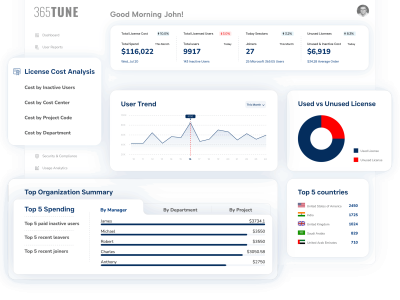
Example in action: Your audit tool flags User A as inactive. An advanced Admindroid alternative like 365tune shows:
-
- User A holds an E5 license: $38/month
-
- No activity in 90 days
-
- Potential savings: $342 if reclaimed (9 months remaining in annual contract)
-
- Manager: John Smith, Engineering Department
This transforms “interesting data” into “actionable decision.”
Department & Manager-Level Attribution
Map every license to organizational structure:

Real impact: One IT director used manager-level reporting to show department heads their quarterly license costs. Within 60 days, voluntary cleanup efforts reduced spend by 12%.
Trend Analysis & Forecasting
Move beyond snapshots to time-series insights:
-
- License consumption trends over 6-12 months
-
- Seasonal patterns (e.g., academic calendars, contractor cycles)
-
- Growth trajectory forecasting
-
- Budget vs. actual tracking
Interactive element suggestion: Include a calculator where readers can input their current license count and waste percentage to see potential annual savings.
Automated Recommendations & Workflows
Don’t just identify problems—prescribe solutions:
365tune’s approach:
-
- Detects unused E5 license for 60+ days
- Analyzes user’s actual workload usage (only uses Outlook/OneDrive)
- Recommends downgrade to E3
- Calculates monthly savings: $23/month per user
- Generates approval workflow for manager
- Tracks outcome and savings realized
Micro-conversion moment: “Could your team benefit from automated license optimization? Note which of these capabilities would save you the most time.”
Unified Dashboard for IT + Finance
The most powerful Admindroid alternative breaks down silos:
IT View:
-
- Active/inactive user counts
-
- Compliance status
-
- Security audit trails
-
- Usage by application
Finance View:
-
- Total license spend
-
- Cost by department
-
- Budget variance
-
- ROI metrics
-
- Savings opportunities
Shared View:
-
- Collaborative decision-making
-
- Approval workflows
-
- Scheduled reports
-
- Executive summaries
Real-World Savings: What’s Possible?
Case Study: Healthcare Organization (7,200 Users)
Challenge: Annual Microsoft 365 spend: $2.1M, but no visibility into actual usage patterns.
Approach: Implemented audit + financial reporting alternative to Admindroid.
Results in 90 days:
-
- Identified 940 inactive or underutilized licenses
-
- Flagged 230 users with E5 licenses only using basic features
-
- Discovered 85 disabled accounts still holding licenses
-
- Total annual savings potential: $287,000 (13.7% of budget)
Implementation:
-
- Reclaimed 85 disabled account licenses immediately: $41K annual savings
-
- Downgraded 230 E5→E3: $158K annual savings
-
- Redistribution pool for new hires: $88K avoided new purchases
Case Study: Financial Services Firm (3,500 Users)
The “Aha” Moment: Their existing audit tool showed guest user activity. But when they overlaid cost data, they discovered:
-
- 127 external contractors with full E3 licenses
-
- Average contractor tenure: 3.2 months
-
- Wasted spend on departing contractors: $63K annually
Solution: Implemented automated workflows to:
-
- Flag contractors 2 weeks before project end
-
- Trigger license reclamation process
-
- Redirect licenses to active hiring pool
How much could you be saving? Organizations with 1,000+ Microsoft 365 users typically find 15-25% license optimization opportunities when combining audit with financial analysis.
Admindroid vs. 365tune: Feature Comparison

Key differentiator: 365tune doesn’t replace audit capabilities—it enhances them with the financial layer that drives business decisions.
Addressing Common Objections
Objection 1: “We’re already handling this with PowerShell scripts and Excel.”
We hear this often. And yes, talented IT teams can build custom reporting by:
-
- Querying Microsoft Graph API manually
- Exporting audit logs to CSV
- Maintaining pricing spreadsheets
- Running pivot tables and VLOOKUP formulas
- Updating scripts when APIs change (which happens quarterly)
The reality: This approach consumes 8-15 hours per month per admin. For a team of 3, that’s 360-540 hours annually—hours that could be spent on strategic initiatives instead of report wrangling.
The opportunity cost: At a fully-loaded cost of $85/hour for IT staff, manual reporting costs $30,600-$45,900 annually. A purpose-built tool pays for itself in time savings alone—before counting the optimization opportunities you’ll actually discover.
Objection 2: “Audit tools and cost analysis are separate domains—we don’t need them combined.”
This used to be true. IT managed operations; Finance managed budgets. But digital transformation changed everything.
Today’s reality:
-
- CFOs demand IT accountability for cloud spending
-
- IT needs Finance support for strategic infrastructure investments
-
- Both teams waste time reconciling disconnected data sources
-
- Executive dashboards require integrated operational + financial metrics
The integration advantage: When audit context and cost data live in one platform, you eliminate:
-
- Version control issues across spreadsheets
-
- Time-consuming manual reconciliation
-
- Communication gaps between IT and Finance
-
- Delayed decision-making due to data silos
One IT director put it perfectly: “We used to spend Monday mornings arguing about whether the numbers were right. Now we spend Monday mornings deciding what to do about them.”
Objection 3: “We’re concerned about data security and compliance with a third-party SaaS.”
Absolutely valid. Any Admindroid alternative handling your Microsoft 365 data must meet enterprise security standards:
Non-negotiables:
-
- SOC 2 Type II certification
-
- ISO 27001 compliance
-
- Enterprise-grade encryption (TLS 1.3 in transit, AES-256 at rest)
-
- Role-based access control (RBAC)
-
- Single Sign-On via Microsoft Entra ID (Azure AD)
-
- Data residency options
-
- Comprehensive audit trails
-
- GDPR/CCPA Compliance
365tune’s approach:
-
- Hosted on Microsoft Azure’s SOC 2 Type II-certified infrastructure
-
- All data access via Microsoft Graph API (no credential storage)
-
- Customer maintains full control via Entra ID permissions
-
- Zero-trust architecture with continuous monitoring
Before selecting any SaaS alternative: Request SOC 2 reports, security questionnaires, and penetration test results. If a vendor can’t provide these, keep looking.
How to Transition to a Modern Audit + Cost Platform
Phase 1: Assessment (Week 1-2)
Connect your Microsoft 365 tenant:
-
- Grant read-only Microsoft Graph API permissions
-
- Initial data sync (license inventory, user assignments, usage logs)
-
- Baseline cost analysis
Quick win: Most organizations identify 5-10% immediate savings opportunities during initial scan.
Phase 2: Cost Model Configuration (Week 2-3)
Customize for your organization:
-
- Upload your Microsoft EA pricing or CSP markup
-
- Map users to departments/cost centers
-
- Define manager hierarchy
-
- Set up custom reporting roles (IT Admin, Finance, Read-Only)
Validation step: Reconcile first month’s cost report against Microsoft invoice (should match within 2%)
Phase 3: Optimization (Week 3-4)
Activate automation:
-
- Configure inactive license thresholds (30/60/90 days)
-
- Set up downgrade recommendation rules
-
- Enable manager notifications for team review
-
- Schedule automated reports
Training: 30-minute session for IT team, 15-minute walkthrough for Finance stakeholders
Phase 4: Continuous Improvement (Ongoing)
Monthly review cycle:
-
- Week 1: Review automated recommendations
-
- Week 2: Manager approval workflows
-
- Week 3: Implement approved changes
-
- Week 4: Measure savings and adjust thresholds
Quarterly business review: Track cumulative savings, forecast upcoming needs, present executive summary to leadership.
Do you have a plan for license optimization? Drop a comment below with your biggest challenge, and we’ll provide specific guidance.
The Future of Microsoft 365 Management
The trajectory is clear: operational data and financial data are converging.
Leading organizations no longer ask “Can we audit our Microsoft 365 environment?” They ask:
-
- “Can we predict our license needs 6 months out?”
-
- “Can we attribute costs to the teams consuming resources?”
-
- “Can Finance access reports without IT intervention?”
-
- “Can we optimize automatically instead of manually?”
An Admindroid alternative built for 2025 answers “yes” to all of these questions.
What AI Brings to the Table
Next-generation platforms like 365tune are incorporating:
-
- Natural language queries: “Show me unused E5 licenses in the Sales department”
-
- Predictive analytics: Forecasting license demand based on hiring patterns
-
- Anomaly detection: Automatic alerts for unusual license spikes or cost changes
-
- Optimization recommendations: AI-suggested license right-sizing based on actual usage
The goal isn’t to replace human judgment—it’s to augment it with data-driven insights.
Making the Decision: Your Next Steps
If you’ve read this far, you’re likely facing one of these situations:
Scenario A: You use Admindroid (or similar) and recognize the limitations around cost visibility
Scenario B: You’re building reports manually with PowerShell and Excel, and it’s consuming too much time
Scenario C: Your Finance team is asking questions your current audit tool can’t answer
Scenario D: You’re preparing for a Microsoft license renewal and want leverage through data
Any of these scenarios make you a perfect candidate for an enhanced alternative.
Evaluation Checklist
When assessing Admindroid alternatives, ask vendors:
Functionality:
-
- Does it provide per-SKU cost tracking?
-
- Can I map costs to departments/managers/cost centers?
-
- Does it forecast future license needs?
-
- Are there automated optimization recommendations?
-
- Can Finance access reports without IT help?
Integration:
-
- Microsoft Graph API native integration?
-
- Single Sign-On via Entra ID?
-
- Export to Power BI or other BI tools?
-
- API access for custom integrations?
Security & Compliance:
-
- SOC 2 Type II certified?
-
- ISO 27001 compliant?
-
- Role-based access control?
-
- Data encryption standards?
Business Model:
-
- Transparent, predictable pricing?
-
- Free tier or trial available?
-
- Scales with your organization?
-
- No hidden fees for API calls or data volume?
Conclusion: From Audit Logs to Business Intelligence
Traditional audit tools served us well in the early days of Microsoft 365. They answered the essential question: “Who did what?”
But today’s business environment demands more. You need to answer:
-
- “What did it cost?”
-
- “Where can we save?”
-
- “How do we optimize?”
-
- “What should we do next?”
An Admindroid alternative isn’t about abandoning audit capabilities—it’s about augmenting them with financial intelligence.
At 365tune, we’ve built a platform that bridges IT operations and financial accountability. Our customers typically discover 15-25% optimization opportunities within 30 days of deployment—often finding six-figure annual savings in enterprise environments.
The audit logs you’re already collecting contain a goldmine of financial insights. You just need the right tool to unlock them.
Ready to see what you’re missing?
[Start a 14 Day Free Trial] → Get lifetime free access as an early adopter + shape the product roadmap with your feedback
Still have questions about transitioning from Admindroid? Drop a comment below or email us at [email protected]. Our team responds within 24 hours.