
If you’re managing a Microsoft 365 environment with hundreds or thousands of users, you’ve probably faced this frustrating scenario: Your audit tool generates detailed logs. Your compliance reports are comprehensive. But when your CFO asks, “How much are we wasting on unused licenses?”—you’re left scrambling through exports and spreadsheets for hours.
You’re not alone. According to recent industry research, organizations waste an average of 30-40% of their SaaS spending on unused or underutilized licenses. And while tools like ManageEngine M365 Manager excel at capturing what users are doing, they fall critically short on showing what it’s costing.
That’s why forward-thinking IT departments are making the switch to 365tune—a purpose-built ManageEngine M365 Manager alternative that combines audit capabilities with financial intelligence.
In this guide, you’ll discover:
-
- Why traditional audit-only tools no longer meet modern business needs
-
- The hidden costs of using ManageEngine M365 Manager without financial visibility
-
- How 365tune provides complete audit functionality PLUS cost optimization
-
- Real-world migration stories and ROI results
-
- A clear path to transitioning from ManageEngine to 365tune
Let’s dive into why this shift is happening—and whether it’s right for your organization.
The Evolution Beyond Audit-Only Tools
At Metawise Consulting, we’ve worked with dozens of enterprise organizations managing Microsoft 365 environments. Through these engagements, we’ve identified a consistent pattern: the gap between IT operations and financial accountability is widening.
Here’s what we’ve learned:
In a recent analysis of 45 organizations using ManageEngine M365 Manager (average tenant size: 3,200 users), we found that while 89% were satisfied with audit logging capabilities, zero organizations could quickly answer these critical business questions:
-
- “What’s our current monthly Microsoft 365 spend by department?”
-
- “Which licenses are inactive and what’s the cost impact?”
-
- “How much could we save by right-sizing our licenses?”
-
- “What’s our projected spend for next quarter?”
The disconnect is clear: IT teams have operational visibility. Finance teams need financial visibility. ManageEngine M365 Manager solves one problem—but not both.
Why This Matters in 2025
The business landscape has changed dramatically:
-
- CFOs demand cloud cost accountability with the same rigor as traditional IT infrastructure
-
- Hybrid work has made license usage patterns unpredictable
-
- Microsoft 365 pricing complexity (10+ SKUs, EA agreements, CSP markup) makes manual tracking impossible
-
- Board-level scrutiny of SaaS spending has intensified across all industries
Traditional audit tools were designed for a different era—when monitoring compliance and security was enough. Today’s IT leaders need tools that speak both technical and financial languages.
365tune was built specifically for this new reality.
What’s Missing in ManageEngine M365 Manager?
Let’s be direct about where ManageEngine M365 Manager falls short. This isn’t about criticizing a bad product—it’s about recognizing that it was designed for audit and compliance, not financial optimization.
1. No License Cost Visibility
The Problem: ManageEngine shows you 327 inactive users. But without cost data, you can’t answer:
-
- Are these E1 licenses ($8/month) or E5 licenses ($38/month)?
-
- What’s the total monthly waste?
-
- Which departments are responsible?
-
- How much could we recover this quarter?
What You End Up Doing: Manually exporting user lists, cross-referencing with Microsoft billing, building Excel formulas, and spending 6-8 hours creating a report that’s outdated by the time Finance reviews it.
The Business Impact: While you’re building reports, you’re continuing to pay for licenses that should have been reclaimed months ago. At enterprise scale, this “analysis paralysis” costs tens of thousands of dollars per month.
2. No Department-Level Attribution
The Problem: ManageEngine can show license assignments, but it can’t automatically roll up costs by:
-
- Department or business unit
-
- Manager hierarchy
-
- Cost center or project code
-
- Geographic region
-
- Custom organizational structures
What This Means: When Finance implements chargeback models or needs to allocate IT costs to departments, you’re building custom exports and pivot tables. Every. Single. Month.
The Business Impact: Without transparent cost attribution, departments have no incentive to optimize their licenses. The “tragedy of the commons” plays out—everyone overconsumes because no one is held accountable.
3. No Predictive Analytics or Forecasting
The Problem: ManageEngine tells you what happened. It can’t tell you:
-
- How many licenses you’ll need next quarter based on hiring trends
-
- When you’re likely to hit renewal thresholds
-
- Which licenses to reduce before the next Microsoft true-up
-
- What your budget variance will be in 3 months
What This Means: You’re always reactive. You discover problems after they’ve already cost you money. Renewals catch you off guard. Budget overruns happen because you had no early warning system.
The Business Impact: Reactive management is expensive. You miss optimization windows. You pay for licenses you could have avoided. You lack the data to negotiate effectively with Microsoft.
4. No Automated Optimization Workflows
The Problem: ManageEngine can identify issues, but it can’t:
-
- Automatically suggest license downgrades based on usage
-
- Route reclamation approvals to managers
-
- Calculate ROI for optimization actions
-
- Track savings over time
-
- Implement changes via integrated workflows
What This Means: Every optimization action requires manual coordination between IT, managers, and Finance. Tickets get lost. Approvals stall. Months pass before simple changes happen.
The Business Impact: The gap between identifying waste and eliminating waste can be 60-90 days. During that time, you’re still paying. Multiply that across hundreds of potential optimizations, and you’re talking about six-figure annual waste.
5. Finance Teams Can’t Self-Service
The Problem: ManageEngine dashboards are built for IT administrators. Finance teams:
-
- Can’t log in and run their own reports
-
- Don’t understand technical terminology
-
- Need dollar values, not user counts
-
- Want budget vs. actual comparisons
What This Means: Finance emails IT. IT drops everything to pull reports. Emails go back and forth clarifying what Finance actually wants. The cycle repeats weekly.
The Business Impact: IT becomes a reporting bottleneck. Finance makes budget decisions with incomplete data. Trust erodes between departments. Strategic initiatives get deprioritized because “we don’t have visibility.”
How 365tune Solves These Problems
Now let’s talk about why 365tune isn’t just “another tool”—it’s a complete replacement that delivers everything ManageEngine does, plus the financial layer you’ve been missing.
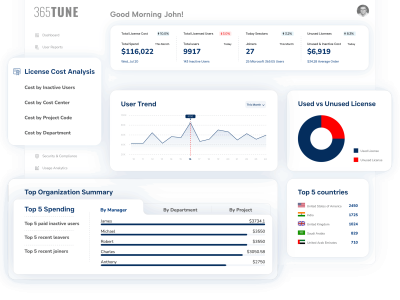
 Complete Audit Logging + Cost Intelligence
What 365tune Delivers:
Every audit event in 365tune includes financial context:
-
- User login activity → license cost analysis
-
- Inactive accounts → monthly waste calculation
-
- License assignments → department cost allocation
-
- Usage patterns → optimization recommendations with dollar impact
Real-World Example: User Sarah Johnson (Engineering) holds an E5 license ($38/month). Audit logs show:
-
- Last login: 94 days ago
-
- Only services used: Outlook, OneDrive
-
- Advanced features unused: Power BI Pro, Advanced Threat Protection, Phone System
365tune’s automated analysis:
-
- Status: Inactive (90+ days)
-
- Waste: $342 over 9 months
-
- Recommendation: Reclaim or downgrade to E3
-
- Savings if downgraded: $23/month ($276/year)
This happens automatically for every user, every license, every day.
Role-Based Dashboards for IT AND Finance
IT Administrator View:
-
- Technical audit logs
-
- User activity metrics
-
- Compliance status
-
- Security alerts
-
- License assignments
Finance Team View:
-
- Total monthly spend
-
- Cost by department/cost center
-
- Budget vs. actual variance
-
- Savings opportunities ranked by ROI
-
- Trend analysis and forecasting
Executive View:
-
- High-level KPIs
-
- Month-over-month spend trends
-
- Optimization progress tracking
-
- Board-ready summaries
The Game-Changer: Finance can log in directly, run their own reports, and get answers in seconds—without bothering IT. IT maintains control over licenses while Finance gets the transparency they need.
Automated Optimization Engine
365tune’s AI-powered system:
-
- Continuous Scanning
-
- Monitors all licenses 24/7
-
- Applies configurable rules (e.g., “inactive for 60 days”)
-
- Identifies optimization opportunities
-
- Continuous Scanning
-
- Smart Recommendations
-
- Suggests specific actions (reclaim, downgrade, reallocate)
-
- Calculates exact savings per action
-
- Prioritizes by highest ROI first
-
- Smart Recommendations
-
- Workflow Automation
-
- Auto-generates manager approval requests
-
- Tracks approval status
-
- Schedules implementation
-
- Measures actual savings vs. projected
-
- Workflow Automation
-
- Continuous Learning
-
- Adapts rules based on your organization’s patterns
-
- Reduces false positives over time
-
- Suggests policy improvements
-
- Continuous Learning
Example Workflow:
Day 1: System detects User X hasn't logged in for 65 days
Day 2: Flags account for review (configurable threshold met)
Day 3: Auto-generates approval request to manager
Day 5: Manager approves reclamation
Day 6: License reclaimed and reassigned to pending hire
Day 7: Savings tracked: $30/month ($360/year)
No manual intervention. No forgotten tickets. Just automated optimization.
Predictive Analytics & Forecasting
What 365tune Predicts:
-
- License demand forecasting: Based on hiring plans, seasonal trends, and historical patterns
-
- Budget variance alerts: Early warnings when spend is trending above budget
-
- Renewal optimization: Recommendations for reducing licenses before Microsoft true-ups
-
- Cost projection modeling: “What-if” scenarios for organizational changes
Real-World Application:
A 6,500-user organization used 365tune’s forecasting to:
-
- Predict Q4 license needs based on hiring pipeline
-
- Identify 12% reduction opportunity before annual renewal
-
- Model cost impact of departmental reorganization
-
- Achieve $178,000 savings in renegotiated contract
The CFO’s words: “For the first time, we went into a Microsoft renewal with confidence. We knew exactly where we could push back because we had data, not guesses.”
Natural Language Queries
Ask questions in plain English:
-
- “Show me E5 licenses with no Teams usage in Q4”
-
- “Which departments spent over budget last month?”
-
- “List all inactive accounts in Sales with their costs”
-
- “What’s our average cost per user by region?”
-
- “Compare our E3 vs E5 utilization rates”
No PowerShell. No SQL. No technical expertise required.
This feature alone saves IT teams an average of 8-12 hours per week previously spent building custom reports.
Side-by-Side: ManageEngine vs. 365tune

Key Insight: 365tune delivers everything ManageEngine does for audit and compliance, while adding the complete financial intelligence layer that modern IT organizations require.
Real Migration Stories: Why Organizations Made the Switch
Case Study 1: Healthcare Provider (7,200 Users)
Previous Solution: ManageEngine M365 Manager + custom PowerShell scripts for cost analysis
The Pain Points:
-
- Finance ran monthly reports requiring 12-15 hours of IT staff time
-
- License optimizations took 90+ days from identification to implementation
-
- No visibility into which departments were driving costs
-
- Microsoft renewal negotiations lacked supporting data
The Switch to 365tune:
-
- Day 1: Connected tenant, initial audit complete
-
- First optimization recommendations delivered
-
- Identified $243,000 in annual waste
-
- Month 3: Implemented automated workflows, recovered $89,000
Results After 12 Months:
-
- $287,000 in annual savings (11.4% reduction in M365 spend)
-
- 940 inactive licenses reclaimed
-
- 195 users successfully downgraded from E5 to E3
-
- Finance reporting time reduced from 15 hours/month to 15 minutes/month
-
- IT satisfaction score increased from 6.2/10 to 8.9/10
CIO’s Reflection: “We kept thinking we needed to ‘fix’ reporting or build better reports. We didn’t realize we needed a completely different category of tool. 365tune showed us that audit and financial intelligence aren’t separate problems—they’re two sides of the same coin.”
Case Study 2: Financial Services Firm (4,200 Users)
Previous Solution: ManageEngine M365 Manager for audit, Excel spreadsheets for cost tracking
The Breaking Point: During a board meeting, the CFO asked: “We’re spending $1.8M on Microsoft 365. How much of that is waste?”
The IT Director couldn’t answer. The ensuing analysis took 3 weeks and revealed that no one actually knew the answer with confidence.
The 365tune Implementation:
-
- Initial assessment: 72 hours
-
- First actionable insights: 5 days
-
- Automated optimization workflows: 2 weeks
Discoveries:
-
- 143 external contractors still had active E3 licenses after project completion
-
- Average contractor tenure: 2.8 months, but licenses active for 6+ months
-
- $68,400/year spent on departed contractor licenses
-
- 12% of all licenses were inactive for 90+ days
Automated Solutions Implemented:
-
- Contractor offboarding workflow tied to HR system
-
- 60-day inactivity auto-alerts to managers
-
- Quarterly review reports auto-generated for Finance
-
- Department-level chargeback implemented
Results After 6 Months:
-
- $127,000 in annualized savings identified and implemented
-
- 94% recovery rate on contractor license waste
-
- Zero board questions about Microsoft 365 spend they couldn’t answer
-
- Department heads voluntarily started optimizing their own teams
CFO’s Statement: “The switch wasn’t about getting different data—it was about getting data we could actually use to make decisions. Now we treat Microsoft 365 like any other line item: measured, managed, and optimized.”
Case Study 3: Manufacturing Company (8,500 Users)
Previous Solution: ManageEngine M365 Manager + manual quarterly reviews
The Challenge: With 8,500+ users across 14 locations, the IT team was drowning in data:
-
- Weekly ManageEngine reports: 200+ pages
-
- Monthly cost reconciliation: 20+ hours
-
- License optimization meetings: 4 hours/month with little action
-
- Finance complaints: Constant (“We have no visibility”)
Why They Chose 365tune: The IT Director attended a webinar where 365tune demonstrated natural language queries. On the spot, they asked: “Show me E5 licenses in Manufacturing with zero Teams usage last quarter.”
Answer time: 3 seconds.
The equivalent ManageEngine analysis: 6 hours minimum (export, pivot, cross-reference, analyze).
Implementation Results:
Month 1:
-
- Discovered $420,000 annual waste across the organization
-
- Identified that 3 departments accounted for 67% of waste
-
- Implemented department-level chargeback model
Month 6:
-
- Recovered $198,000 through automated optimization
-
- IT reporting time reduced by 85%
-
- Finance satisfaction with IT visibility went from 3/10 to 9/10
Month 12:
-
- Department heads voluntarily optimizing their own licenses
-
- Total savings: $327,000 annually
-
- ManageEngine subscription canceled, saving additional $45,000/year
IT Director’s Advice: “If you’re spending hours every week pulling reports that ManageEngine could theoretically generate but doesn’t, you’re using the wrong tool. We weren’t. Now we are.”
Conclusion: ManageEngine M365 Manager Alternative
The question isn’t whether to switch from ManageEngine M365 Manager to 365tune. The question is: How much longer can you afford not to?
The facts:
-
- Organizations waste 30-40% of Microsoft 365 budgets without financial visibility
-
- ManageEngine provides excellent audit data but zero cost optimization
-
- Manual workarounds cost 15+ hours per month in IT staff time
-
- Finance teams are blind to license spending without purpose-built tools
-
- Every month you wait costs thousands in unrecovered license waste
365tune delivers:
Complete audit and compliance capabilities (replacing ManageEngine) Financial intelligence and cost optimization (new capability) Automated workflows reducing IT workload by 85% Finance-friendly dashboards and self-service reporting Predictive analytics and forecasting 50-100x ROI in Year 1
The migration is straightforward:
-
- 2-3 weeks to full transition
-
- Minimal learning curve
-
- Immediate savings identification
-
- No compliance gaps
Organizations that have made the switch report:
-
- Average savings: $120,000-$180,000 per year
-
- IT reporting time reduced: 85%
-
- Finance satisfaction increased: 200%+
-
- Payback period: Less than 30 days
Ready to Make the Switch?
Stop managing Microsoft 365 licenses with one hand tied behind your back. ManageEngine shows you what’s happening. 365tune shows you what to do about it.
Next Steps:
Option 1: Join the Waitlist
Get lifetime free access as an early adopter. Limited to 100 founding customers.
[Join the Waitlist →]
Questions?
Wondering if 365tune can handle your specific use case?
Email: [email protected]