

Microsoft 365 HIPAA compliance readiness needs strong visibility and continuous monitoring. 365tune support by offering the clear audit reports, usage insights, and compliance-ready dashboards by helping the healthcare organizations through MPs tracking activity, identifying risks, and preparing confidently for HIPAA audits within Microsoft 365.
Introduction:
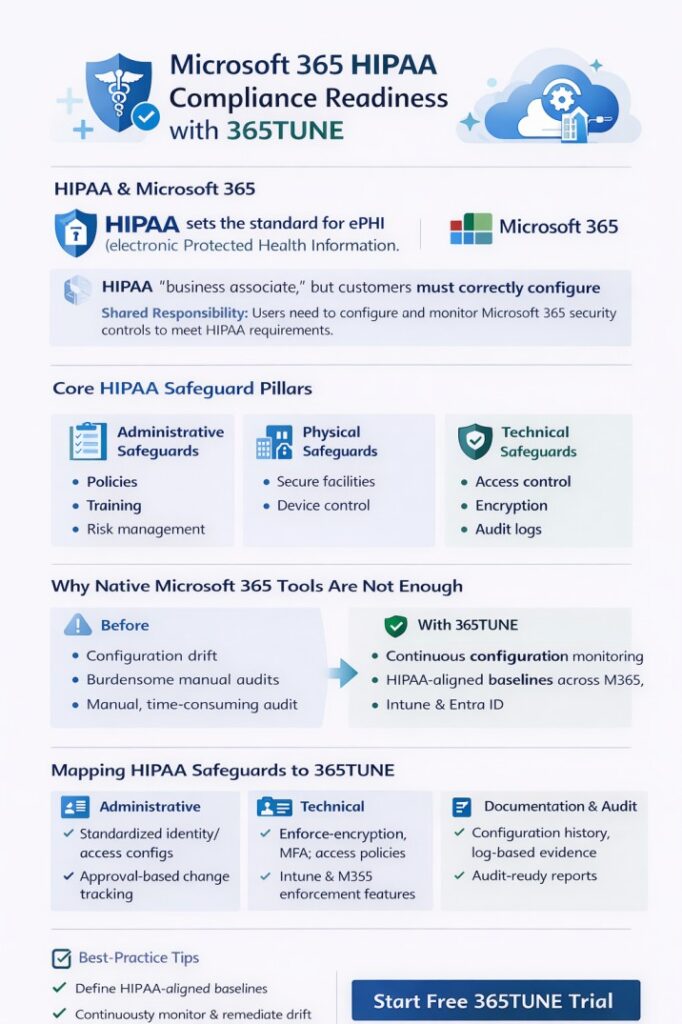
HIPAA, which is known as the Healthcare Insurance Portability and Accountability Act, sets strict standards for protecting electronic protected health information called ePHI. Using Microsoft 365 HIPAA compliance is essential for healthcare organizations to safeguard the patient data, avoid regulatory penalties, and maintain trust.
Compliances operate under a shared responsibility model, such as Microsoft securing the underlying infrastructure; in turn, organizations are responsible for configuring security models, managing access, and enforcing policies.
Now the healthcare environment becomes more cloud-driven and collaborative, and also the HIPAA compliance increasingly depends on correct configuration, continuous monitoring, and proactive governance within Microsoft 365 rather than on tools alone.
What Is HIPAA, and Why Does It Matter for Microsoft 365?
The US federal law designs the Health Insurance Portability and Accountability Act to protect the privacy, security, and integrity of patient health information. It also applies to any organizations that create, store, process, or transmit electronic protected health information (ePHI), which includes healthcare providers, health plans, and healthcare clearinghouses.
The two main groups to which HIPAA applies are covered entities and business associates. Here the covered entities include the hospitals, clinics, physicians, and insurers. Next, the business associates are vendors or service providers, such as cloud platforms, which may access or handle ePHI.
While using Microsoft 365, it acts as a business associate and provides a Business Associate Agreement (BAA) for eligible services. HIPAA compliances are built around three safeguard categories, such as administrative safeguards, physical safeguards, and technical safeguards.
The administrative safeguards include the policies, training, and risk management. Next is the physical safeguard, which provides the secure facilities and device control. Finally, the technical safeguards have access controls, encryption, and audit logs.
Misconfiguration is one of the biggest risks in cloud environments. Weak access controls, excessive sharing, disabled logging, or unsecured devices can lead to data breaches and HIPAA violations, which makes proactive configurations and monitoring essential when using Microsoft 365.
Does Your Microsoft 365 Tenant Need to Be HIPAA Ready?
Using Microsoft 365 does not make your environment HIPAA compliant. It is not automatically HIPAA compliant because compliance depends on how the platform is configured and used.
The key factor is that the customer managed the security and configuration. While Microsoft offers a secure cloud infrastructure and provides a HIPAA business associate agreement for eligible services, the responsibility for protecting the electronic protected health information ultimately rests with the customers.
The healthcare organizations must enable and maintain the controls such as multi-factor authentication, conditional access, data loss prevention, audit logging, and secure sharing settings. Without these safeguards in place, the sensitive health data may be exposed even within a trusted cloud platform.
Employees accessing Microsoft 365 from multiple locations and devices increase the risk of unauthorized access if the policies are applied inconsistently. Must give equal importance to consistent policy enforcement across the users and devices.
Make HIPAA ready by ensuring a Microsoft 365 tenant is intentionally configured, continuously monitored, and supported by clear policies and training, turning security features into enforceable, organization-wide safeguards rather than optional settings.
Challenges with Native Microsoft 365 Compliance Management
It can be more challenging to manage the HIPAA compliance using native Microsoft 365 tools alone, especially as environments grow and evolve. The one common issue is configuration drift across tenants and devices.
Gradually the security settings may change due to updates, user actions, or new workloads, creating gaps between intended policies and actual configurations. Another difficulty is maintaining the consistent security baselines.
While Microsoft offers the audit logs and compliance features, identifying trends, historical changes, or subtle deviations often requires manual review and deep technical expertise. These all make proactive risk detection more difficult.
At last, the significant manual effort required to validate the compliance during audits. For the time-consuming and error-prone, the most important is collecting the evidence, exporting logs, and documenting configurations.
How 365tune Supports HIPAA Compliance Readiness
365tune guides the organizations to define, deploy, and maintain the HIPAA-aligned configurations across Microsoft 365 and Intune. Through the continuous configuration monitoring, 365tune provides ongoing visibility into environment changes and policy status.
It also enables the standardized configuration baselines that ensure the consistent security and compliance settings are applied across tenants, users, and devices. This platform provides automated detection of configuration drift, quickly identifying deviations from approved HIPAA-aligned settings before they become risks.
In addition, the change tracking and historical reporting clear audit trails, helping organizations produce accurate compliance evidence and maintain HIPAA readiness with less manual effort.
Mapping HIPAA Safeguards to 365tune Capabilities
Administrative Safeguards
365tune helps to enforce the HIPAA administrative safeguards by standardizing identity and access configurations across Microsoft 365. Detailed change tracking strengthens accountability and governance, allowing the organizations to clearly document who made changes and under what approval process.
Technical Safeguards
365tune reinforced HIPAA technical safeguards by allowing the secure device configurations through Intune and enforcing the consistent security policies. It also helps to maintain controls for encryption, multifactor authentication, and access management while continuously validating that these settings remain intact. Reduces the risk of misconfigurations, which could expose ePHI.
Documentation and Audit Readiness
365tune offers the configuration history and changes to the logs, which simplify evidence collection for audits. Clear insight into what changed, when, and why enables faster audit preparation and helps the organizations demonstrate ongoing HIPAA compliance with confidence.
Using 365tune During a HIPAA Audit
Using 365tune during the HIPAA audit supports the organizations in clearly demonstrating compliance and security maturity across the Microsoft 365 environments. It also offers a consistent security posture by making sure the standardized configurations are applied and maintained across users, devices, and workloads by reducing the configuration drift, which auditors often flag.
By centralizing the configuration data and audit-ready report, the 365tune significantly reduces the audit preparation effort. IT and compliance teams no longer need to manually collect the screenshots or to reconstruct timelines, saving time and minimizing stress during audits.
Best Practices for HIPAA Readiness with 365tune
Arranging for HIPAA compliance with 365tune is most effective if the best practices are embedded into daily operations.
Begin with establishing approved security baselines aligned with the HIPAA administrative and technical safeguards by ensuring the consistent configurations across Microsoft 365, Intune, and Entra ID. These baselines serve as a single source of truth for auditors and internal teams.
Following that, monitor and remediate the configuration drift continuously. 365tune detects deviations from the approved settings and enables the rapid correction by helping to prevent the compliance gaps before they become audit findings.
Finally, improve your security posture constantly by using the configuration insights. With analyzing trends, change history, and risk areas, the organizations can proactively strengthen controls, demonstrate ongoing compliance, and stay audit-ready at all times.
Conclusion:
365tune clarifies the HIPAA readiness by giving the healthcare organizations continuous control and visibility over the Microsoft 365 configurations. It helps to maintain the consistent HIPAA-aligned security setting, reduces the compliance risk, and streamlines the audit preparation.
With ongoing monitoring and documented configuration history, the organizations can remain confidently audit-ready while strengthening their overall security posture.